From a reference · Creator+
AI remix: turn your song into a new genre with one prompt
Pick a song and describe the sound you want. Soundverse remakes it as lo-fi, EDM, acoustic or another style, re-sung with its own words or yours.
1,000 free tokens to start · No card needed · Cancel paid plans anytime
Unlock AI Remix with Creator — from $9.99/mo, or ₹399/mo in India. 4,000 tokens a month. Billed $119.88 a year, or $12.49 month to month.
What you get
New versions without rebuilding
Turn one track into a lo-fi, club or acoustic version from a short prompt, with no stems or session files to prepare.
Still your song
The melody carries over into the new style, and the remix re-sings the original lyrics unless you write new ones.
Easy to compare with the original
In AI Studio, Remix Track puts the remix on a new track below the original, and each remix made in chat arrives with its own title and cover art.
Who it's for
Independent artists
Give a finished single a second life as an acoustic, lo-fi or club version without reopening the project.
Producers
Test a song in other genres from a prompt before you commit to a full re-arrangement.
DJs
Turn a track you have the rights to into an up-tempo club version to try in a set.
Wedding and event creators
Rework a custom song you made into a slow version for a first dance and an upbeat one for the party.
Content creators
Make a calmer or more energetic version of your own song to fit the mood of a video.
When to use it
- Your song is finished and you want a second version in another genre
- A video or event needs a slower or faster mood of a song you already have
- An old demo sounds dated, but its melody still holds up
- You've rewritten a verse and want to hear it in a new arrangement
- You're unsure which genre suits a song before producing it properly
What you can make with it
A first-dance version
Turn an upbeat custom song into a slow, acoustic version for a first dance, with the couple's lyrics kept.
A quieter take for fans
Prompt a slow, mellow lo-fi remix of your single to offer listeners a calmer version of the same song.
A genre test before production
Remix a demo as pop, then as R&B, and use the take you prefer as the brief for the real arrangement.
A clean or event-friendly edit
Edit a few lines in the Lyrics box for a clean or event-friendly version, and the remix sings the new words.
An up-tempo set version
Ask for a faster, club-style remix of your own track to test on the dance floor.
Versions lined up in AI Studio
Run Remix Track on the same clip a few times and compare the results under the original to choose a direction.
An instrumental cut
For a version with no vocals, run Stem Separator on the remix and use the backing stem.
A mood for each video
Make a calm and an energetic remix of your own song, so each video in a series gets a version that fits.
Screenshots
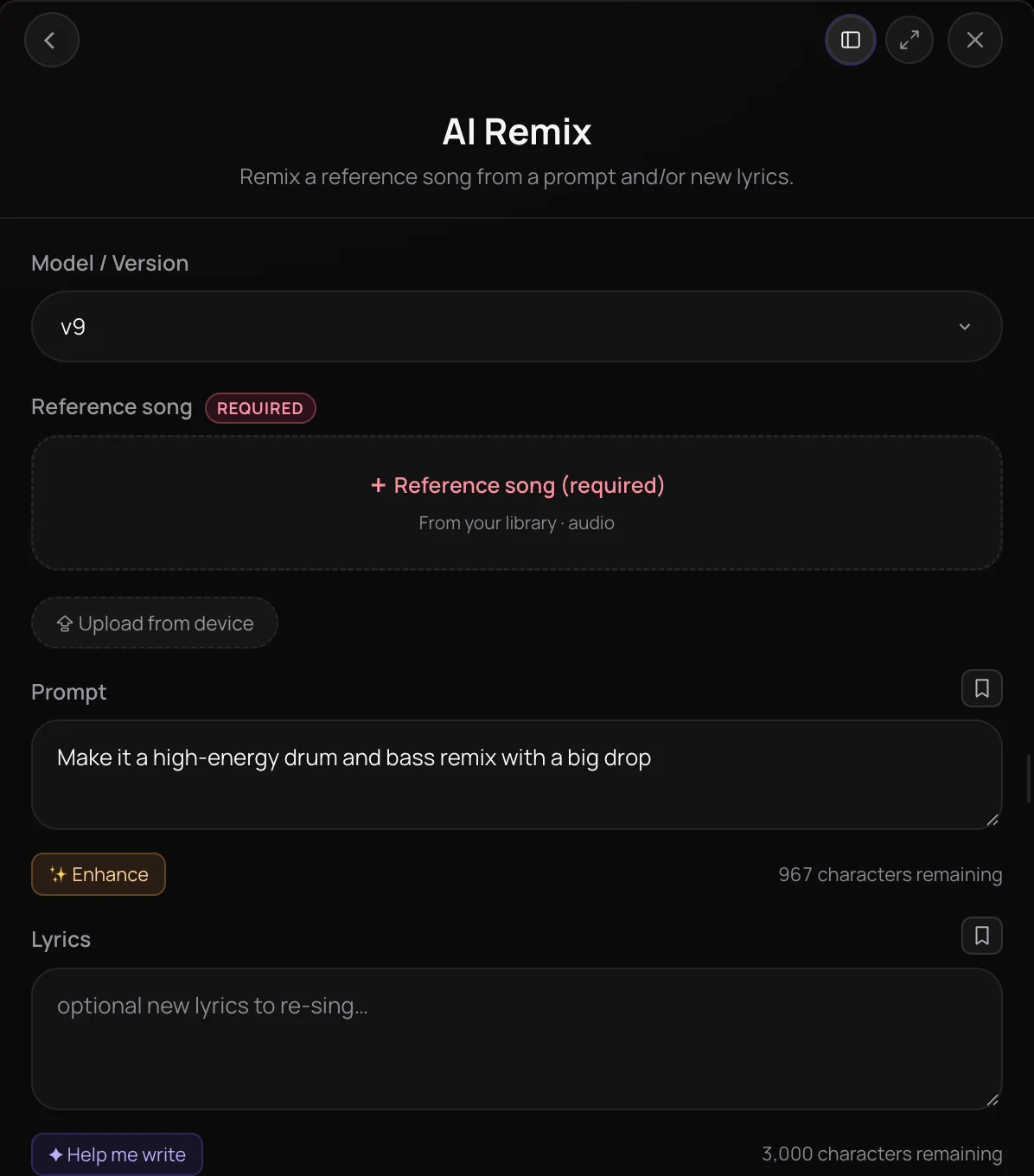
AI Remix is a Soundverse tool that takes a song you already have and remakes it in a new genre, mood or tempo from a short prompt. It's built for artists, producers and creators who want alternate versions without rebuilding a track from scratch. The remix is always sung: it re-sings the song's own lyrics unless you write new ones, and in chat it arrives with a title and cover art.
See it in action
- Remix Any Song Into a New Genre with AI | Soundverse AI Remix A tutorial on remixing a song from one genre into another with AI Remix.
- Every AI Tool in Soundverse “Edit”: Inpainting, Stems, Voice Swap, Remix and More | Full Walkthrough From 3:08. The AI Remix part of Soundverse's Edit walkthrough, from input to result.
How it works
Pick a reference song
Open AI Remix and add the song you want to remix under Reference song, from your Library or your device.
Describe the remix
In Prompt, describe the genre, tempo or mood you want, like a slow, atmospheric synthwave remix.
Check the lyrics
Picking a Library song fills Lyrics with its saved words. Keep them, edit them, or write new ones with Help me write.
Generate the remix
Click Generate in Chat. The remix arrives with a title and cover art, ready to play, download or open in AI Studio.
Why use AI Remix
Same song, new style
Restyle a track in the genre, mood or tempo you describe while its melody carries over, so the remix stays recognizable.
Lyrics you control
The remix re-sings the original lyrics by default, or sings your new words exactly as you write them.
Starts from your song
Open AI Remix from a song's Remix menu in your Library, or from a clip in AI Studio, with the song already attached.
Named and covered
Each remix made in chat comes back with a short title and matching cover art, so alternate versions are easy to tell apart.
What it costs
Needs Creator or above. Remixing with Soundverse v9 needs Pro.
- Remix: 800 tokens (about $2.00–$2.50 on Creator, or ₹80–₹100 in India).
- Remix with Soundverse v9: 800 tokens (about $2.00–$2.50 on Pro, or ₹83–₹104 in India).
Agent One runs this tool for you, and the agent's own steps are metered on top of the tool's price: about 7 tokens a step in Lite mode, 54 in Standard mode and 128 in Pro mode, the default on paid plans.
Creator $12.49 a month, or $9.99 a month billed yearly ($119.88 a year) · Pro $31.24 a month, or $24.99 a month billed yearly ($299.88 a year) · Max from $72 a month, or $60 a month billed yearly ($720 a year).
In India (PayU): Creator ₹499 a month, or ₹399 a month billed yearly (₹4,788 a year) · Pro ₹1,299 a month, or ₹1,039 a month billed yearly (₹12,468 a year) · Max from ₹2,999 a month, or ₹2,399 a month billed yearly (₹28,788 a year).
Prices outside India are in US dollars, billed through Stripe; in India they are in rupees, billed through PayU. Monthly tokens reset each month and don't roll over.
Frequently asked questions
Is AI Remix free, and can I use my remixes commercially?
AI Remix is available on the Creator plan and above, and each remix uses tokens from your plan. Soundverse is free to sign up, and new accounts get free starter tokens for the free tools. Paid plans add a commercial license; the Pricing page lists what each plan covers. You need the rights to the song you remix, including any file you upload.
Will my AI remix still sound like the original song?
AI Remix is built to keep your song's melody while it changes the genre, tempo or mood you describe, so the remix stays recognizable. AI Remix re-sings the original lyrics unless you write new ones in the Lyrics box. It works on songs with vocals, and each run makes one new version, so if a take drifts too far from the original, tighten the prompt and remix again.
Can AI Remix make an instrumental version with no vocals?
No. AI Remix always returns a sung track, even when the prompt asks for no vocals. With an empty Lyrics box, AI Remix re-sings the original song's own lyrics, and when it finds no lyrics to sing, the remix can come back with wordless syllables. For an instrumental, split the finished remix with Stem Separator and keep the music stem, or use Similar Music Generator for a new instrumental in a song's style.
What is AI Remix?
AI Remix is a Soundverse tool that remakes a song you already have in a new genre, mood or tempo, guided by a short text prompt. Every Soundverse remix is sung, either with the original song's lyrics or with new words you write, and a remix made in chat arrives with a title and cover art.
How do I remix a song with AI?
Open AI Remix, pick the song under Reference song and describe the new style in Prompt, for example a slow, atmospheric synthwave remix. Check the Lyrics box, which fills with the song's saved lyrics when you pick it from your Library, then click Generate in Chat. AI Remix needs a prompt, lyrics or both before it can run.
Can I change the lyrics in a remix?
Yes. Write new words in the Lyrics box, up to 3,000 characters, and AI Remix sings them exactly as written. When you pick a song from your Library, the box starts filled with that song's saved lyrics, so you can rewrite a line or two instead of starting over. Help me write can draft new lyrics for you.
What songs can I remix with AI Remix?
AI Remix works on a song with vocals, from your Soundverse Library or a file from your device in MP3, WAV, AAC, OGG, M4A or MP4 format. The song must be between 10 seconds and 5 minutes 50 seconds long, so trim a longer track first, for example with Media Converter. Only remix music you have permission to use; you need the rights to anything you upload.
How is AI Remix different from Similar Song Generator?
AI Remix reworks your actual song into a new version that keeps its melody, while Similar Song Generator writes a brand-new song in the style of a reference and sings your lyrics over it. To change only one section of a song, use Inpainting instead, and to change just the singer's voice, use Voice Swap.
Can I use AI Remix inside AI Studio?
Yes. In AI Studio, right-click a clip, open AI Tools and choose Remix Track. AI Remix opens with that song attached as the reference, and the finished remix lands on a new track, so you can compare it with the original in the same project.
Ready to remix your track?
Pick a song, describe the sound you want, and hear it re-sung in a new style.
