Create · Free to try
Describe a song. Get the lyrics, vocals, title and cover art.
Agent One, Soundverse's AI music agent, plans the steps and runs the tools. Your first Agent One song is free, and sharing unlocks two more.
1,000 free tokens to start · No card needed · Cancel paid plans anytime
Unlock more of Agent One with Creator — from $9.99/mo, or ₹399/mo in India. Standard and Pro agent modes; plans of up to 12 steps. Billed $119.88 a year, or $12.49 month to month.
What you get
A finished song from one message
Lyrics, vocals, a title and cover art arrive together, ready to play, download or keep editing.
Big jobs, planned for you
Attach a brief and get a set of songs, or ask for a music video. Agent One shows the plan and checks your token balance before it starts.
Changes in plain words
Say "now with a female voice" or "make it longer". Agent One remembers the chat and builds on what it already made.
Who it's for
Independent artists
Take an idea or a lyric sheet to a sung, titled song with cover art, then keep shaping it in plain words in the same chat.
Brand, film and event teams
Hand over a written brief, and Agent One plans a song for each track it describes, keeping your own titles and lyrics as written.
Content creators and YouTubers
Ask in plain words for a vlog instrumental or a hook for a Short instead of learning each tool's settings.
Game developers
One workflow plans labeled background tracks for your game, such as menu, exploration and boss-fight music, and makes each one.
Hindi and Hinglish songwriters
Ask for lyrics in Hindi or Hinglish, and Agent One writes them and turns them into a full song.
When to use it
- You have an idea for a song and don't know which tool to open first
- A client or director has sent a brief with track titles and lyrics
- A birthday, festival or match day is coming up and you want a song for it
- You want options to choose from, such as several hooks or a pack of game tracks
- You repeat the same steps on every new track and want to save them once
- You'd rather describe a change in words than learn a tool's settings
What you can make with it
Occasion songs with event details
Run the Occasion Song workflow for a birthday, Diwali or a cricket final. It drafts a short brief on the event, asks for your mood and any names or slogans to include, then writes the lyrics and makes the song.
A pack of game tracks
Describe your game, such as a cozy puzzle game or a retro platformer, and Generate Game Background Track Pack makes up to 10 labeled instrumentals for its menus, levels and boss fights.
A bank of hooks
Batch Hook Generator writes up to 10 short hooks on one topic in your style and sets each one to music, so you can compare them and keep the strongest.
Karaoke and practice versions
Create a Karaoke Instrumental takes the vocal out of a song you have the rights to, and Remove Drums for Practice takes out the drums so you can play along.
One song in four languages
Translate Song into Multiple Languages transcribes a song you have the rights to, translates the lyrics into Hindi, Spanish, Swedish and French, and layers a new vocal in each language over the original instrumental.
A song in a trending genre
Trending Genre Song offers popular genres such as Pop, Lo-fi, Afrobeats and Synthwave, waits for your pick, then writes, names and makes a full song in it with cover art.
Tempo, key and the instrumental
Identify BPM & Key and Make Instrumental reads a track's tempo and key, then pulls out its instrumental or makes a new one inspired by it.
Your own repeatable workflow
When a run does what you want, Save as workflow turns its steps into a workflow you can run again on your next track or edit as nodes.
Screenshots

Agent One is Soundverse's AI music agent: you describe an outcome in plain words, and it plans the steps, picks the tools and runs them for you. One request can become lyrics, a sung song, a title and cover art; a creative brief can become a set of songs; and a finished track can become stems, a remix or a music video. It's built for artists, creators and teams who would rather ask than run each tool by hand.
See it in action
- Introducing Soundverse Agent One, the AI Agent For Music. Your Whole Music Team, in One Agent Agent One's launch video: a song made from scratch, remixed into a new genre and turned into a music video, plus how to switch between Lite, Standard and Pro.
- I Gave AI a Ramayana Movie Brief, and It Made the Whole Soundtrack | Soundverse Agent One One PDF brief for a Ramayana film goes in; Agent One plans the soundtrack, writes lyrics for each scene and makes 14 songs, sung and instrumental.
- Introducing Soundverse AI - Computer Use Chrome Extension: Agent One Now Works in Your Browser Agent One works through a single's release to-do list in a browser, from finding channels and playlists to uploading a video to YouTube as Private.
- Introducing Soundverse AI Studio, Now Working with Agent | Collaborative AI DAW for Musicians Agent One inside AI Studio: ask for a part, a track or an arrangement change, and it lands on your timeline, ready to edit.
What you can do
Songs and instrumentals
From one line to a finished track, on the Soundverse model your plan includes.
A full song from an idea
Agent One writes the lyrics, makes the sung song, names it and draws its cover. Ask for up to three versions, a language, or a male or female voice. On Free, one request covers a full song.
- Upbeat birthday song for my sister Riya, in Hinglish, female vocal
- Two versions of a slow love song about the monsoon
Your lyrics, sung as written
Paste your lyrics, with or without [Verse] and [Chorus] tags, and Agent One sings them word for word in the style you describe, then names the song and draws its cover.
- Sing these lyrics as a slow acoustic ballad with a male vocal
Instrumentals up to 5 minutes
Ask for music with no vocals for a vlog, a game or a study session, up to 300 seconds long, with a title and cover art.
- Calm lo-fi instrumental for a study vlog, about two minutes
- Epic orchestral trailer music, 90 seconds
Sing it in your own voice (Creator+)
Ask for a song in a voice clone you've trained, and Agent One sings it in that voice. Training a voice clone needs the Creator plan or above.
- Make a summer pop song sung in my saved voice
Creative brief to a set of songs
Attach a brief and get a soundtrack or an album planned track by track.
Reads your documents
Attach up to three documents per message: PDF, DOCX, MD, CSV, TSV, TXT or XLSX. Agent One reads the text, keeps any lyrics and titles in the brief exactly as written, and plans a song for each track.
- Here's our film's music brief. Make every song it lists.
Whole projects in one request (Pro+)
Pro mode on the Pro or Max plan plans up to 120 steps at once, and every song still gets its own title and cover. On Creator, a request plans up to 12 steps.
- Make the 10-track album described in this brief, in order
A film brief, 14 songs
In a public Soundverse demo, Agent One turned one PDF brief for a Ramayana film into 14 songs, with sung tracks and instrumentals for the score.
Edit what you already have
Describe the change you want, and Agent One picks the tool that makes it.
Continue a song
Agent One reads a song's words, writes lyrics for the part that comes next and extends the song with it.
- Make this song longer with a new verse about coming home
Fix one part, keep the rest (Creator+)
To change how a line is sung, Agent One rewrites only that part with Inpainting and leaves the rest of the song as it was.
- Change the second line of the chorus to "we'll be fine tonight"
Remix, stems and new layers (Creator+)
Remix a song into another style, split it into 14+ stems, or generate one new stem, such as strings or drums, that fits it.
- Remix this into a Bollywood dance track
- Separate every instrument in this song into its own stem
Swap the voice or the instrument
Re-sing a vocal in another voice model with Voice Swap, or turn a hummed line into an instrument such as sitar or bansuri with Voice to Instrument.
- Turn my humming into a sitar line
Translate a song
Translate lyrics so they still fit the music, then sing the new version. The translation itself uses no tokens.
- Translate this song into Spanish and sing it
Cover art, images and music videos
Visuals for your music, from cover art at no token cost to lip-synced videos.
Cover art with every song
Every song a plan makes gets cover art at no token cost, and you can ask for a new cover at any time.
- Make a darker neon cover for this song
Images for posts and promo
Make thumbnails, social visuals or promo images from a prompt, at 500 tokens an image, or 800 at 4K.
- Square promo image of a singer on a rooftop at dusk
Music videos you approve first (Creator+)
Agent One studies the song, writes a script with a named cast and place, and stops for your go-ahead before filming. Then it lip-syncs performance shots, leaves out any shot that fails and renders the video.
- Make a music video for this song, set on a rainy city street at night
Clips and vertical reels (Creator+)
Make short video clips from a prompt, or a 9:16 music video of one part of a song, such as the chorus, for Reels and Shorts. Video is priced per second of footage.
- Make a 9:16 video for the chorus of this song
Release and promote
The plans and words around a release, written from your track. 200 tokens each.
Release plan
A day-by-day rollout plan split by platform, with the release day and the pre-save and pitch deadlines.
- Plan the release of this single for the first Friday of next month
Captions and press copy
Reels hooks, Instagram captions, a Spotify bio, a press release and hashtags, written from your track.
- Write Instagram captions and a short press release for this song
Playlist pitches
Pitches for Spotify, Amazon and independent curators that name real playlists found on the web.
- Write a playlist pitch for this song
Release visuals pack
Matching cover art, story backgrounds, a YouTube thumbnail, a tour poster and a merch mockup, made from your track.
- Make a release visuals pack for this song
Work on music websites
With Computer Use, Agent One does browser work while you watch each step.
Legwork in a browser
Agent One can work through websites in Soundverse's cloud browser, or in your own Chrome with the Soundverse extension. Each step shows in your chat, and you can stop the run at any time.
- Find ten Spotify playlists that take submissions for indie pop
Sign in yourself
When a site asks you to sign in, sign in yourself in the live browser rather than typing a password into the chat. Spotify sign-in is always done by you, and Agent One never solves CAPTCHAs.
A time limit you set
Each browse pauses after 9, 20 or 30 minutes, set in Settings under Agent One, and asks whether to carry on.
Ready-made business workflows
For registrations, pitching and royalty work, Music Business Agent offers seven flagship workflows and 87 single actions that run through Agent One.
Work inside AI Studio
Turn on the Studio switch, and Agent One edits your project live for everyone in it.
Writes real MIDI parts
Ask for a beat, a bassline, chords, a pad or a lead, and each lands on its own track with a fitting instrument, ready to edit in the piano roll.
- Add a funky bassline that fits this song
- Add lo-fi drums under the chorus
Arranges and mixes
Agent One moves, trims, splits, duplicates and deletes clips, cuts bars and closes the gap, and sets volume, pan, effects, EQ and instrument sounds.
- Cut bars 9 to 17 and close the gap
- More reverb on the vocal and a brighter pad
Listens before it writes
Before writing a part, Agent One reads a clip's key, tempo and sections, so the new part fits the song.
Studio edits use no tokens
Edits to the timeline cost no tokens; each Agent One request uses tokens as it does in chat, and on Free a request that edits the timeline counts as one of your three generations. When Agent One generates audio, the result lands on a lane it reserves for it.
Understand and check a song
Answers about a track before you change, release or reuse it.
Sections, tempo and key
Map a song's sections with their times, find its tempo and key, and transcribe its words with timings.
- What's the tempo and key of this track?
- Map the sections of this song
A reusable style prompt
Turn a track into a style prompt you can reuse, plus an instrumental prompt and its lyrics tagged by section.
- Describe this track's style as a prompt I can reuse
Copyright check
See whether a track matches a commercially released recording, with its title, artist, label and ISRC where known.
- Check this track for copyright matches
Web search
Ask a question and get a short answer from a live web search, with links to its sources.
- What are this month's biggest Afrobeats releases?
How it works
Describe it, attach files
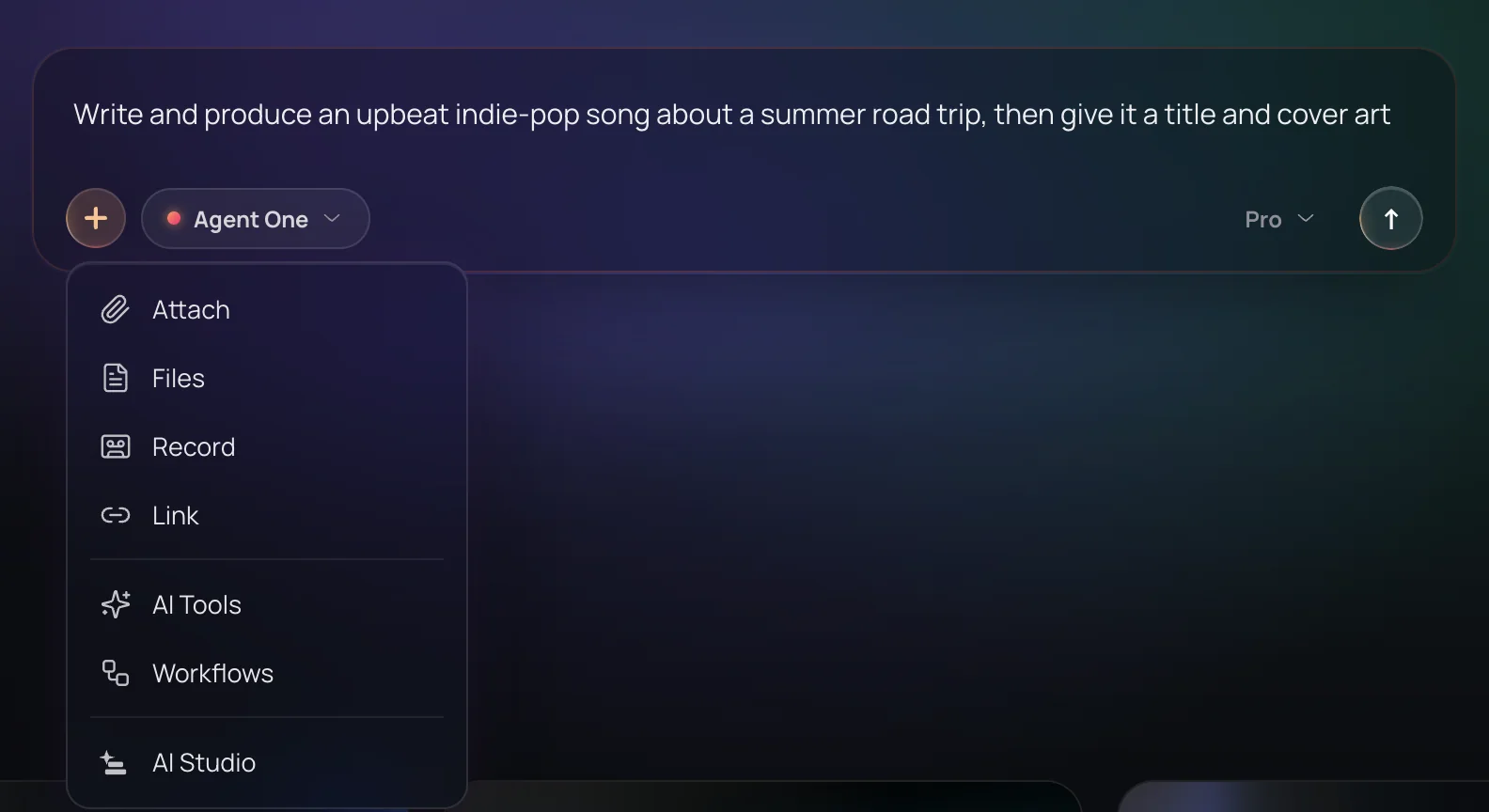
Type your request in the Agent One composer. Use + to attach Library files, documents such as a PDF brief, a mic recording of up to 60 seconds or a link to an audio, video or image file, or type @ to reference a song, DNA or playlist.
Pick a mode and send
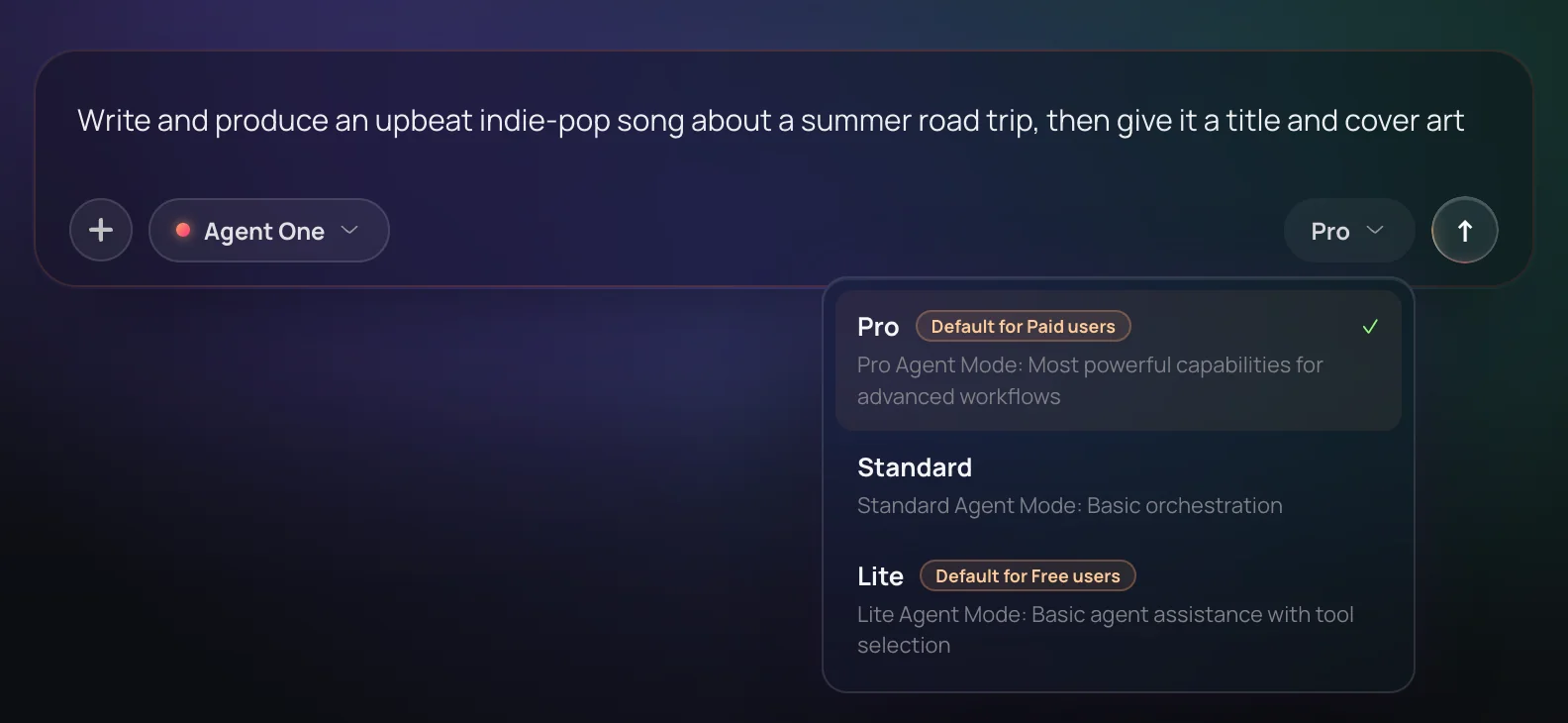
Choose Lite, Standard or Pro and send. Lite is on every plan, and Standard and Pro come with any paid plan. Agent One asks you a question only when it can't carry on without one.
Watch the plan run
The plan appears as a row of steps, and a plan your token balance can't finish is stopped before its first step. Steps that don't depend on each other run side by side, and Stop generating ends a run at any time.
Refine, edit or reuse
Play and download results in the chat, ask for changes in plain words or press Regenerate. Open a song in AI Studio to edit it on a timeline, or save the steps as a workflow to run again.
What each plan includes
| What | Free | Creator | Pro | Max |
|---|---|---|---|---|
| Agent One modes | Lite | Lite, Standard, Pro | Lite, Standard, Pro | Lite, Standard, Pro |
| Steps per request (On every plan, Lite plans up to 4 steps and Standard up to 12. Lookups such as a balance check or a Library search don't count.) | Up to 4 | Up to 12 | Up to 120 in Pro mode | Up to 120 in Pro mode |
| Agent One generations (On Free, most AI tool panels run through Agent One and use the same three generations. A run that fails or only answers a question gives its generation back.) | 3: the first free, two more by sharing | As your tokens and limits allow | As your tokens and limits allow | As your tokens and limits allow |
| Song model it uses | Soundverse v6 | Soundverse v8 | Soundverse v9 | Soundverse v9 |
| Music video, video and lip sync | Not included | Included, priced per second | Included, priced per second | Included, priced per second |
| Remix, Similar, Inpainting, Stem Generator, 14+ stems, voice training (Soundverse v9 versions of these tools need Pro.) | Not included | Included | Included | Included |
| Tokens | 1,000 once, at sign-up | 4,000 a month | 10,000 a month | 25,000 to 125,000 a month |
| Hourly and daily run limits (Settings, Rate limits shows your live limits.) | Base limits | 2× Free | 5× Free | 10× to 50× Free |
| Commercial use (The Pricing page lists what each plan's license covers.) | Personal use only | Commercial license | Commercial license | Commercial license |
Why use Agent One
A finished song, not parts
Every song a plan makes comes with its own title and cover art. Writing lyrics, naming the song and drawing its cover use no tokens; the song itself and Agent One's planning do.
Plans before it spends
You see the plan as a row of steps before it runs. Agent One checks your token balance first and, for a music video, stops for your go-ahead before any shot is filmed.
Remembers the conversation
"Now with a female voice" reuses the same lyrics, and "that song about rain" is found in the project or your Library. If a run stops early, saying continue picks up without redoing finished steps.
Your plan's newest model
Agent One picks the newest Soundverse model your plan includes: Soundverse v6 on Free, Soundverse v8 on Creator, and Soundverse v9 on Pro and Max.
What it costs
Free plan: the Lite agent, with plans of up to 4 steps. Standard and Pro modes need Creator. New accounts get 1,000 free tokens to start. Free accounts get 3 Agent One runs in all; sharing unlocks the 2nd and 3rd.
- One request in Lite mode: from 7 tokens (from about $0.02 on Creator, or ₹1 in India).
- One request in Standard mode: from 54 tokens (from about $0.13 on Creator, or ₹5 in India).
- One request in Pro mode: from 128 tokens (from about $0.32 on Creator, or ₹13 in India).
Free: Lite agent; plans of up to 4 steps.
Creator: Standard and Pro agent modes; plans of up to 12 steps.
Pro: Standard and Pro agent modes; plans of up to 120 steps.
Max: Standard and Pro agent modes; plans of up to 120 steps.
Each tool Agent One runs for you is charged at that tool's own price, on top of the agent's.
A song made through Agent One
- AI Song Generator — Song with Soundverse v6: 300 tokens (about $0.75–$0.94 on Creator, or ₹30–₹37 in India).
- AI Song Generator — Song with Soundverse v8: 400 tokens (about $1.00–$1.25 on Creator, or ₹40–₹50 in India).
- AI Song Generator — Song with Soundverse v9: 500 tokens (about $1.25–$1.56 on Pro, or ₹52–₹65 in India).
Agent One makes a song with the newest Soundverse version your plan includes, and its own work comes on top: at least 7 tokens a request in Lite mode, 54 in Standard or 128 in Pro. Runs a month count the song's price alone.
Creator $12.49 a month, or $9.99 a month billed yearly ($119.88 a year) · Pro $31.24 a month, or $24.99 a month billed yearly ($299.88 a year) · Max from $72 a month, or $60 a month billed yearly ($720 a year).
In India (PayU): Creator ₹499 a month, or ₹399 a month billed yearly (₹4,788 a year) · Pro ₹1,299 a month, or ₹1,039 a month billed yearly (₹12,468 a year) · Max from ₹2,999 a month, or ₹2,399 a month billed yearly (₹28,788 a year).
Prices outside India are in US dollars, billed through Stripe; in India they are in rupees, billed through PayU. Monthly tokens reset each month and don't roll over.
Good to know
Links aren't fetched
Agent One can't download a song from a pasted link. Import the file first with + then Link, which takes a direct audio, video or image link; YouTube links import only on Pro and Max, after you turn the option on in Settings, Preferences.
Typed requests only
The composer's mic records a clip of up to 60 seconds to attach. It doesn't take spoken commands.
Documents are read as text
Agent One reads up to three documents per message. Scanned PDFs, where each page is a picture, have no text to read, and XLS and PPTX files aren't read.
Renders up to 10 minutes
A mix or render Agent One makes is at most 10 minutes long, so it uses fewer or shorter songs to fit.
Free runs in Lite
On Free, Agent One runs in Lite mode with up to 4 steps per request, for three generations: the first free and two unlocked by sharing.
Video needs Creator, and tokens
Music videos, video clips and lip sync need Creator or above. Video is priced per second, so a one-minute music video costs more than Creator's 4,000 monthly tokens; Agent One shows the price before any shot and offers a shorter section or a lower resolution if your balance falls short.
No tempo changes in AI Studio
Inside AI Studio, Agent One can read the project tempo but can't change it.
Frequently asked questions
Is Agent One free to use?
Yes, Agent One, Soundverse's AI music agent, is free to try. On the Free plan you get three Agent One generations in Lite mode: the first is free, and sharing Soundverse unlocks each of the next two. Most AI tool panels run through Agent One too, so the three cover those as well. New accounts get 1,000 starter tokens, and a run that fails or only answers a question gives its generation back. Paid plans drop the cap.
How good are the songs Agent One makes?
Agent One makes songs with the newest Soundverse model your plan includes: Soundverse v6 on Free, Soundverse v8 on Creator and Soundverse v9 on Pro and Max. Every song arrives with a title and cover art. Results vary with the request, so with Agent One you can ask for changes in plain words, press Regenerate, ask for up to three versions at once, or open the song in AI Studio to edit it by hand.
Can I use music from Agent One commercially?
It depends on your plan. On the Free plan, what you make with Agent One is for personal use. Paid plans include a commercial license; the Pricing page lists what each plan covers. You need the rights to any audio, document or image you attach, and Agent One trains an Artist DNA only after you confirm, in your own words, that you own or control the songs.
What can't Agent One do?
Agent One can't fetch a song from a link you paste, such as YouTube or Spotify, so import the file first. It takes typed requests, not voice commands, and it doesn't read scanned PDFs, XLS or PPTX files. A mix or render Agent One makes is at most 10 minutes long. On Free it runs only in Lite mode, and music videos need Creator. In AI Studio, Agent One can't change the project tempo.
What is Agent One, Soundverse's AI music agent?
Agent One is Soundverse's AI music agent: you describe what you want in plain words, and it plans the steps, chooses the tools and runs them for you. On Soundverse, one Agent One request can write lyrics, make the song, name it and draw its cover, and later requests in the same chat can extend it, remix it, split it into stems or make a music video.
What's the difference between Lite, Standard and Pro in Agent One?
Lite, Standard and Pro are Agent One's three modes, picked in the chat composer. Lite plans up to 4 steps per request, Standard up to 12 and Pro up to 120, and Agent One's own work costs at least 7, 54 or 128 tokens per request. Lite is on every plan. Any paid plan unlocks Standard and Pro, but Pro mode's 120 steps need the Pro or Max plan; on Creator, Pro mode plans up to 12.
How many tokens does a song cost with Agent One?
With Agent One, each song version costs 300 tokens on Soundverse v6, 400 on Soundverse v8 and 500 on Soundverse v9, whatever its length. Writing the lyrics, naming the song and drawing its cover cost no tokens. Agent One's own planning adds at least 7 tokens in Lite, 54 in Standard or 128 in Pro, and more on longer runs. Remixes, stems, images and video are priced by each tool.
Can Agent One turn a creative brief into a set of songs?
Yes. Attach up to three documents per message, such as a PDF, DOCX, XLSX or TXT brief, and Agent One reads them, keeps the brief's own lyrics and track titles as written, and plans a song for each track. Pro mode on the Pro or Max plan plans up to 120 steps in one request, enough for a full soundtrack. In a public Soundverse demo, one Ramayana film brief became 14 songs.
Can Agent One make a music video?
Yes, on the Creator plan and above. Agent One studies the song, writes a timed script with a named cast and place, and stops for your go-ahead before filming. It checks your token balance before any shot, lip-syncs performance shots, leaves out a shot that fails and renders the video. Video is priced per second, so a one-minute music video costs more than the 4,000 tokens Creator includes each month.
Can Agent One work on Spotify for Artists, YouTube or other websites?
Yes, with Computer Use. Agent One can work through websites in Soundverse's cloud browser, or in your own Chrome with the Soundverse extension, and you follow each step from your chat. When a site asks you to sign in, sign in yourself in the live browser rather than typing a password into the chat; in your own Chrome, Agent One uses the sign-ins you already have. Spotify sign-in is always yours to do. Agent One never solves CAPTCHAs, and you can stop a run at any time.
Does Agent One remember earlier messages and files?
Yes. Agent One keeps the recent conversation word for word, folds older messages into a summary, and sees what each earlier request made, including the latest song's lyrics. So "now in a female voice" reuses the same lyrics, and "that song about rain" is found in the project or your Library. If a run stops early, saying continue picks up without redoing the finished steps.
Can Agent One edit my project in AI Studio?
Yes. Open Agent One from the AI Studio top bar and leave its Studio switch on, and it edits the project live: it writes MIDI parts on their own tracks, arranges clips, and sets volume, pan, effects, EQ and instrument sounds. Agent One reads a clip's key and tempo before writing a part, and everyone in the project sees its changes. It can't change the project tempo.
Ready to hear your idea finished?
Describe the song you want, and Agent One plans it, writes it, sings it and gives it a title and cover art.
