Market & release · Free
Music release planner: a day-by-day rollout built around your song
Add your track and release details, and get a dated plan split by platform, with pre-save, smart link and playlist pitch deadlines. Runs on every plan.
1,000 free tokens to start · No card needed · Cancel paid plans anytime
Do more with Release Planner on Creator — from $9.99/mo, or ₹399/mo in India. 4,000 tokens a month. Billed $119.88 a year, or $12.49 month to month.
What you get
Know what to do each day
Each step is scheduled, from the weeks before release day to the week after, and split across the platforms you pick.
Deadlines you can see coming
The plan sets the pre-save, smart link and playlist pitch deadlines, so the steps that need lead time come first.
Research you can check
Release Planner reads your track's style and researches release timing for its genre and region, then lists its sources for you.
Who it's for
Independent artists
Turn a finished song into a dated, day-by-day rollout instead of planning from a blank calendar.
Artist managers
Give the artist and team one dated schedule, with a Key Deadlines section before the day-by-day rollout.
Small labels
Plan each release to the artist's audience size, region and budget, with the research sources listed to check.
Artists releasing in India
Set Main Region to India, and the timing research looks at release days, holidays and clashes there.
When to use it
- Your song is mastered and there's no rollout plan yet
- You haven't chosen a release date and want one backed by research
- A holiday or a big release might clash with your release week
- You're releasing in a region you don't know well
- Release day is only a week or two away
- You need to know when pre-saves and playlist pitches are due
What you can make with it
A week-by-week rollout
Each week of the plan lists the days with something to do: the platform, what to post and why.
A release date with reasons
Leave the date empty and Release Planner picks a day that leaves room for your rollout, and explains the choice from its research.
Clash checks
The timing research looks for holidays and big releases to avoid in your genre and region.
A plan for one region
Choose US, UK, EU, India, Latin America, Asia or Global, and the research follows that region.
A short-notice rollout
Set Rollout Length to one or two weeks when release day is close, so the plan covers only the time you have.
A streaming and email plan
Choose Spotify + Email to keep the plan on streaming and your fan list, without social posting.
A plan sized for a debut
Set Audience Size to under 1k so the steps suit a first release rather than an established act.
Sources you can check
The plan ends with the links its research used, so you can check any timing claim before you rely on it.
Blanks for what it doesn't know
Where a step needs something you didn't give, like your smart link, the plan leaves a blank such as [smartlink URL].
Screenshots
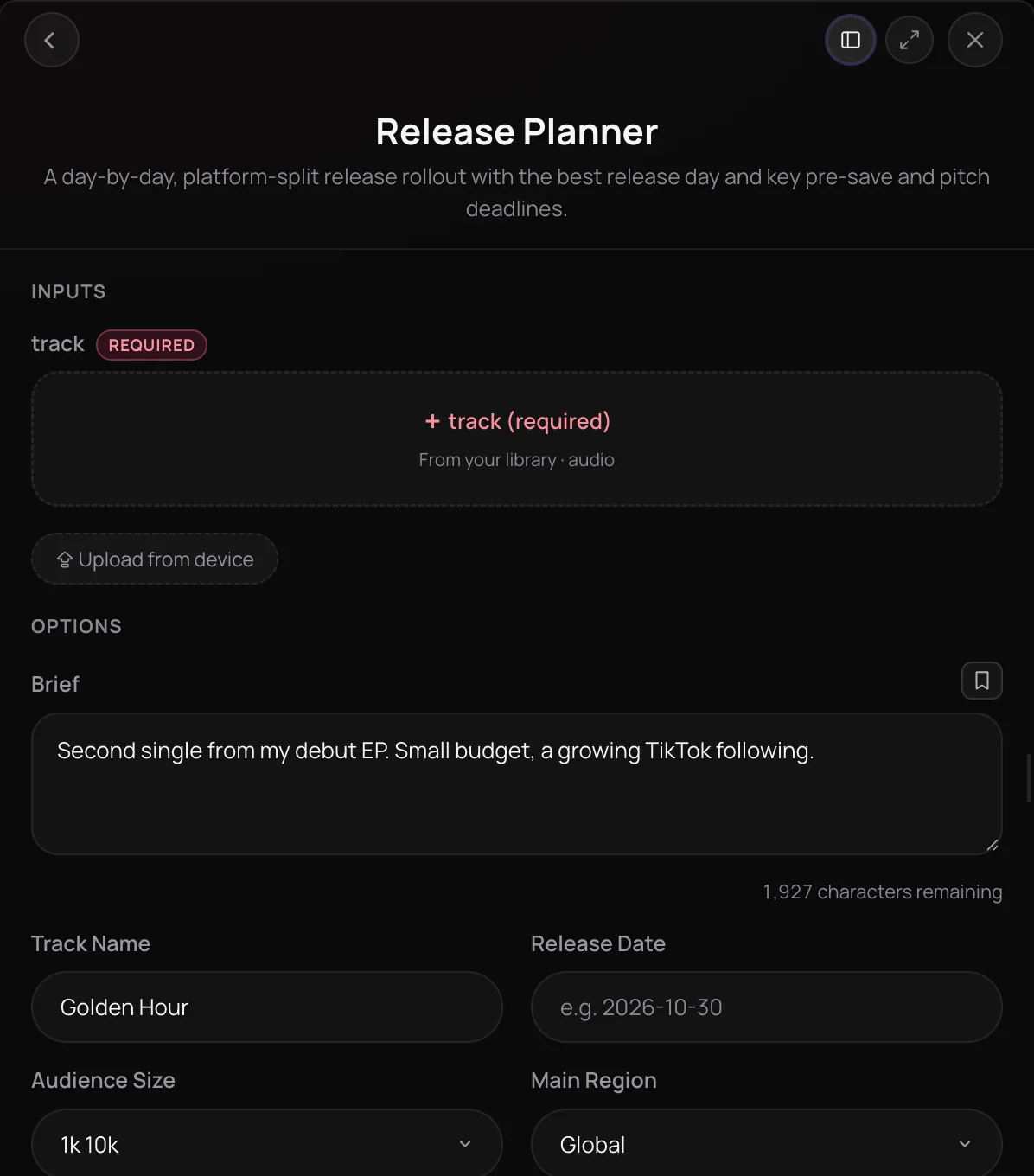
Release Planner is Soundverse's music release planner: it analyzes your track's style and writes a day-by-day, platform-split rollout around your release date. It is built for independent artists, managers and small labels who have a finished song and no schedule yet. You get a recommended release day, pre-save, smart link and playlist pitch deadlines, and a plan sized to your audience, region, budget and rollout length.
See it in action
- AI Music Release Planner: Get a Day-by-Day Rollout Plan for Your Song | Soundverse AI A walkthrough of Release Planner turning a track and a few release details into a day-by-day, platform-split rollout plan.
How it works
Add your track
Open Release Planner from AI Tools under Market, or choose Promote, then Release Plan on a song in your Library. Pick the track from your Library or upload an audio file.
Fill in the details
Add the track name and release date, then set Audience Size, Main Region, Rollout Length (1 to 12 weeks) and Platforms. The optional brief takes the story, your budget and what has worked before.
Generate in Chat
Leave Recommend Release Day on if you want a suggested day, then press Generate in Chat. Release Planner analyzes the track's style before it plans.
Work through the plan
The rollout arrives in your Agent One chat as day-by-day steps split by platform. Copy it into your calendar or task list and follow it.
Why use Release Planner
Built from your track
Release Planner reads your song's style before it plans, so the timing and tactics fit the genre instead of a generic checklist.
Real dates and deadlines
Give it a release date and every step gets a date, including the pre-save, smart link and playlist pitch deadlines. Without one, it can recommend a day or plan in days counted from release.
Split by platform
Choose All, IG + TikTok, IG + TikTok + Shorts or Spotify + Email, and the plan lays out the work for each one.
Sized to your stage
Audience size, main region, budget and rollout length shape the plan, so a first release and an established act get different schedules.
What it costs
Works on the Free plan. New accounts get 1,000 free tokens, enough for about 5 release plans.
- One release plan: 200 tokens (about $0.50–$0.62 on Creator, or ₹20–₹25 in India).
Creator $12.49 a month, or $9.99 a month billed yearly ($119.88 a year) · Pro $31.24 a month, or $24.99 a month billed yearly ($299.88 a year) · Max from $72 a month, or $60 a month billed yearly ($720 a year).
In India (PayU): Creator ₹499 a month, or ₹399 a month billed yearly (₹4,788 a year) · Pro ₹1,299 a month, or ₹1,039 a month billed yearly (₹12,468 a year) · Max from ₹2,999 a month, or ₹2,399 a month billed yearly (₹28,788 a year).
Prices outside India are in US dollars, billed through Stripe; in India they are in rupees, billed through PayU. Monthly tokens reset each month and don't roll over.
Frequently asked questions
Is Release Planner free?
Soundverse is free to sign up, and new accounts get free starter tokens. Each Release Planner run uses tokens from your plan, and the Pricing page lists the tools and tokens each plan includes. The rollout comes back as text in your chat, so you can copy it into any calendar or task app.
Can I use Release Planner on the Free plan?
Yes. Release Planner runs on every Soundverse plan, including Free, and each release plan costs 200 tokens, so the 1,000 tokens new accounts get at sign-up cover five. Release Planner runs on its own, not through Agent One, so it doesn't use Agent One's free generations. On the Free plan, the optional brief takes up to 400 characters, and paid plans allow 2,000; every other option is the same on every plan.
How good is a Release Planner rollout?
A Release Planner rollout is a researched starting point, not a promise of streams. Release Planner plans from your track's style, the details you enter and a web search on release timing for your genre and region, and it lists the sources it used. It can't see your streaming numbers or audience data, so add what has worked before and your budget to the brief, and adjust dates to your own calendar.
Can Release Planner post or pitch for me?
No. Release Planner writes the plan; it does not post, schedule, submit pitches or contact anyone. It also cannot see your streaming numbers, so it plans from the track and the details you enter. To carry out steps on real sites, Music Business Agent (Computer Use) can claim profiles, pitch editorial playlists and build a smart link in its Release Autopilot workflow.
What is Release Planner, Soundverse's music release planner?
Release Planner is Soundverse's music release planner, which turns a finished track into a day-by-day, platform-split rollout plan. It recommends a release day and sets the pre-save, smart link and playlist pitch deadlines, sized to your audience, region, platforms and rollout length.
How do I make a music release plan with AI?
Open Release Planner in Soundverse and add your track from the Library or as an upload. Enter the track name and release date, set Audience Size, Main Region, Rollout Length and Platforms, and add an optional brief with the story and budget. Press Generate in Chat, and the plan arrives in your Agent One chat.
How does Release Planner choose a release day?
Release Planner analyzes your track's style, then looks up current release timing for that genre and your main region on the web. If you enter a date, such as 2026-10-30 or 30 Oct 2026, Release Planner plans every step around it, and with Recommend Release Day on it also says which weekday suits the release best. Without a date, Release Planner picks one using that research, and plans in days counted from release only if it cannot.
What does a Release Planner rollout include?
A Release Planner rollout is a day-by-day plan split by the platforms you pick: All, IG + TikTok, IG + TikTok + Shorts, or Spotify + Email. It covers the release day plus the pre-save, smart link and playlist pitch deadlines. Rollouts start 1 to 12 weeks before release, with 6 weeks as the default, run to one week after release day, and scale to your audience size.
Can I make the visuals, copy and pitches too?
Yes. Each part of a rollout has a Soundverse tool that starts from the same track. Asset Studio makes matching cover art, story backgrounds, a YouTube thumbnail, a tour poster and a merch mockup. Caption & Copy Writer writes hooks, captions, a bio and a press release, and Playlist Pitch Description writes DSP and curator pitches.
What files does Release Planner accept?
Release Planner takes one audio track, picked from your Soundverse Library or uploaded as MP3, WAV, AAC, OGG or M4A. The track is required, because every plan starts from an analysis of its style. On the Free plan the brief holds up to 400 characters; paid plans allow 2,000. You need the rights to anything you upload.
Ready to plan your release?
Add your track and Release Planner maps the rollout day by day, with the dates that matter.
