Own & train · Creator+
Train a detailed model of your voice and re-sing vocals with it
Give it 10 minutes or more of clean solo recordings, choose the training quality, and use the finished model in Voice Swap. On the Creator plan and above.
1,000 free tokens to start · No card needed · Cancel paid plans anytime
Unlock Train Voice Model with Creator — from $9.99/mo, or ₹399/mo in India. 4,000 tokens a month. Billed $119.88 a year, or $12.49 month to month.
What you get
Your voice on any vocal
When training finishes, pick your model in Voice Swap and re-sing an existing vocal in your voice.
More material, more accuracy
Ten minutes or more of your voice gives the model far more to learn from than a short clip, and you choose how long it trains.
Private unless you share it
New models start Private, so only you can use them. Make one Public and it appears in the Public tab for everyone.
Who it's for
Singers
Re-sing guide vocals and references in your own voice with Voice Swap once your model is trained.
Songwriters and topliners
Hear a demo's topline in your own voice without recording every take again.
Producers working with a vocalist
With the singer's explicit consent, model their voice and swap it onto guide vocals for a project.
When to use it
- You have at least 10 minutes of clean, dry recordings of your voice
- A demo has someone else's guide vocal and you want to hear it in yours
- A quick voice clone isn't detailed enough for what you need
- You want one consistent voice across several songs
- A singer has agreed to let you model their voice for a project
- You can wait a few hours for a higher-fidelity model
What you can make with it
Your voice on a guide vocal
Load a demo's guide vocal into Voice Swap, choose your model under Yours, and hear the part re-sung in your voice.
Takes recorded in the panel
Press Record in Train Voice Model to capture takes of a minute or more each, until you pass 10 minutes in total.
A quick test run first
Train at 10 epochs to check that your recordings work, then train again at a higher setting for the model you keep.
A Studio-quality model
Slide Training quality toward 350 epochs when fidelity matters more than waiting time.
One voice across an EP
Re-sing the guide vocals of several songs with the same model, so every track carries the same voice.
A session singer, with consent
With their explicit consent, train a singer's voice and keep the model Private so only you can use it.
Your voice for others
Publish your model to the Public tab when you want other people to be able to re-sing vocals in your voice in Voice Swap.
Screenshots
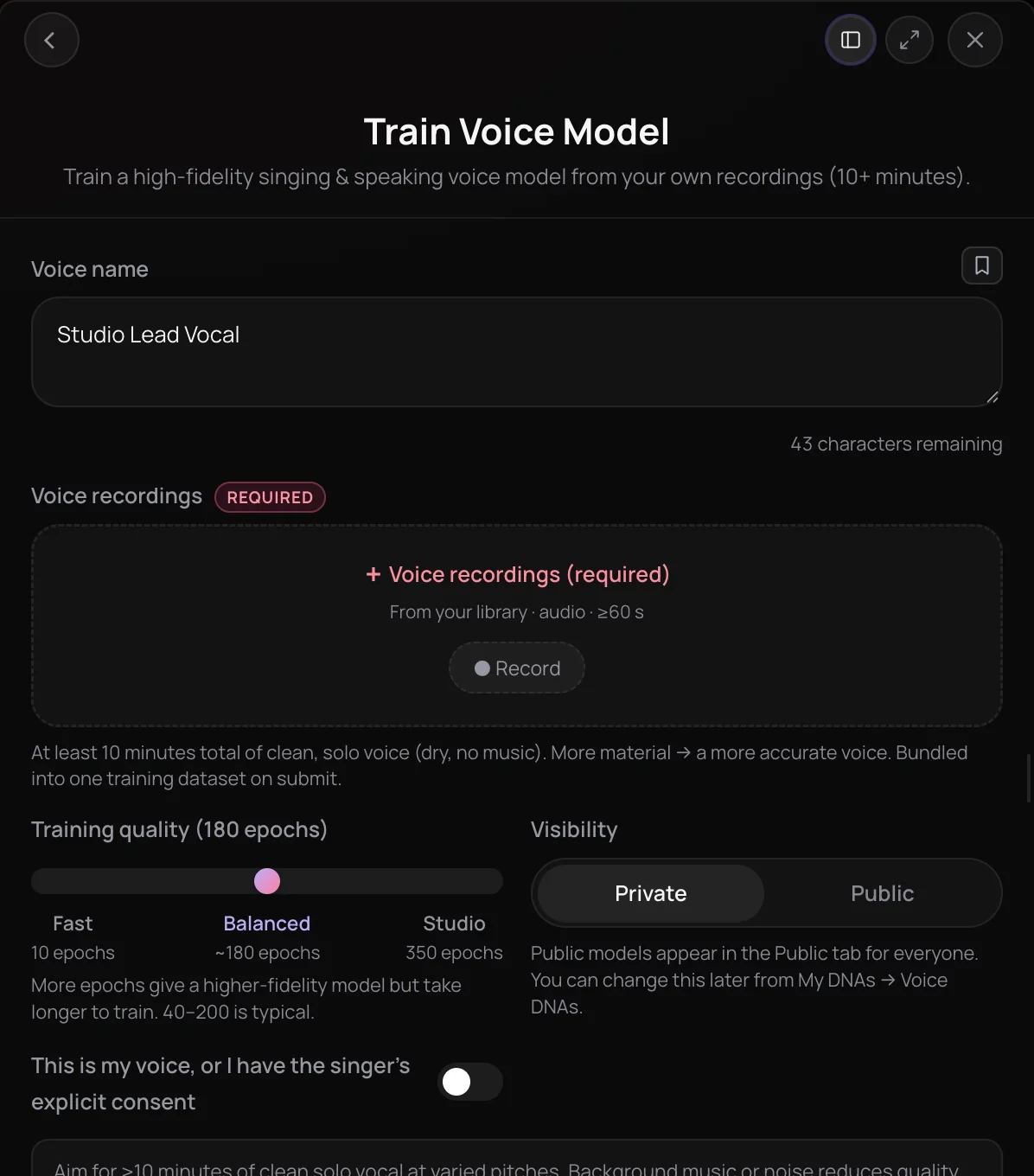
Train Voice Model lets you train a voice model on at least 10 minutes of your own singing or speaking. It is for singers and creators who want a detailed model of their voice, not a quick sketch. You pick the training quality and visibility, training runs in the background and takes hours, and the finished model works in Voice Swap.
See it in action
- How to Train Your Own AI Voice Model, Then Use It in Voice Swap | Soundverse AI A custom voice model is trained on your own recordings, then used in Voice Swap to put your voice on a vocal.
How it works
Name your voice
Open Train Voice Model under Build & Train in AI Tools and type a Voice name, such as Nova.
Add 10+ minutes of audio
Pick recordings from your Library or press Record in the panel. Use clean, dry, solo voice, each clip at least 60 seconds, at least 10 minutes in total.
Set quality and visibility
Slide Training quality from 10 epochs (Fast) to 350 (Studio); Balanced, at about 180, is the default. Keep the model Private or make it Public.
Confirm consent and start
Turn on the consent switch and press Start Training. The chat shows the upload and every epoch, and the model is ready to pick under Yours in Voice Swap when it is done.
Why use Train Voice Model
More material, more accuracy
Ten minutes or more of your voice gives the model far more to learn from than a short clip, and more material makes a more accurate voice.
Choose your training depth
Slide from 10 to 350 epochs. More epochs give a higher-fidelity model but take longer to train and use more tokens.
Ready for Voice Swap
When training finishes, pick your model in Voice Swap to re-sing an existing vocal in your voice.
Private unless you share it
New models start Private. Make one Public and it appears in the Public tab for everyone.
What it costs
Needs Creator or above.
- Train at 180 epochs (the default): 5,700 tokens at 30 tokens an epoch (about $14.24–$17.80 on Creator, with a top-up, or ₹569–₹711 in India).
Training costs 300 tokens plus 30 an epoch: 600 at 10 epochs, 10,800 at 350.
A run costs more than Creator's 4,000 monthly tokens, so on Creator it needs a top-up. Pro includes 10,000 a month.
Creator $12.49 a month, or $9.99 a month billed yearly ($119.88 a year) · Pro $31.24 a month, or $24.99 a month billed yearly ($299.88 a year) · Max from $72 a month, or $60 a month billed yearly ($720 a year).
In India (PayU): Creator ₹499 a month, or ₹399 a month billed yearly (₹4,788 a year) · Pro ₹1,299 a month, or ₹1,039 a month billed yearly (₹12,468 a year) · Max from ₹2,999 a month, or ₹2,399 a month billed yearly (₹28,788 a year).
Prices outside India are in US dollars, billed through Stripe; in India they are in rupees, billed through PayU. Monthly tokens reset each month and don't roll over.
Frequently asked questions
Is Train Voice Model free?
Train Voice Model is available on the Creator plan and above, and each training run uses tokens from your plan. The cost depends on the epochs you choose, so a Studio run costs more than a Fast one, and the panel shows the cost before you start. Paid plans add a commercial license for what you make; the Pricing page lists what each plan covers.
How many tokens does Train Voice Model use?
Train Voice Model costs 300 tokens plus 30 per epoch: 600 at the Fast end of 10 epochs, 5,700 at the default of about 180, and 10,800 at Studio's 350. The default run costs more than the 4,000 tokens the Creator plan adds each month, so on Creator choose fewer epochs or add a top-up, or use Pro, which adds 10,000. The panel shows the cost before you start.
When does a voice model sound worse?
Train Voice Model is only as good as its recordings. Background music, noise, reverb and takes that stay on a few notes all lower quality, and a Fast run of 10 epochs trades fidelity for speed. A voice model also doesn't write or generate songs by itself; it re-sings vocals in Voice Swap. To sing brand-new songs in your voice, use Train Voice Clone with the AI Song Generator.
Can I train a voice model of someone else's voice?
Only with their explicit consent. Train Voice Model asks you to confirm “This is my voice, or I have the singer's explicit consent”, and Start Training stays disabled until you switch it on. Train your own voice or the voice of a singer who has agreed, never a voice you have no permission to use. You need the rights to anything you upload.
Can other people use my voice model?
Only if you choose Public. Train Voice Model keeps every new voice model Private by default, so only you can use it. A Public model appears in the Public tab for everyone, which means other people can pick your voice in Voice Swap.
How much audio do I need to train a voice model?
Train Voice Model needs at least 10 minutes of clean, solo, dry voice in total, with no music behind it, and each clip should be at least 60 seconds long. Sing at varied pitches so the model hears your whole range. More material gives a more accurate voice, while background music or noise lowers quality. Train Voice Model accepts MP3, WAV, FLAC and M4A recordings.
How long does voice model training take?
Train Voice Model runs as a background job, and a model is ready hours after you press Start Training, not minutes. Higher Training quality settings take longer: 10 epochs is the Fast end and 350 is Studio. The chat shows the upload and each epoch as it completes, and Soundverse notifies you when the model is ready.
What is Train Voice Model?
Train Voice Model is the Soundverse tool to train a voice model of your singing or speaking voice from at least 10 minutes of your own recordings. Soundverse adds the finished model to the Yours tab in Voice Swap, where you use it to re-sing other vocals in that voice.
How is Train Voice Model different from Train Voice Clone?
Train Voice Clone is the quick option: one clip with at least 15 seconds of singing becomes a saved voice that the AI Song Generator can sing new songs in, without a long training run. Train Voice Model needs at least 10 minutes of audio, trains for 10 to 350 epochs over hours, and builds a higher-fidelity model for re-singing existing vocals in Voice Swap.
Ready to train a voice model?
Add at least 10 minutes of your voice, pick the training quality and start training.
