AI models · Pro+
A full song with vocals, title and cover art, made on Soundverse v9
Describe it or paste your lyrics, and Soundverse v9 sings it. Included on Pro and Max, at about 500 tokens a song.
1,000 free tokens to start · No card needed · Cancel paid plans anytime
Unlock Soundverse v9 with Pro — from $24.99/mo, or ₹1,039/mo in India. 10,000 tokens a month. Billed $299.88 a year, or $31.24 month to month.
What you get
A finished song from one prompt
Soundverse v9 returns a full song with vocals, plus a title and cover art at no extra token cost, ready to play, download or open in AI Studio.
Your voice and your material
Sing in your own voice clone, or guide Soundverse v9 with a reference song, a hummed melody or a MIDI file.
The newest version by default
On Pro and Max, AI Song Generator and Agent One start on Soundverse v9, so there's no menu to change first.
Who it's for
Independent artists and songwriters
Turn finished lyrics into a full song on the newest Soundverse version, sung in your own voice clone if you like.
Producers making demos
Build a demo from a hummed melody, a MIDI file or a reference song, then take it into AI Studio.
Content creators and YouTubers
Make vocal songs and instrumentals for videos and podcasts on the version Pro and Max accounts start on.
Indian-language creators
Write lyrics in Hindi or another language and hear them sung; try a short verse first, since no language list is published.
When to use it
- Your plan is Pro or Max and this is the take you mean to release
- Your lyrics are finished and you want them sung
- You've hummed a melody or written one in MIDI and want a full song around it
- You want to hear one idea on Soundverse v9 and Soundverse v8 side by side
- You need an instrumental bed for a video or a podcast
What you can make with it
Your own lyrics, sung
Write the verses and chorus yourself, paste them in Custom mode and let Soundverse v9 sing them; the song arrives named, with cover art.
A song in your own voice
Turn on Use custom voice and Soundverse v9 sings in a voice clone made from your own recordings.
A new song guided by a reference
Add a song of 30 seconds or more that you have the rights to with Use song reference, and Soundverse v9 writes something new guided by it.
A song on a hummed melody
Hum 5 to 60 seconds into Melody to Song Generator, add your lyrics and choose Soundverse v9.
A song from a MIDI file
Give MIDI to Song Generator a MIDI melody and lyrics, and choose Soundverse v9 for the song built on it.
Instrumental beds
In AI Music Generator, pair a prompt with Genre, Vibe and Tempo tags for a Soundverse v9 track with no vocals.
A duet
Describe two voices trading lines, such as a male and female duet, like the Hindi duet in Soundverse's blind test.
Songs from Agent One
On Pro and Max, ask Agent One for a song in plain words and it picks Soundverse v9 for you.
A longer cut afterwards
Lengthen a Soundverse v9 song in Extend Music with Soundverse v8, the newest version Extend Song offers.
Screenshots
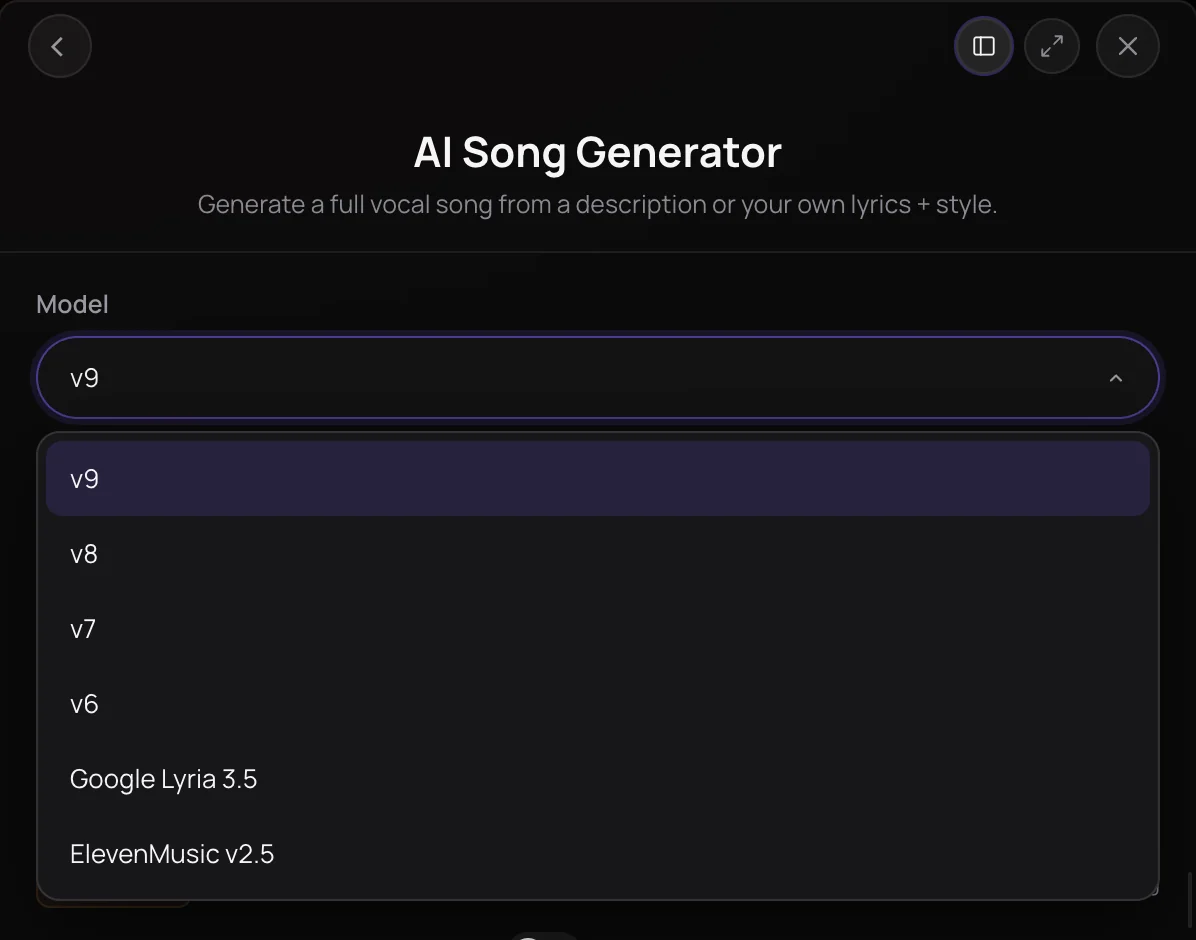
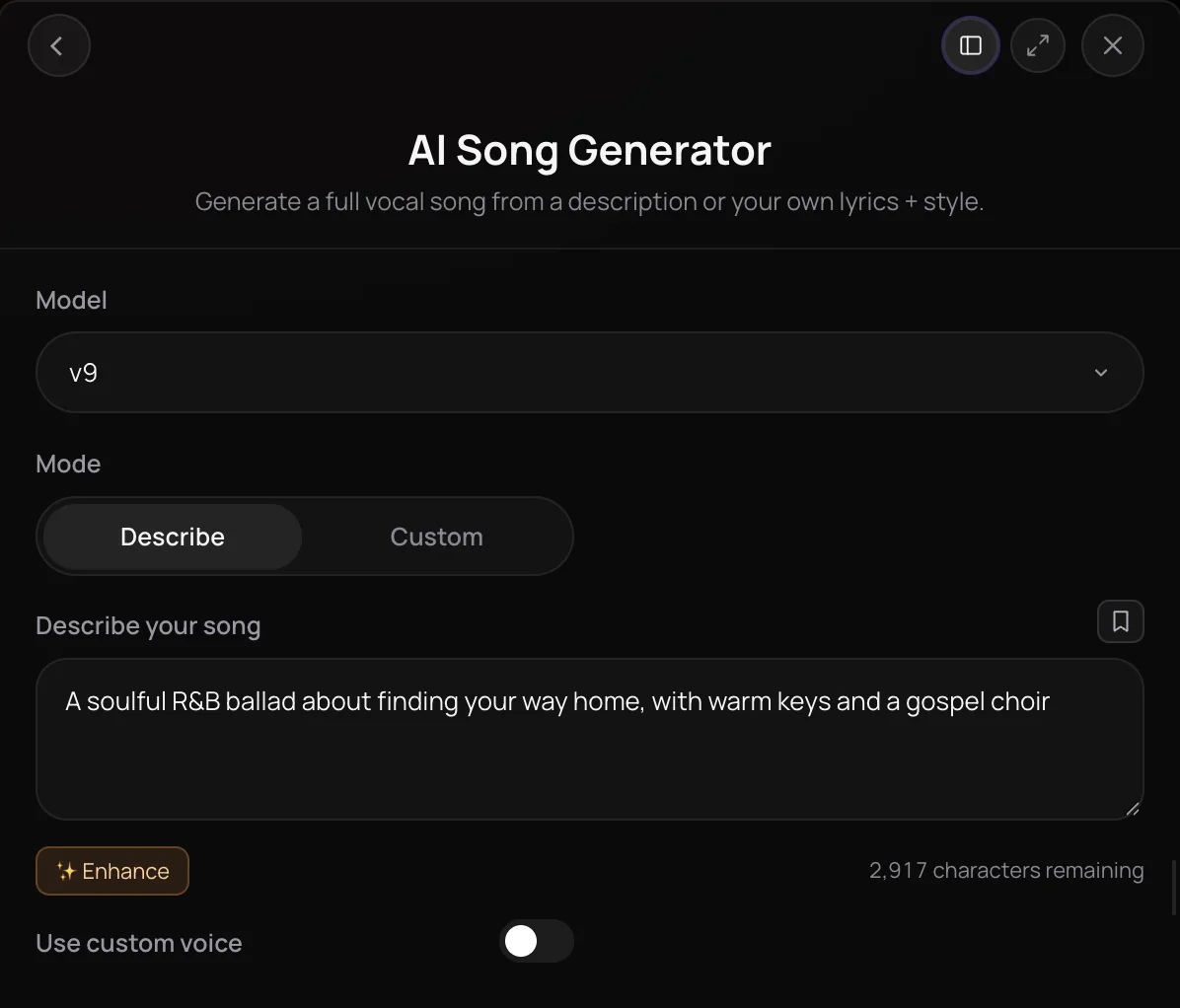
Soundverse v9 is the newest of Soundverse's numbered song models, and it makes full songs with vocals and instrumentals from a description, your lyrics, a melody or a reference song. It sits at the top of the Model menu, and on the Pro and Max plans the song tools and Agent One start on it. It's for Pro and Max subscribers who want the newest version for songs, demos and content, each delivered with a title and cover art.
See it in action
- Soundverse v9 vs Suno v6: Blind Test. Can You Tell Which Is Which? 8 Songs, Same Prompt A blind test of eight song pairs made from the same prompts, first takes only, with Soundverse v9 against another AI music model, from pop to a Hindi duet.
What you can do
What you can make with Soundverse v9
Pick Soundverse v9 in the Model menu of each tool below. It needs the Pro plan or above.
Songs with vocals (Pro+)
AI Song Generator: describe the song, or switch to Custom for your lyrics (up to 3,000 characters), a Style of Music and up to five Quick Style pills.
- An uplifting synth-pop anthem about city lights at 2 a.m., bright female vocals, a big sing-along chorus
- A romantic Hindi duet, male and female vocals trading lines, tabla and soft strings, a rainy-night mood
Instrumentals (Pro+)
AI Music Generator: a prompt plus Genre, Theme, Vibe, Instruments and Tempo tags, for a track with no vocals.
- Epic cinematic trailer score with taiko drums, soaring strings and brass, a slow build to a huge final hit
- Lo-fi hip hop study beat, dusty drums, mellow Rhodes, vinyl crackle, 80 BPM
Songs from a melody or MIDI (Pro+)
Melody to Song Generator and MIDI to Song Generator: 5 to 60 seconds of hummed melody or a MIDI file, plus your lyrics.
Ways to steer Soundverse v9
The same inputs work on every Soundverse version; on Soundverse v9 they need Pro.
Use custom voice (Pro+)
Sing in one of your voice clones. Train Voice Clone makes one from a recording of your own voice for about 6,000 tokens; only use a voice you have the right to use.
Use song reference (Pro+)
In Custom mode, add a song at least 30 seconds long, and Soundverse v9 writes a new song guided by it.
Similar Song and Similar Music (Pro+)
Similar Song Generator and Similar Music Generator offer Soundverse v9 too, for a new song or instrumental in the style of a reference track.
How it works
Open AI Song Generator
Open AI Song Generator from AI Tools, or AI Music Generator for an instrumental. On Pro and Max, the Model menu already shows "v9", which is Soundverse v9.
Check Soundverse v9 is picked
If another version is selected, open the Model menu and pick "v9". On the Free and Creator plans, Soundverse v9 is locked, and you're asked to upgrade to Pro before it runs.
Describe it or add lyrics
Describe the song, or switch to Custom to paste lyrics, add a Style of Music and pick up to five Quick Style pills. Turn on Use custom voice to sing in one of your voice clones.
Generate in Chat
Click Generate in Chat. The song arrives in your chat with a title and cover art, ready to play, download or open in AI Studio.
Compare Soundverse models
| Model | Plans | Tokens per song | Default on | Extends a song | Reference song | Voice clone | Melody and MIDI |
|---|---|---|---|---|---|---|---|
| Soundverse v9 | Pro and Max | 500 | Pro and Max | No | Pro and Max | Yes | Yes |
| Soundverse v8 | Creator and up | 400 | Creator | Yes | Creator and up | Yes | Yes |
| Soundverse v7 | Creator and up | 400 | — | Yes | Creator and up | Yes | Yes |
| Soundverse v6 | Every plan | 300 | Free | Yes | Creator and up | Yes | Yes |
A voice clone is trained on Creator and up. Tokens per song are the same for a song and an instrumental.
What each plan includes
| What | Free | Creator | Pro | Max |
|---|---|---|---|---|
| Soundverse v9 songs and instrumentals | Not included | Not included | Included | Included |
| Version the song panels and Agent One start on | Soundverse v6 | Soundverse v8 | Soundverse v9 | Soundverse v9 |
| Newest version for extending a song (Soundverse v9 can't extend a song.) | Soundverse v6 | Soundverse v8 | Soundverse v8 | Soundverse v8 |
| Tokens (Max comes in five sizes.) | 1,000 once, at sign-up | 4,000 a month | 10,000 a month | 25,000 to 125,000 a month |
Why use Soundverse v9
The newest Soundverse version
Soundverse v9 sits above the three earlier Soundverse versions in every Model menu that offers it, and Pro and Max accounts start on it.
Songs and instrumentals
Make a full song with vocals in AI Song Generator or an instrumental in AI Music Generator, both on Soundverse v9.
Guided by your material
Steer Soundverse v9 with your lyrics, a voice clone, a reference song, a hummed melody or a MIDI file, depending on the tool.
Agent One uses it on Pro
Describe a song to Agent One on Pro or Max and it uses Soundverse v9 without you opening a menu, with a title and cover art on every song.
What it costs
Needs Pro or above.
- Song with Soundverse v9: 500 tokens (about $1.25–$1.56 on Pro, or ₹52–₹65 in India).
- Instrumental with Soundverse v9: 500 tokens (about $1.25–$1.56 on Pro, or ₹52–₹65 in India).
Soundverse v9 can't extend songs yet.
Agent One runs this tool for you, and the agent's own steps are metered on top of the tool's price: about 7 tokens a step in Lite mode, 54 in Standard mode and 128 in Pro mode, the default on paid plans.
Creator $12.49 a month, or $9.99 a month billed yearly ($119.88 a year) · Pro $31.24 a month, or $24.99 a month billed yearly ($299.88 a year) · Max from $72 a month, or $60 a month billed yearly ($720 a year).
In India (PayU): Creator ₹499 a month, or ₹399 a month billed yearly (₹4,788 a year) · Pro ₹1,299 a month, or ₹1,039 a month billed yearly (₹12,468 a year) · Max from ₹2,999 a month, or ₹2,399 a month billed yearly (₹28,788 a year).
Prices outside India are in US dollars, billed through Stripe; in India they are in rupees, billed through PayU. Monthly tokens reset each month and don't roll over.
Good to know
No Extend Song
Soundverse v9 can't extend a song. Continue it in Extend Music with Soundverse v8, Soundverse v7 or Soundverse v6.
No length setting
Soundverse v9 decides how long each song or instrumental runs. Extend Music can lengthen it afterwards.
Pro and Max only
On Free and Creator, Soundverse v9 is locked, and you're asked to upgrade to Pro before it runs. Free includes Soundverse v6, and Creator adds Soundverse v7 and Soundverse v8.
Frequently asked questions
Is Soundverse v9 free?
No. Soundverse v9 is included on the Pro and Max plans, and each song or instrumental costs about 500 tokens, the price the panel shows before you generate. Runs made in chat also go through Agent One, which adds at least 128 tokens in its Pro mode, the default on paid plans, or 7 in Lite mode. You can start free: new accounts get 1,000 tokens for songs on Soundverse v6, the version the Free plan includes.
How good is Soundverse v9?
Listen and decide: Soundverse publishes no sound-quality score for Soundverse v9. In October 2026, Soundverse posted a blind test on YouTube that pairs eight first-take Soundverse v9 songs with songs another AI music model made from the same prompts, loudness-matched and unedited: pop, hip-hop, rock, R&B, a Hindi duet and three instrumentals. Each Soundverse v9 run gives you one take, so generate again whenever you want another.
Can I use songs made with Soundverse v9 commercially?
Soundverse v9 runs only on paid plans, and paid plans include a commercial license; the Pricing page lists what each plan covers. If you guide Soundverse v9 with a reference song, a melody, a MIDI file or a voice clone, you need the rights to that material, and you should only sing in a voice that's yours or that you have permission to use.
What can't Soundverse v9 do?
Soundverse v9 can't extend a song, so Extend Music offers Soundverse v8, Soundverse v7 and Soundverse v6 for that instead. Soundverse v9 has no length setting either: the model decides how long each song runs. And Soundverse publishes no language list for Soundverse v9, so test a short verse before writing a full song in a new language.
What is Soundverse v9?
Soundverse v9 is the newest of Soundverse's numbered song models, added in October 2026, and it makes full songs with vocals and instrumentals from a description, your lyrics, a melody or a reference song. Soundverse v9 sits at the top of the Model menu, above the three earlier Soundverse versions, and it's included on the Pro and Max plans, where it's the version you start on.
Which Soundverse tools offer Soundverse v9?
You can pick Soundverse v9 in AI Song Generator, AI Music Generator, Melody to Song Generator, MIDI to Song Generator, Similar Song Generator and Similar Music Generator. Extend Music doesn't offer Soundverse v9, because it can't extend a song. With Agent One, Pro and Max accounts get Soundverse v9 for new songs automatically.
Which languages and genres can Soundverse v9 sing?
Soundverse v9 takes any style you describe, and in Custom mode, Quick Style pills from Pop, Hip Hop and K-Pop to Bollywood, Afrobeat, Lofi and Metal. Its public blind test covered pop, hip-hop, rock, R&B, a Hindi duet and cinematic, lo-fi and house instrumentals. There's no language setting: write the lyrics in the language you want sung, and since Soundverse publishes no full language list, try a short verse first in a new language.
How do I use Soundverse v9 with Agent One?
On the Pro and Max plans, just describe what you want. Agent One uses the newest version your plan includes: Soundverse v9 for songs and instrumentals, and Soundverse v8 for extensions, since Soundverse v9 can't extend. To choose a version yourself, pick a tool such as AI Song Generator in the composer's tool picker, and its Model menu appears.
Should I use Soundverse v9 or Soundverse v8?
Use Soundverse v9 when you're on Pro or Max and want the newest version, and Soundverse v8 when you need to extend a song or want to spend fewer tokens: about 400 a song against about 500 on Soundverse v9. Both take your lyrics, a voice clone or a reference song in AI Song Generator, so on Pro you can generate the same idea on each and keep the take you prefer.
How do I make a Soundverse v9 song longer?
Use Extend Music. Choose Extend Song, add your Soundverse v9 song and the lyrics for the new part, and pick Soundverse v8 (shown as "v8" in the Model / Version menu), the newest version Extend Song offers. You get the whole song back with the new section attached. For an instrumental, the Extend Music mode adds 5 to 120 seconds from a prompt instead.
Ready to hear Soundverse v9?
Open AI Song Generator, check that Soundverse v9 ("v9" in the Model menu) is selected, and describe your song or paste your lyrics.
