AI models · Creator+
One complete song from a text prompt, made on Google Lyria 3.5
Describe the music, add lyrics if you like, and Google Lyria 3.5 returns one full track with a title and cover art. Creator plan and up.
1,000 free tokens to start · No card needed · Cancel paid plans anytime
Unlock Google Lyria 3.5 with Creator — from $9.99/mo, or ₹399/mo in India. 4,000 tokens a month. Billed $119.88 a year, or $12.49 month to month.
What you get
Hear a brief on another model
Run the same prompt on Google Lyria 3.5 and a Soundverse version from one Model menu, then keep the take you prefer.
Text in, a finished track out
Google Lyria 3.5 needs no audio: a description, plus optional lyrics, gives one complete song or instrumental.
A set cost per song
Each run uses about 500 tokens whatever the length, so you know the cost before you generate.
Who it's for
Songwriters
Hear a song idea from text alone, with the lyrics written for you or your own lyrics laid out with tags.
Producers comparing models
Run one brief on Google's model and on the Soundverse versions from the same Model menu.
Video creators and podcasters
Get an instrumental from a text prompt and a few style tags; in AI Music Generator the result never has vocals.
When to use it
- You have an idea in words but no reference track or melody
- You want to hear one brief on Google Lyria 3.5 next to a Soundverse version
- You need the lyrics written along with the song
- You want an instrumental from a text prompt alone
- You're writing a holiday or seasonal song
What you can make with it
A song from a one-line idea
Type one line in AI Song Generator and pick Google Lyria 3.5; it writes the lyrics and the song together.
Your lyrics, laid out with tags
Paste lyrics with [Verse], [Chorus] and [Bridge] tags in Custom mode; Google Lyria 3.5 reads them together with your style as one prompt.
A text-only instrumental
In AI Music Generator, a prompt and style tags on Google Lyria 3.5 give you a track with no vocals.
One brief, three model families
Give Google Lyria 3.5, ElevenMusic v2.5 and a Soundverse version the same brief, then compare what comes back.
A Halloween or holiday song
Describe the occasion and the sound, like a spooky pop song with theremin and handclaps.
A 90s R&B slow jam
Describe the era and the feel, such as warm vocals, Rhodes and finger snaps about a late-night phone call.
Ask for it in Agent One
Name Lyria in your Agent One message to have it use Google Lyria 3.5; unless you name it, Agent One won't pick it.
Straight onto your timeline
Working in AI Studio? Pick Google Lyria 3.5 in the studio's AI Song Generator, and Generate in Studio puts the track on a lane.
Edit it with other tools
Split the result with Stem Separator or lengthen it with Extend Music; neither runs on Google Lyria 3.5.
Screenshots
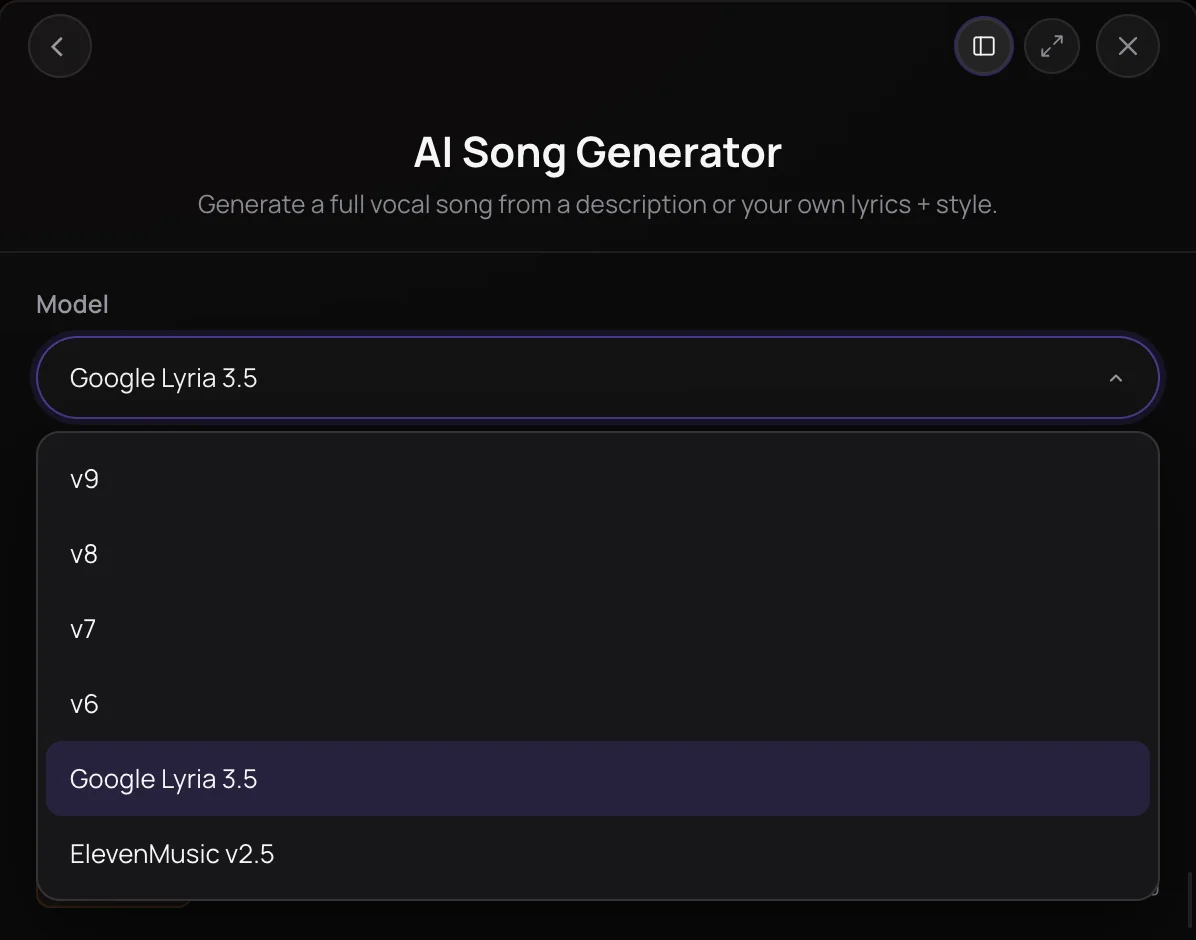
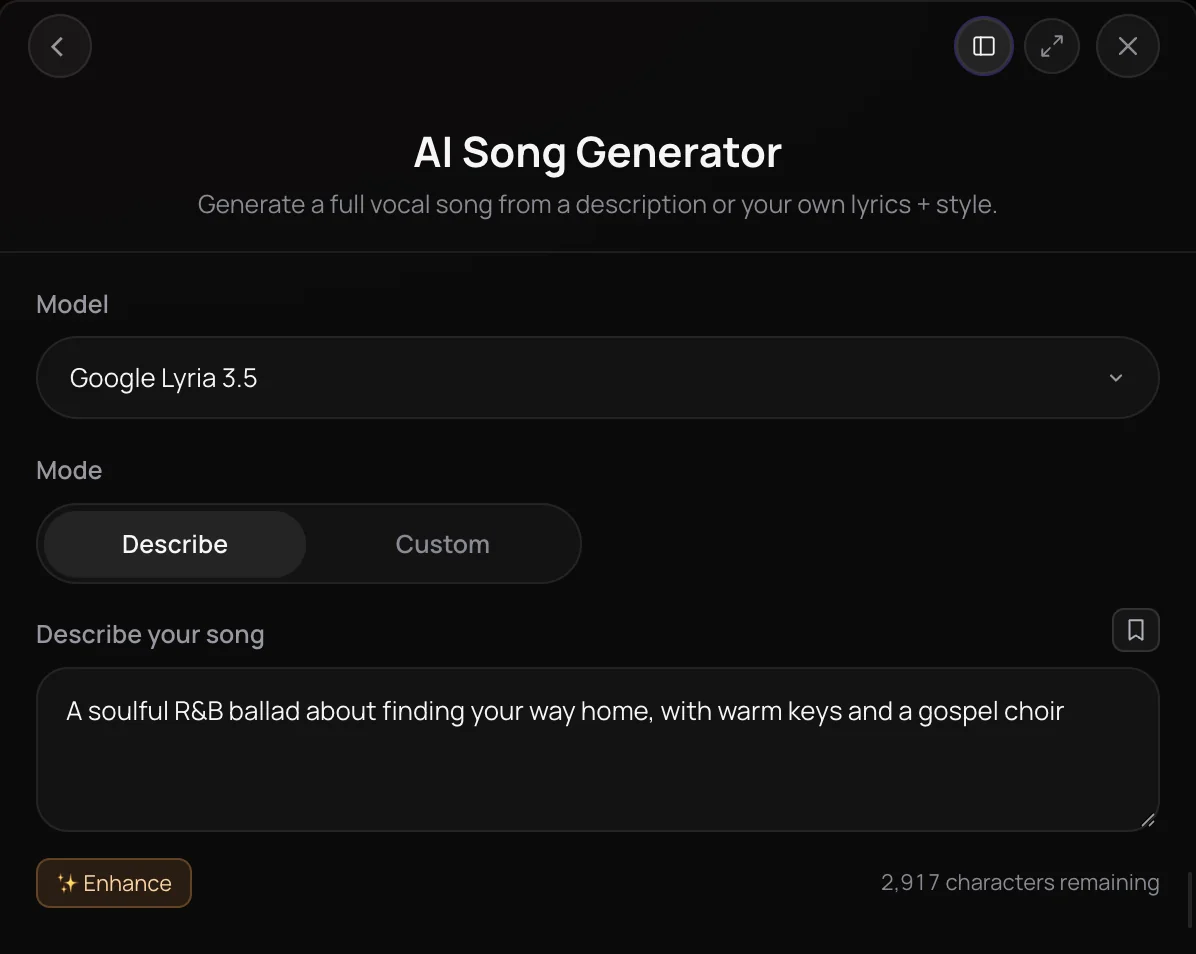
Google Lyria 3.5 is Google's AI music model, offered in Soundverse's AI Song Generator for songs with vocals and in AI Music Generator for instrumentals. It works from text alone: describe the genre, mood and instruments, and for a song, paste your own lyrics or let it write them. It's for songwriters, creators and producers on the Creator plan and above who want to hear an idea on Google's model next to the Soundverse versions.
See it in action
- New AI Models on Soundverse: Google Lyria 3.5, Veo 3.1, Seedance 2.5 and More Soundverse runs one Halloween brief through each new model, Google Lyria 3.5 and ElevenMusic v2.5 among them, and shows exactly what came back.
What you can do
Where Google Lyria 3.5 runs
Google Lyria 3.5 is in two tools' Model menu, and Agent One uses it when you ask. It needs the Creator plan or above.
AI Song Generator (Creator+)
A song with vocals from a description, or in Custom mode from your lyrics (up to 3,000 characters) and a Style of Music.
- A 90s R&B slow jam about a late-night phone call, warm male vocals, Rhodes and finger snaps
- A spooky Halloween pop song with a playful chorus, theremin and handclaps
AI Music Generator (Creator+)
An instrumental from a prompt and style tags; here Google Lyria 3.5 always leaves the vocals out.
- Warm acoustic folk instrumental for a travel vlog, fingerpicked guitar and soft percussion
Agent One (Creator+)
Name the model in your message, as in "make a 90s R&B slow jam with Lyria". Agent One uses Google Lyria 3.5 only when you ask for it.
How it works
Open a music tool
Open AI Song Generator from AI Tools for a song with vocals, or AI Music Generator for an instrumental with no vocals.
Pick Google Lyria 3.5
Choose Google Lyria 3.5 in the Model menu. It needs the Creator plan or above, so on Free you're asked to upgrade before it runs.
Describe it or add lyrics
Describe the music you want. For a song in your own words, switch AI Song Generator to Custom, paste your lyrics with tags such as [Verse] and [Chorus], and add a Style of Music.
Generate in Chat
Click Generate in Chat. The track arrives in your chat with a title and cover art, ready to play, download or open in AI Studio.
Why use Google Lyria 3.5
Google's model, same panel
Google Lyria 3.5 sits in the same Model menu as the Soundverse versions, so you can hear one idea on each without switching tools.
Songs or instrumentals
AI Song Generator gives you a song with vocals, from your lyrics or lyrics written for you; AI Music Generator always gives an instrumental.
A set price per song
Each Google Lyria 3.5 song uses about 500 tokens, whatever its length, and the panel shows the estimate before you generate.
Works in AI Studio too
Open AI Song Generator or AI Music Generator inside AI Studio, choose Google Lyria 3.5, and use Generate in Studio to place the track on your timeline.
What it costs
Needs Creator or above.
- Song with Google Lyria 3.5: 500 tokens (about $1.25–$1.56 on Creator, or ₹50–₹62 in India).
Agent One runs this tool for you, and the agent's own steps are metered on top of the tool's price: about 7 tokens a step in Lite mode, 54 in Standard mode and 128 in Pro mode, the default on paid plans.
Creator $12.49 a month, or $9.99 a month billed yearly ($119.88 a year) · Pro $31.24 a month, or $24.99 a month billed yearly ($299.88 a year) · Max from $72 a month, or $60 a month billed yearly ($720 a year).
In India (PayU): Creator ₹499 a month, or ₹399 a month billed yearly (₹4,788 a year) · Pro ₹1,299 a month, or ₹1,039 a month billed yearly (₹12,468 a year) · Max from ₹2,999 a month, or ₹2,399 a month billed yearly (₹28,788 a year).
Prices outside India are in US dollars, billed through Stripe; in India they are in rupees, billed through PayU. Monthly tokens reset each month and don't roll over.
Good to know
Text only
Google Lyria 3.5 can't follow a reference track or sing in your voice clone. Use a Soundverse version for Use song reference and Use custom voice.
No length or seed setting
Google Lyria 3.5 decides how long each track runs, and it isn't offered in Extend Music or Inpainting.
Some prompts are refused
Naming a real artist or pasting copyrighted lyrics gets a prompt refused. Describe the sound instead and write your own lyrics.
Frequently asked questions
Is Google Lyria 3.5 free?
No. Google Lyria 3.5 is available on the Creator plan and above, and each song or instrumental costs about 500 tokens, whatever its length; the panel shows the price before you generate. Runs made in chat also go through Agent One, which adds at least 128 tokens in its Pro mode, the default on paid plans, or 7 in Lite mode. On the Free plan, Google Lyria 3.5 is locked, but signing up is free and new accounts get 1,000 tokens for Soundverse v6.
How good is Google Lyria 3.5?
Judge Google Lyria 3.5 on your own brief. In October 2026, Soundverse posted a video that runs one Halloween brief through each of its new models, Google Lyria 3.5 included, and shows exactly what came back. Because Google Lyria 3.5 shares a Model menu with the Soundverse versions and ElevenMusic v2.5, you can run the same prompt on each and keep the take you prefer.
Can I use songs made with Google Lyria 3.5 commercially?
Check before you publish. Google Lyria 3.5 runs on the Creator plan and above, and what you can do with a Google Lyria 3.5 song depends on your plan: see Pricing and Terms for what each plan covers. Any lyrics you paste into Google Lyria 3.5 should be your own or ones you have the rights to, and copyrighted lyrics are refused.
What can't Google Lyria 3.5 do?
Google Lyria 3.5 works from text only, so it can't follow a reference track or sing in your voice clone; the Soundverse versions offer Use song reference and Use custom voice for that. Google Lyria 3.5 has no length or seed setting, it isn't offered in editing tools such as Extend Music or Inpainting, and prompts that name a real artist or include copyrighted lyrics are refused.
What is Google Lyria 3.5?
Google Lyria 3.5 is Google's AI music model, available on Soundverse as a choice in the Model menu of AI Song Generator and AI Music Generator. On Soundverse, Google Lyria 3.5 turns a text description, plus your own lyrics if you add them, into one complete song with vocals or, in AI Music Generator, an instrumental.
How do I use Google Lyria 3.5 on Soundverse?
Open AI Song Generator or AI Music Generator from AI Tools, choose Google Lyria 3.5 in the Model menu, describe the music or paste your lyrics, and click Generate in Chat. In an Agent One chat, name the model in your message, as in "make a 90s R&B slow jam with Lyria", or pick AI Song Generator in the composer and choose Google Lyria 3.5 from its Model menu.
Can Google Lyria 3.5 sing my own lyrics?
Yes. In AI Song Generator, switch Mode to Custom and paste up to 3,000 characters of lyrics, using tags such as [Verse], [Chorus] and [Bridge] to lay out the song. Google Lyria 3.5 reads your lyrics together with your description and style as one prompt; when every line must be sung exactly as written, ElevenMusic v2.5 is built for that. Your lyrics must be original, since copyrighted lyrics are refused.
How is Google Lyria 3.5 different from Soundverse v9 and ElevenMusic v2.5?
Soundverse v9 and the other Soundverse versions are the default song models, and only they offer Use song reference and Use custom voice. ElevenMusic v2.5 sings lyrics section by section as written and adds a set length, an audio reference, loops and video scoring. Google Lyria 3.5 is the text-only choice: a description and optional lyrics in, one complete song out, at about 500 tokens a song.
Can I edit a Google Lyria 3.5 song afterwards?
Yes. A Google Lyria 3.5 song lands in your Library like any other track, so you can split it with Stem Separator, lengthen it with Extend Music, rewrite one section with Inpainting, or open it in AI Studio to arrange and mix it. Those tools run on their own models rather than on Google Lyria 3.5.
Ready to try Google Lyria 3.5?
Open AI Song Generator, choose Google Lyria 3.5 in the Model menu, and describe your song or paste your lyrics.
