Create · Free to try
Turn your lyrics or an idea into a full song with vocals
Paste lyrics or describe a vibe. Soundverse sings it, names it and adds cover art. Start free on Soundverse v6, about 300 tokens a song.
1,000 free tokens to start · No card needed · Cancel paid plans anytime
Unlock more of AI Song Generator with Creator — from $9.99/mo, or ₹399/mo in India. 4,000 tokens a month. Billed $119.88 a year, or $12.49 month to month.
What you get
Your words, sung as written
In Custom mode, AI Song Generator sings your lyrics word for word, in the style you set with Style of Music and up to five Quick Style tags.
A finished song, not a sketch
Every song arrives with vocals, a title and cover art, ready to play, download or open in AI Studio to keep editing.
Sung in your own voice
Train a voice clone on the Creator plan or above, then turn on Use custom voice and your next songs are sung in it.
Who it's for
Songwriters with finished lyrics
Custom mode sings your words as written, so you can judge phrasing and structure before you book a singer or a studio.
Independent artists
Sketch a release idea as a full song with vocals, then take it into AI Studio to add your own parts.
Wedding, birthday and event creators
Describe the people and the occasion, names included, and get a personal song to share, named and with its own cover.
Content creators and YouTubers
Turn a one-line description of your channel or series into an original theme song.
Hindi and Bollywood creators
Paste Hindi lyrics in Custom mode and add the Bollywood Quick Style tag to hear them as a full song.
When to use it
- You have finished lyrics but no melody or singer yet
- You have a one-sentence idea and want to hear it as a song
- A wedding, birthday or anniversary is coming up and you want a personal song
- You want to hear the same lyrics in two or three different genres
- You need a sung demo to pitch to an artist or a co-writer
- You've trained a voice clone and want new songs sung in it
What you can make with it
A wedding song with both names
In Describe mode, say who the couple are, how they met and both their names, and get a song you can send them on the day.
One lyric in three genres
Keep your lyrics in Custom mode and change only Style of Music, for example to acoustic folk, synthwave and gospel, then compare the takes.
A pitch demo with your structure
Lay out your parts in the Lyrics box with section tags such as [Verse], [Chorus] and [Bridge], then download the demo and send it.
A theme song for your channel
Put the channel's name, topic and energy into one Describe prompt and hear it as an original theme song.
Hindi lyrics, Bollywood sound
Paste your Hindi lyrics in Custom mode and pick Bollywood from Quick Style, next to a tag such as Acoustic or EDM, to set the arrangement.
New songs in your own voice
Pick a clone you made with Train Voice Clone, which needs the Creator plan or above, under Use custom voice to hear new lyrics in your own voice.
A music video for the song
Pick the finished song in AI Music Video Generator, on the Creator plan and above, to script it, film the scenes and cut them to the music.
Your parts on top
Open the song in AI Studio to record harmonies or ad-libs over it, add a Drum Kit One pattern, then mix and export.
Screenshots
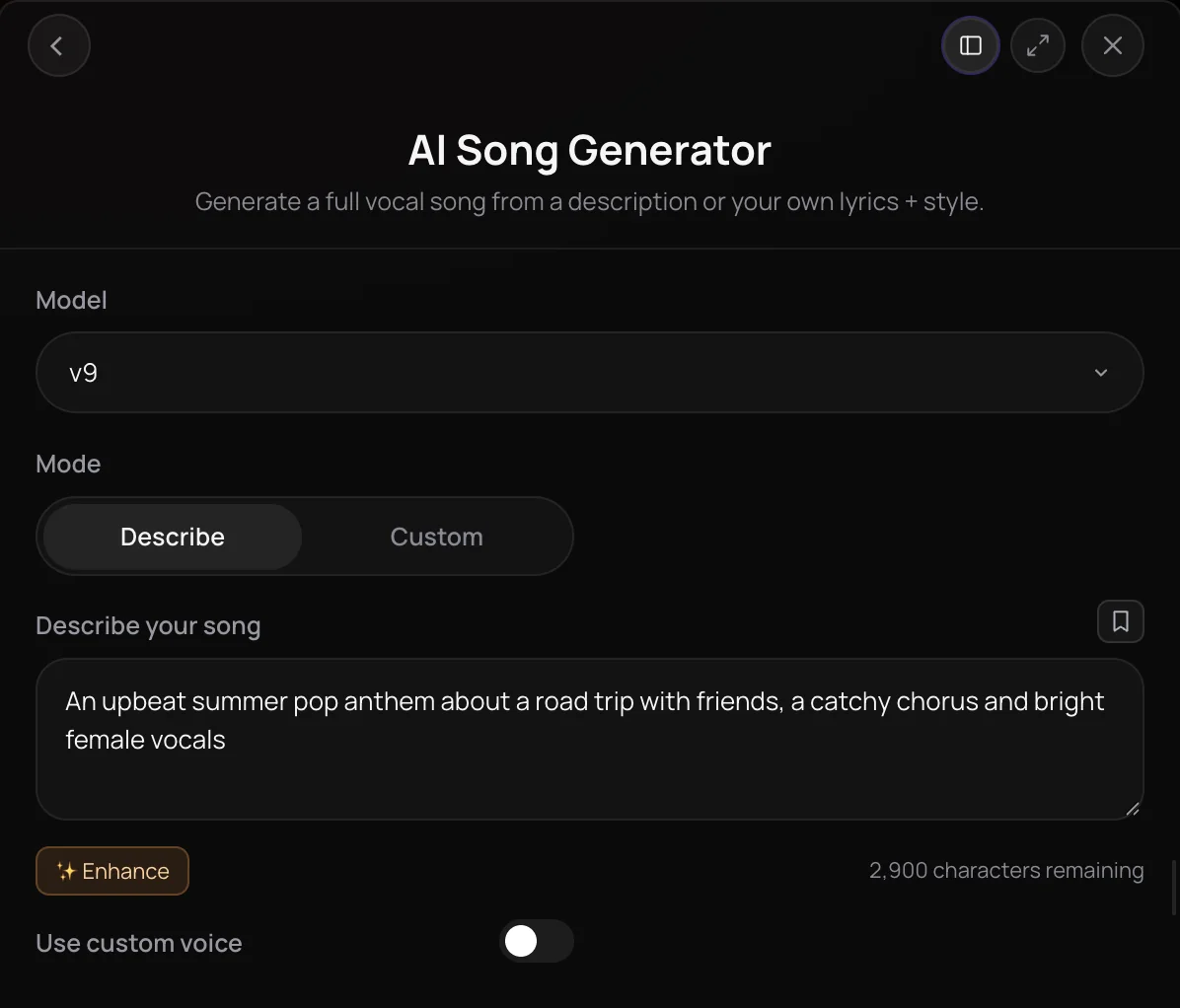
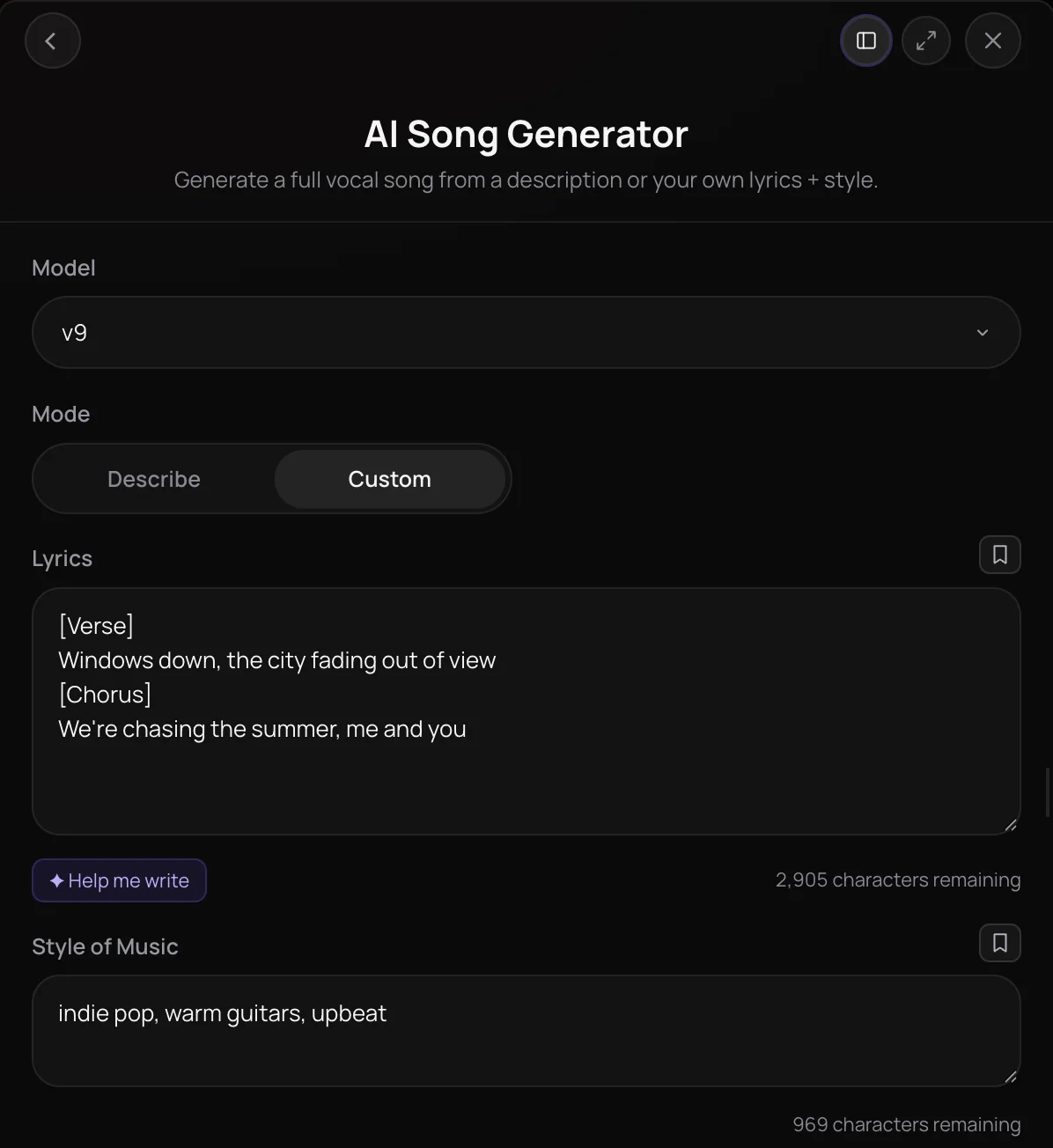
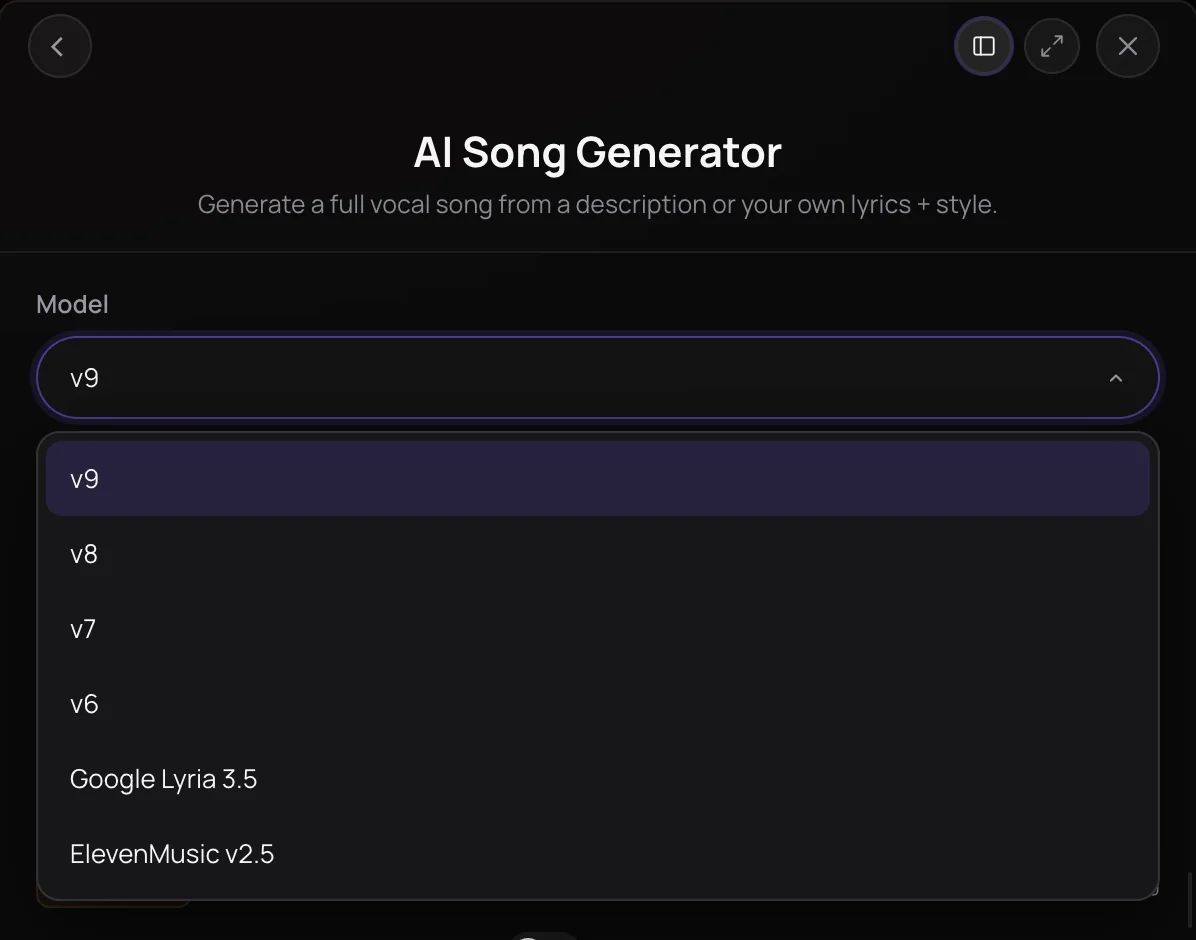
AI Song Generator turns a short description or your own lyrics into a full song with vocals. Describe mode writes the lyrics for you, and Custom mode sings your words exactly as written, in the style you set with typed genres and Quick Style tags. It's built for songwriters, artists and creators who want to hear an idea as a finished track, and every song arrives with a title and cover art, ready to play, download or open in AI Studio.
See it in action
- Make a Song in YOUR Voice with AI: Voice Clone + AI Song Generator | Soundverse AI Clone your voice from a short recording, then describe a song and have AI Song Generator sing the full track in your voice.
- Every AI Tool in Soundverse "Create": Songs, Vocals, SFX, Videos and More | Full Walkthrough From 0:05. The AI Song Generator part of Soundverse's Create walkthrough: a full song with vocals, from one sentence.
How it works
Pick a model and a mode
Open AI Song Generator from AI Tools, choose a model, then pick Describe to start from an idea or Custom to use your own lyrics.
Describe it or add lyrics
In Describe, write what the song is about. In Custom, paste lyrics or use Help me write, then add a Style of Music and up to five Quick Style tags.
Add a voice or a reference
Optionally turn on Use custom voice to sing in one of your voice clones, or, in Custom mode, turn on Use song reference to guide the sound with a track.
Generate in Chat
Click Generate in Chat. The song arrives in your chat with a title and cover art, ready to play, download, regenerate or open in AI Studio.
Why use AI Song Generator
Two ways to start
Describe mode writes the lyrics from your idea. Custom mode sings your own lyrics word for word, in the style you set.
Style you can steer
Type any style into Style of Music, or pick up to five Quick Style tags across popular, electronic, urban, acoustic, world, classical, chill and dance.
Your voice, your reference
Sing with a voice clone you trained, or point the song at a reference track you have the rights to, on the numbered model versions.
Finished, not bare
Every song comes with a title and cover art, and lands where you can play it, download it or keep editing it in AI Studio.
What it costs
Free plan: Soundverse v6. Soundverse v7 and Soundverse v8, Google Lyria 3.5 and ElevenMusic v2.5 need Creator; Soundverse v9 needs Pro. New accounts get 1,000 free tokens, enough for about 3 songs. On the Free plan it runs through Agent One, which gives free accounts 3 runs in all; sharing unlocks the 2nd and 3rd.
- Song with Soundverse v6: 300 tokens (about $0.75–$0.94 on Creator, or ₹30–₹37 in India).
- Song with Soundverse v7: 400 tokens (about $1.00–$1.25 on Creator, or ₹40–₹50 in India).
- Song with Soundverse v8: 400 tokens (about $1.00–$1.25 on Creator, or ₹40–₹50 in India).
- Song with Soundverse v9: 500 tokens (about $1.25–$1.56 on Pro, or ₹52–₹65 in India).
- Song with Google Lyria 3.5: 500 tokens (about $1.25–$1.56 on Creator, or ₹50–₹62 in India).
- 3-minute song with ElevenMusic v2.5: 720 tokens at 4 tokens a second (about $1.80–$2.25 on Creator, or ₹72–₹90 in India).
Agent One runs this tool for you, and the agent's own steps are metered on top of the tool's price: about 7 tokens a step in Lite mode, 54 in Standard mode and 128 in Pro mode, the default on paid plans.
Creator $12.49 a month, or $9.99 a month billed yearly ($119.88 a year) · Pro $31.24 a month, or $24.99 a month billed yearly ($299.88 a year) · Max from $72 a month, or $60 a month billed yearly ($720 a year).
In India (PayU): Creator ₹499 a month, or ₹399 a month billed yearly (₹4,788 a year) · Pro ₹1,299 a month, or ₹1,039 a month billed yearly (₹12,468 a year) · Max from ₹2,999 a month, or ₹2,399 a month billed yearly (₹28,788 a year).
Prices outside India are in US dollars, billed through Stripe; in India they are in rupees, billed through PayU. Monthly tokens reset each month and don't roll over.
Frequently asked questions
Is AI Song Generator free?
Signing up for Soundverse is free, and new accounts get free starter tokens to try AI Song Generator. Every song uses tokens from your plan, and newer model versions can cost more per song. The Free plan runs the entry model version; Creator and above unlock the newer versions and two additional engines, and the newest version needs the Pro plan.
What can I make with AI Song Generator on the Free plan?
Three songs to start, on Soundverse v6. On the Free plan, AI Song Generator runs through Agent One, which gives free accounts three generations in total: the first is ready right away, and each of the next two unlocks when you share Soundverse. Each song uses about 300 tokens, plus a small charge for Agent One, from the 1,000 free tokens you get at sign-up, and on Free the Lyrics box takes up to 400 characters. Paid plans lift the cap.
How good do songs from AI Song Generator sound?
AI Song Generator makes a full song with vocals over a backing track, and the model you pick sets the sound: Soundverse v6 on Free, Soundverse v7 and Soundverse v8 on Creator, and Soundverse v9, the newest, on Pro. Every run comes out differently, so if a take misses, generate again or adjust the style. To change one part of a song you like, use Inpainting, on the Creator plan and above, instead of starting over.
Can I use songs from AI Song Generator commercially?
It depends on your plan. On the Free plan, songs you make with AI Song Generator are for personal use. Paid plans add a commercial license; the Pricing page lists what each plan covers. If you use a reference song or a voice clone, you need the rights to that audio and the permission of the person whose voice it is.
What are AI Song Generator's limits?
Use song reference and Use custom voice appear only on the numbered model versions, and the song reference is offered only in Custom mode and needs the Creator plan or above. On the Free plan, runs use the entry model version. AI Song Generator makes a whole new song each time, so to change one part of a finished song, use Inpainting rather than regenerating.
What is AI Song Generator?
AI Song Generator is Soundverse's AI song generator for full songs with vocals: you describe a song or paste your own lyrics, choose a style, and it generates the track. Each song from AI Song Generator comes with a title and cover art and lands in your Soundverse chat, ready to play, download or edit in AI Studio.
How do I turn my own lyrics into a song with AI?
Open AI Song Generator, switch Mode to Custom and paste your lyrics into the Lyrics box, or use Help me write to draft them. Add a Style of Music or Quick Style tags, then click Generate in Chat. In Custom mode, AI Song Generator sings your lyrics exactly as written; it doesn't rewrite or translate them.
How long can my lyrics be in AI Song Generator?
AI Song Generator's Lyrics box takes up to 3,000 characters. The Describe box also takes up to 3,000 characters, and Style of Music takes up to 1,000. You can mark the parts of your song with section tags such as [Verse] and [Chorus], as the Lyrics box shows.
Can AI Song Generator sing in my own voice?
Yes, with a voice clone. Train Voice Clone, on the Creator plan and above, turns a singing sample of at least 15 seconds into a reusable voice once you confirm it's your voice or that you have the singer's consent. Then turn on Use custom voice in AI Song Generator and pick it. Custom voices work on the numbered model versions.
Can I get stems or extend the song afterwards?
Yes. Stem Separator splits a song into vocals and music or into separate instrument stems, and you can start it from the song's download menu in the chat. Extend Music continues a song with new lyrics, and Inpainting, on the Creator plan and above, rewrites one section while keeping the rest. You can also open the song in AI Studio.
Ready to hear your song?
Describe an idea or paste your lyrics, pick a style, and get a full song with a title and cover art.
