Create · Free to try
AI vocal generator: your lyrics sung a cappella, ready to layer
Paste your lyrics, pick a vocal style or add a voice reference, and get the vocal on its own, with no music behind it. Start free on Soundverse v6.
1,000 free tokens to start · No card needed · Cancel paid plans anytime
Unlock more of AI Singing Generator with Creator — from $9.99/mo, or ₹399/mo in India. 4,000 tokens a month. Billed $119.88 a year, or $12.49 month to month.
What you get
A vocal for your own beat
You get the sung vocal with no drums or instruments behind it, ready to layer over your beat or a track from AI Music Generator.
Pop, rap, rock or a choir
Pick a Vocal style such as Pop (Female), Rap, Rock or Choir, or add a voice reference, at least 30 seconds long, of a voice you may use.
Lined up in AI Studio
Generate in Studio puts the vocal on your AI Studio timeline at the playhead, without cutting or moving the clips already there.
Who it's for
Producers and beatmakers
Get a sung vocal with nothing behind it to place over your own beat, so you hear the track with a voice on it.
Songwriters
Hear a verse and chorus of your lyrics sung before you book a session singer.
Film, game and trailer composers
Add a choir layer to a cue without booking a choir.
Bands writing demos
Rock and Metal styles let you hear a sung line on a demo before your singer records it.
When to use it
- Your beat is finished and needs a vocal idea on top
- You've written a hook and want to hear it sung, not just read
- A singer is booked next week and you want to send a guide
- A cue or a drop needs a choir or chopped-vocal layer
- You want a vocal you can edit and mix yourself, not a finished song
What you can make with it
A rap verse for your beat
Paste a verse, pick Rap, and line the a cappella up with your beat on an AI Studio timeline, where you can stretch the clip to fit.
Female and male takes of one hook
Run the same lyrics with Pop (Female), then Pop (Male), and keep the voice that suits the song.
A choir under a film cue
Choose Choir for a group sound to sit under strings or a trailer build.
Chopped vocals for a drop
Pick Vocal Chops for a chopped vocal texture, then cut and rearrange the pieces on an AI Studio timeline.
A guide vocal for a session
Send your singer a sung version of the verse and chorus so they hear one way the lyrics can sit before the session.
A vocal in a voice like yours
Add a clean recording of your own singing, 30 seconds or longer, as the voice reference to hear the lyrics in a similar voice.
Rock and metal demo vocals
Pick Rock or Metal, then pair the vocal with an instrumental from AI Music Generator on an AI Studio timeline.
Screenshots
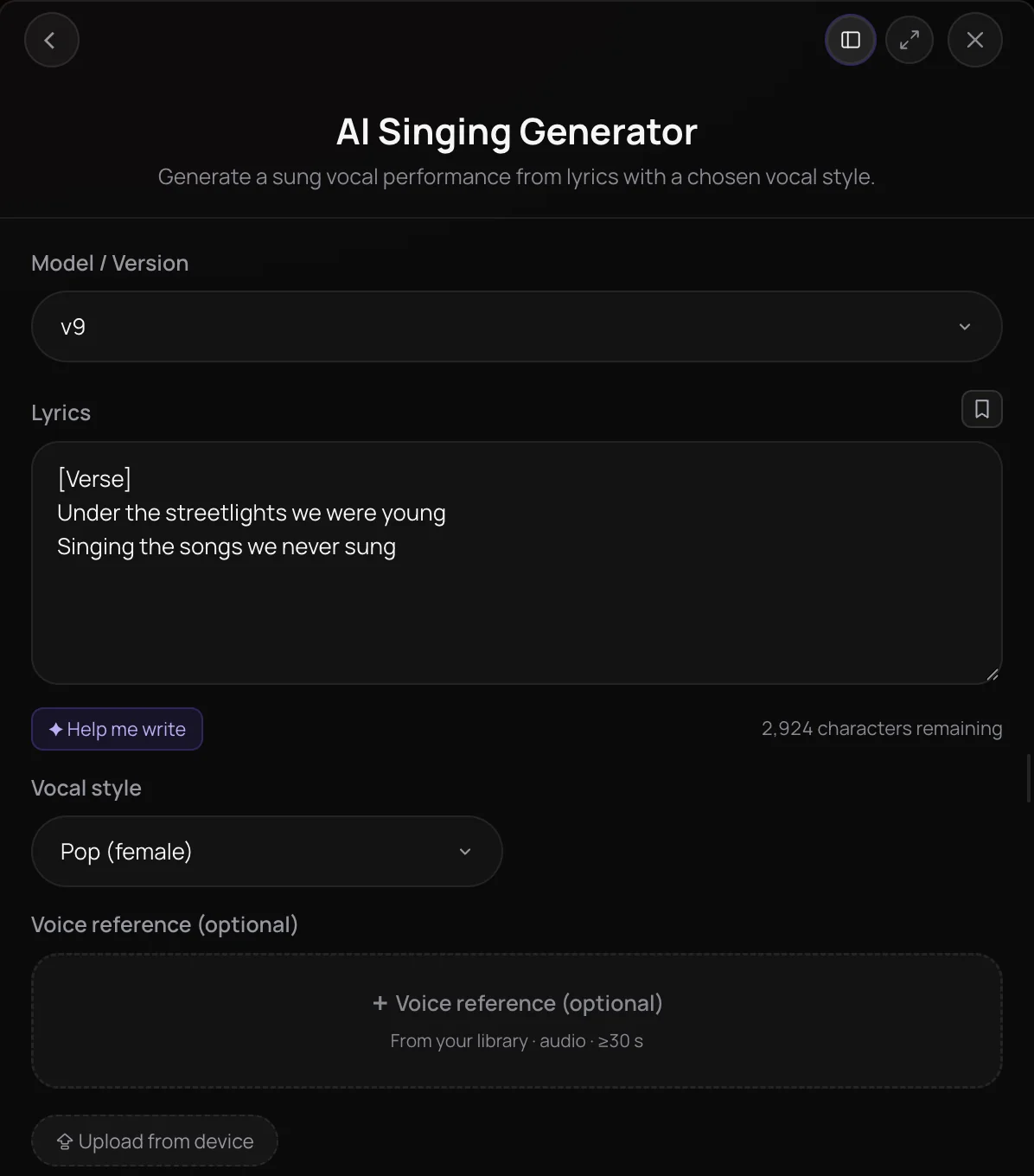
AI Singing Generator is an AI vocal generator that sings your lyrics as an a cappella vocal, with no instrumental behind it. Pick a vocal style such as pop, rap, rock or choir, and optionally add a voice reference of at least 30 seconds so it sings in a similar voice. It's built for producers, songwriters and creators who need a vocal line to layer over their own music in AI Studio or a DAW.
See it in action
- AI Singing Generator - Generate Acapella Without Instrumental with Vocal References - Soundverse AI A demo of AI Singing Generator turning lyrics into an a cappella vocal with no instrumental, guided by a vocal reference.
- Every AI Tool in Soundverse "Create": Songs, Vocals, SFX, Videos and More | Full Walkthrough From 0:31. The AI Singing Generator part of Soundverse's Create walkthrough: your lyrics, sung.
How it works
Add your lyrics
Open AI Singing Generator from AI Tools and paste your lyrics into the Lyrics box, or use Help me write to draft them.
Pick a vocal style
Choose a Vocal style such as Pop (Female), Pop (Male), Rap, Rock, Metal or Choir, and pick a model version.
Add a voice reference
Optionally upload or pick a clip of at least 30 seconds to have the vocal sung in a similar voice. Use only your own voice or one you have permission to use.
Generate the vocal
Click Generate in Chat to get the a cappella vocal in your chat, or use Generate in Studio to place it on your AI Studio timeline.
Why use AI Singing Generator
A vocal on its own
You get the sung vocal with nothing behind it, ready to layer over your own beat, an instrumental or an AI Music Generator track.
Voices for leads and choirs
Pick a female or male pop voice, rap, hip-hop, rock, metal, vocal chops or choir for a lead, a group sound or a chopped texture.
Sing in a familiar voice
Add a voice reference you have the rights to, and AI Singing Generator sings the lyrics in a similar voice.
Lands where you work
Generate in Chat to play and download the vocal, or generate it straight onto an AI Studio track at the playhead.
What it costs
Free plan: Soundverse v6. Soundverse v7 and Soundverse v8 need Creator; Soundverse v9 needs Pro. New accounts get 1,000 free tokens, enough for about 3 songs. On the Free plan it runs through Agent One, which gives free accounts 3 runs in all; sharing unlocks the 2nd and 3rd.
- Vocal with Soundverse v6: 300 tokens (about $0.75–$0.94 on Creator, or ₹30–₹37 in India).
- Vocal with Soundverse v7: 400 tokens (about $1.00–$1.25 on Creator, or ₹40–₹50 in India).
- Vocal with Soundverse v8: 400 tokens (about $1.00–$1.25 on Creator, or ₹40–₹50 in India).
- Vocal with Soundverse v9: 500 tokens (about $1.25–$1.56 on Pro, or ₹52–₹65 in India).
Agent One runs this tool for you, and the agent's own steps are metered on top of the tool's price: about 7 tokens a step in Lite mode, 54 in Standard mode and 128 in Pro mode, the default on paid plans.
Creator $12.49 a month, or $9.99 a month billed yearly ($119.88 a year) · Pro $31.24 a month, or $24.99 a month billed yearly ($299.88 a year) · Max from $72 a month, or $60 a month billed yearly ($720 a year).
In India (PayU): Creator ₹499 a month, or ₹399 a month billed yearly (₹4,788 a year) · Pro ₹1,299 a month, or ₹1,039 a month billed yearly (₹12,468 a year) · Max from ₹2,999 a month, or ₹2,399 a month billed yearly (₹28,788 a year).
Prices outside India are in US dollars, billed through Stripe; in India they are in rupees, billed through PayU. Monthly tokens reset each month and don't roll over.
Frequently asked questions
Is AI Singing Generator free?
You can try AI Singing Generator on the Free plan: signing up for Soundverse is free, and new accounts get free starter tokens. Each vocal uses tokens from your plan, and newer model versions cost more per run. Free accounts use the entry model version, Creator and above unlock the newer versions, and the newest version needs the Pro plan.
What can I make with AI Singing Generator on the Free plan?
On the Free plan, AI Singing Generator sings on Soundverse v6 at about 300 tokens a vocal, from the 1,000 tokens new accounts get at sign-up, and the Lyrics box takes up to 400 characters. A vocal without a voice reference is made through Agent One, which adds a small charge and gives Free accounts three generations in total: the first right away, and each of the next two when you share Soundverse. Creator adds Soundverse v7 and Soundverse v8, and Pro adds Soundverse v9.
How good do vocals from AI Singing Generator sound?
AI Singing Generator's results depend on the model and the voice you give it, and every take comes out differently, so generate again if one misses. Each take sings about the first 350 characters of your lyrics, roughly a verse and a chorus, so lead with your strongest lines. For a voice reference, use a clean recording of just the voice: a clip with music behind the singer can be refused. Paid plans add newer models, up to Soundverse v9 on Pro.
Can I use AI-generated vocals commercially?
It depends on your plan. On the Free plan, vocals you make with AI Singing Generator are for personal use. Paid plans add a commercial license; the Pricing page lists what each plan covers. If you add a voice reference, you need the rights to that recording and the singer's permission to use their voice.
Does AI Singing Generator make a full song?
No. AI Singing Generator makes only the sung vocal, with no drums, instruments or mix behind it. For a complete song with vocals and music in one run, use AI Song Generator. To build a song yourself, pair the vocal with a track from AI Music Generator and line the two up in AI Studio.
Can AI Singing Generator sing in my voice?
It can sing in a voice similar to yours. Add a recording of your singing, at least 30 seconds long, as the voice reference. For a voice you can reuse in AI Song Generator, Train Voice Clone, on the Creator plan and above, saves your voice once you confirm it's yours or that you have the singer's consent. Only use your own voice or one you have permission to use.
What is AI Singing Generator, Soundverse's AI vocal generator?
AI Singing Generator is Soundverse's AI vocal generator: it takes your lyrics and a vocal style and sings them as an a cappella vocal, with no instrumental behind it. You can guide AI Singing Generator with an optional voice reference, then use the vocal in your Soundverse chat, in AI Studio or in your own DAW.
How do I generate vocals from lyrics with AI?
Open AI Singing Generator, paste your lyrics into the Lyrics box or use Help me write, and choose a Vocal style such as Pop (Female) or Rap. Optionally add a voice reference, then click Generate in Chat. AI Singing Generator sings about the first 350 characters of your lyrics, roughly a verse and a chorus, and delivers the vocal to your chat, ready to play, download or open in AI Studio.
What vocal styles can I choose in AI Singing Generator?
AI Singing Generator sings in eight built-in voices: female pop, male pop, rap, hip-hop, rock, metal, vocal chops and choir. Its Vocal style list shows 24 options, with Pop (Female) selected by default, but options such as Gregorian Chant, Vocoder, ASMR Singing or the whispering styles have no voice of their own and are sung in one of those eight, usually female pop. A voice reference, when you add one, replaces the style.
How long can my lyrics be, and what voice reference works?
AI Singing Generator's Lyrics box takes up to 3,000 characters, or 400 on the Free plan, but each take sings only about the first 350 characters, roughly a verse and a chorus. The optional voice reference must be at least 30 seconds long and can be an MP3, WAV, AAC, OGG or M4A file from your device or your Library. Large reference files are compressed automatically before they're used.
Ready to hear your lyrics sung?
Paste your lyrics, pick a vocal style, and get an a cappella vocal to build your track around.
