Create · Free to try
AI music generator: original instrumentals from one prompt
Describe the mood, genre and instruments, and get a track with no vocals, a title and cover art, ready for videos, podcasts and games.
1,000 free tokens to start · No card needed · Cancel paid plans anytime
Unlock more of AI Music Generator with Creator — from $9.99/mo, or ₹399/mo in India. 4,000 tokens a month. Billed $119.88 a year, or $12.49 month to month.
What you get
Music that sits under your voice
Tracks have no vocals or lyrics, so they fit under voiceovers, vlogs, podcasts and game scenes.
Titled and ready to share
Each track made in chat arrives with a title and cover art, or you can generate straight onto your AI Studio timeline.
Try it on the Free plan
Free accounts make tracks with Soundverse v6: your first generation is free and sharing Soundverse unlocks two more. Creator adds Soundverse v7 and Soundverse v8, and Pro adds Soundverse v9.
Who it's for
YouTubers and video creators
Get an original instrumental to sit under a voiceover, steered with themes such as Vlogs, Travel or Tutorials.
Podcasters
Make an intro, a background bed and an outro in one style with the three Podcast themes.
Game and app developers
Generate menu, level and ambient tracks with the Gaming theme and vibes such as Epic, Mysterious or Calm.
Ad and brand teams
Brief a track for a spot with the Advertisement, Corporate or Ads & Trailers theme, plus a vibe and a tempo.
Producers and beatmakers
Start from an instrumental in your genre, then extend it or build on it in AI Studio.
When to use it
- Your video edit is locked and still has no music under it
- You need a podcast intro and outro that sound like they belong together
- A game menu, level or loading screen needs its own track
- You want an instrumental to write a topline or a verse over
- Your ad needs music with a set mood and tempo
What you can make with it
A podcast theme set
Generate an intro, a background bed and an outro with Podcast - Intro, Podcast - Background and Podcast - Outro, keeping the genre and vibe tags the same so the three share a style.
A wedding film score
Pick the Wedding & Romance theme, a Romantic vibe and Piano, Strings and Harp for a wedding film or a save-the-date video.
Music for each game level
Use the Gaming theme with Epic for a boss fight and Calm for a menu screen, and generate one track per scene.
A Bollywood instrumental
Combine the Bollywood genre with Tabla and Sitar from the instrument tags for an Indian-flavored track with no vocals.
A beat to rap or sing over
Choose Hip Hop or R&B, the Song Production theme, and 808 Bass with Drums, then write your verse over the result.
Study and meditation tracks
Pick the Meditation theme or the Study vibe with Handpan, Kalimba or Piano for calm background music.
A loop for a stream or a menu
On the Creator plan and above, pick the additional engine that has a Type control in the Model picker and set Type to Loop for music made to repeat.
Music written to your video
On the Creator plan and above, one of the additional engines takes a video of up to 10 minutes in Score a video and writes music to its pace and length.
A longer cut
If a track ends before your video does, Extend Music adds up to two minutes at a time, continuing the same track.
Screenshots
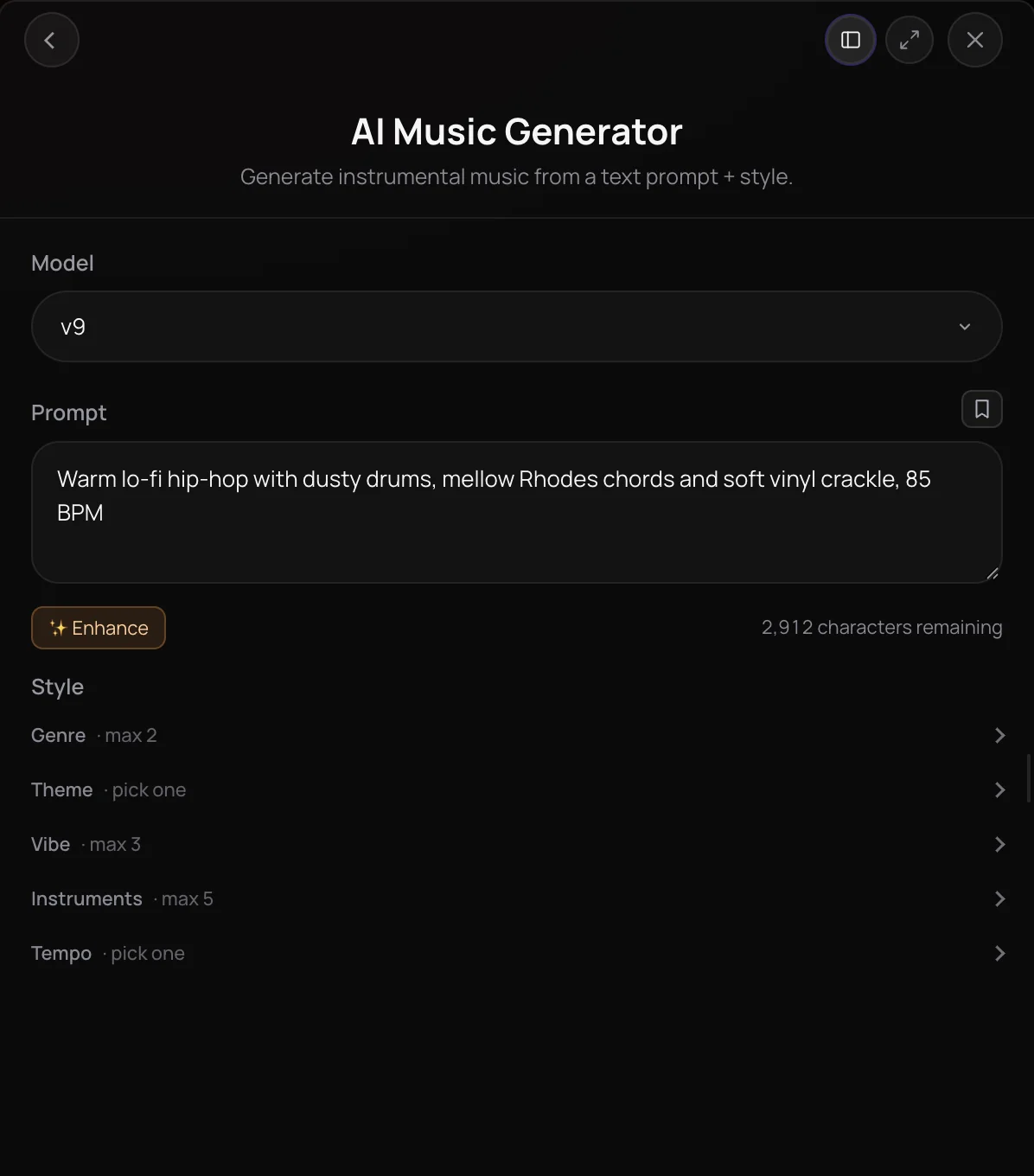
AI Music Generator creates original instrumental music from a text prompt and a set of style tags. You describe the sound, add tags for genre, theme, vibe, instruments and tempo, and it composes a track with no vocals, complete with a title and cover art. It's built for content creators, podcasters, filmmakers, game makers and producers who need background music, beds or starting points without recording anything.
See it in action
- I Skipped Music School With One Sentence One sentence typed into Soundverse becomes a background score and a pop demo, with no instruments or experience needed.
- Every AI Tool in Soundverse "Create": Songs, Vocals, SFX, Videos and More | Full Walkthrough From 0:17. The AI Music Generator part of Soundverse's Create walkthrough: instrumental music from a prompt.
How it works
Write your prompt
Open AI Music Generator from AI Tools and describe the music, such as warm lo-fi hip-hop with dusty drums and mellow keys. Enhance can expand a short idea.
Add style tags
Pick up to two genres, one theme such as Vlogs or Podcast - Intro, up to three vibes, up to five instruments and a tempo.
Choose a model
Pick a model version in the Model picker. Creator and above add newer versions and two more engines, one of which offers length, loop and video options.
Generate in Chat or Studio
Click Generate in Chat to get the track with a title and cover art, or open the tool inside AI Studio and use Generate in Studio to place it on your timeline.
Why use AI Music Generator
Tags that set the brief
Genre, theme, vibe, instrument and tempo tags turn a loose idea into a clear brief, from a podcast intro to a film background score.
Instrumental by design
AI Music Generator makes music without vocals or lyrics, so tracks can sit under voiceovers, videos and games.
Built into AI Studio
Generate straight onto an AI Studio timeline, or score a video clip there with Generate Music for Video, which spans the track across the clip.
Named and packaged
Each track you generate in the chat arrives with a title and cover art, ready to play, download or keep working on from your Library.
What it costs
Free plan: Soundverse v6. Soundverse v7 and Soundverse v8, Google Lyria 3.5 and ElevenMusic v2.5 need Creator; Soundverse v9 needs Pro. New accounts get 1,000 free tokens, enough for about 3 instrumentals. On the Free plan it runs through Agent One, which gives free accounts 3 runs in all; sharing unlocks the 2nd and 3rd.
- Instrumental with Soundverse v6: 300 tokens (about $0.75–$0.94 on Creator, or ₹30–₹37 in India).
- Instrumental with Soundverse v7: 400 tokens (about $1.00–$1.25 on Creator, or ₹40–₹50 in India).
- Instrumental with Soundverse v8: 400 tokens (about $1.00–$1.25 on Creator, or ₹40–₹50 in India).
- Instrumental with Soundverse v9: 500 tokens (about $1.25–$1.56 on Pro, or ₹52–₹65 in India).
- Instrumental with Google Lyria 3.5: 500 tokens (about $1.25–$1.56 on Creator, or ₹50–₹62 in India).
- 3-minute instrumental with ElevenMusic v2.5: 720 tokens at 4 tokens a second (about $1.80–$2.25 on Creator, or ₹72–₹90 in India).
Agent One runs this tool for you, and the agent's own steps are metered on top of the tool's price: about 7 tokens a step in Lite mode, 54 in Standard mode and 128 in Pro mode, the default on paid plans.
Creator $12.49 a month, or $9.99 a month billed yearly ($119.88 a year) · Pro $31.24 a month, or $24.99 a month billed yearly ($299.88 a year) · Max from $72 a month, or $60 a month billed yearly ($720 a year).
In India (PayU): Creator ₹499 a month, or ₹399 a month billed yearly (₹4,788 a year) · Pro ₹1,299 a month, or ₹1,039 a month billed yearly (₹12,468 a year) · Max from ₹2,999 a month, or ₹2,399 a month billed yearly (₹28,788 a year).
Prices outside India are in US dollars, billed through Stripe; in India they are in rupees, billed through PayU. Monthly tokens reset each month and don't roll over.
Frequently asked questions
Is AI Music Generator free?
AI Music Generator is free to try: signing up for Soundverse costs nothing, and new accounts get free starter tokens. Every track uses tokens from your plan, priced by the model you pick. Free accounts use the entry model version, Creator unlocks the newer versions and two additional engines, and the newest version needs the Pro plan or above.
How good is the music from AI Music Generator?
AI Music Generator's results depend on the model you pick and how clearly you describe the music. Paid plans add newer Soundverse versions, up to Soundverse v9, the newest Soundverse model, on Pro. Each run makes one take, so if a track misses, sharpen the prompt or tags and generate again, then open the one you keep in AI Studio to arrange it, mix it or extend it.
Can I use music from AI Music Generator commercially?
That depends on your plan. On the Free plan, tracks from AI Music Generator are for personal use. Paid plans add a commercial license; the Pricing page lists what each plan covers. If you score a video or add an audio reference, you need the rights to that material.
Can AI Music Generator add vocals or lyrics?
No. AI Music Generator makes instrumental music only, with no vocals or lyrics. For a song with singing, use AI Song Generator, which writes or takes your lyrics and generates a full vocal song. For a vocal on its own, use AI Singing Generator, then combine the parts in AI Studio.
What is AI Music Generator?
AI Music Generator is Soundverse's AI music generator for instrumentals: you describe the sound in a prompt, add genre, theme, vibe, instrument and tempo tags, and it composes an original track without vocals. Each AI Music Generator track arrives in your Soundverse chat with a title and cover art, or lands straight on your AI Studio timeline.
How do I make background music with AI?
Open AI Music Generator and describe the music you need, such as calm acoustic guitar for a travel vlog. Add a Theme tag like Vlogs, Podcast - Background or Film - Background Score, pick a vibe and tempo, then click Generate in Chat. To fit music to a video, open the clip in AI Studio and use Generate Music for Video.
Can I control how long the track is?
On the numbered model versions, AI Music Generator decides the length of the track itself. One of the additional engines, available on the Creator plan and above, adds a Length setting from 15 seconds to five minutes, Loop and Ambience types, and a Score a video option for clips up to 10 minutes. You can also lengthen a track afterwards with Extend Music.
How should I write a prompt for AI Music Generator?
Name the genre, mood, main instruments and tempo, and say what the music is for, such as an upbeat corporate track with piano and light drums for a product video. Then back it up with tags: a Theme for the purpose, up to three vibes and up to five instruments. If your idea is short, click Enhance to have AI Music Generator expand the prompt.
Can I edit a track from AI Music Generator?
Yes. Open the track in AI Studio to arrange it, mix it and add instruments, use Extend Music to make it longer, or ask Agent One in the chat for a change. Stem Separator splits the track into separate instrument stems you can rework.
Ready to score your next project?
Describe the sound, add a few tags, and get an original instrumental with a title and cover art.
