Create · Free
AI image generator: cover art, thumbnails and posts up to 4K
Describe the visual, or add an image and say what to change. Pick 16:9, 9:16, 4:3 or 3:4 at 1K, 2K or 4K, and get it in your chat and Library.
1,000 free tokens to start · No card needed · Cancel paid plans anytime
Do more with AI Image Generator on Creator — from $9.99/mo, or ₹399/mo in India. 4,000 tokens a month. Billed $119.88 a year, or $12.49 month to month.
What you get
Visuals that match your music
Describe the subject, mood, colors and style, or tap Enhance to have the prompt rewritten, and get art for covers, thumbnails and posts.
A new look for an old image
Image + Prompt edits a PNG, JPEG or WebP from your Library or device the way you describe, such as a new background or palette.
Sized for where it goes
Choose 16:9 for thumbnails, 9:16 for Stories and Shorts, or 4:3 and 3:4 for posts and posters, and 4K when you need the largest file.
Who it's for
Independent artists
Make artwork for a single, a lyric post or a tour announcement that matches the song's mood.
YouTubers
Generate 16:9 thumbnails and banners from a description, sized for the platform.
Labels and managers
Produce matching visuals across a release, from the cover to the Stories that promote it.
Event and gig promoters
Design a portrait poster or flyer at 4K for print and posts.
Ad and brand teams
Restyle a product or campaign photo by describing the change instead of reshooting it.
When to use it
- Your single is ready but the artwork isn't
- Your next upload needs a 16:9 thumbnail
- You have a photo you like but want a new background or palette
- A gig, launch or listening party needs a poster
- You want a still image to start a video from
What you can make with it
A YouTube thumbnail
Describe the subject, a bold background and the mood at 16:9 for a thumbnail or a channel banner.
A gig poster for print
Choose 3:4 at 4K for a poster or flyer, then add the dates and venue in your own layout.
A new look for a band photo
In Image + Prompt mode, add the photo and describe the change, such as a neon city skyline behind the band.
A Stories background
Make a 9:16 vertical image for Stories or as a backdrop behind lyrics.
The first frame of a video
Make the opening image here, then use it as the first frame in AI Video Generator, on the Creator plan and above.
Art on an AI Studio image lane
Generate an image straight onto an image lane in AI Studio to sit behind your song when you export a video.
A release mood board
Generate a few images in one palette to settle the look of a release before a shoot or a cover commission.
A remix cover
Bring in an earlier cover with Image + Prompt and describe a new version for a remix or a seasonal release.
Screenshots
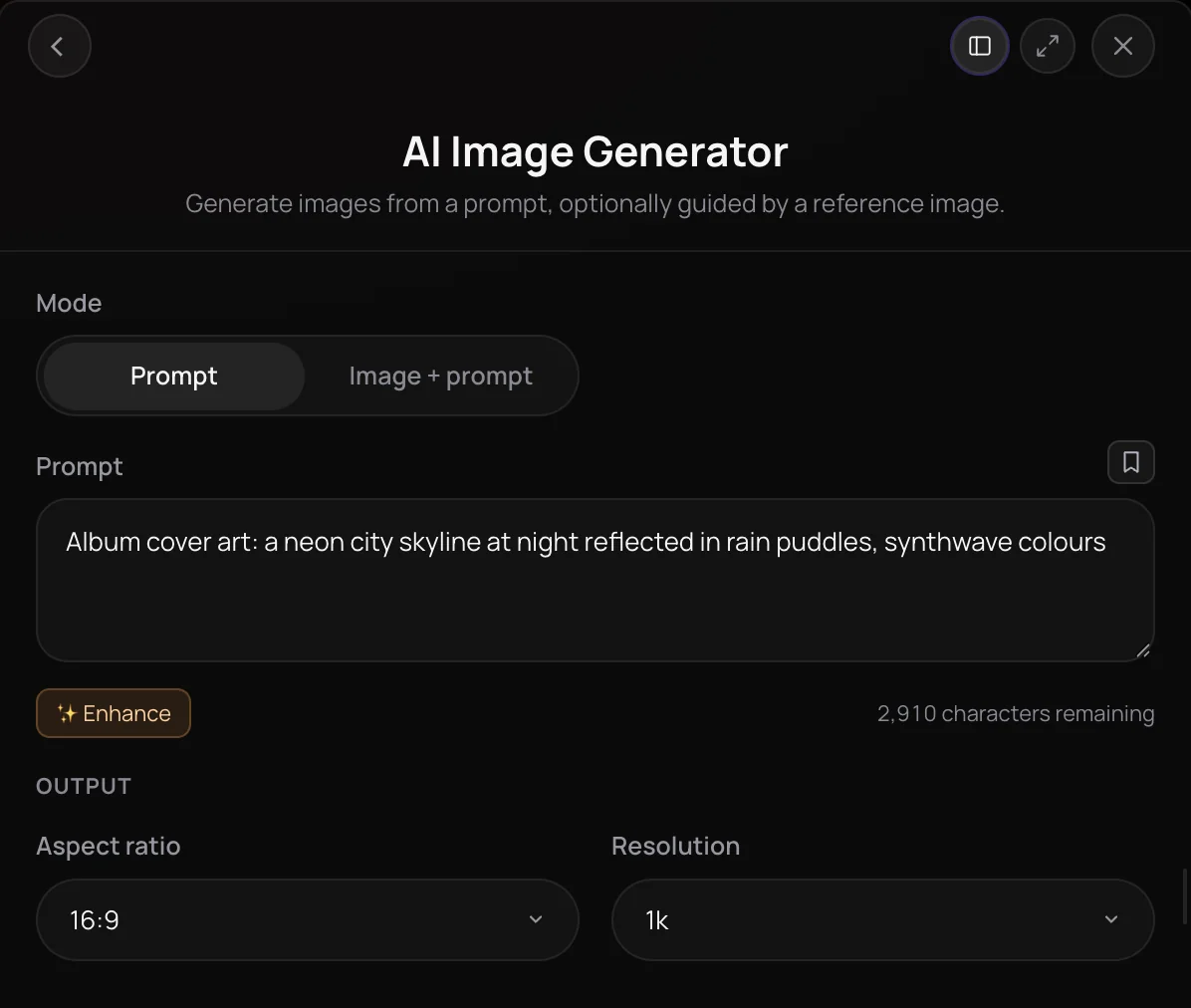
AI Image Generator is a text-to-image tool in Soundverse that turns a prompt into cover art, thumbnails and social posts at 1K, 2K or 4K resolution. Switch to Image + Prompt mode to edit or restyle a picture you already have by describing the change. It's built for artists, producers and labels who need visuals that match their music, without a design tool or a photoshoot.
See it in action
- Every AI Tool in Soundverse "Create": Songs, Vocals, SFX, Videos and More | Full Walkthrough From 2:45. The AI Image Generator part of Soundverse's Create walkthrough: images from a prompt.
How it works
Open AI Image Generator
Find it under Create in AI Tools. In AI Studio, right-click an empty image lane and choose Generate Image.
Choose a mode and prompt
Pick Prompt to start from text, or Image + Prompt to edit a picture from your Library or device. Describe the subject, mood, colors and style, or tap Enhance to have the prompt rewritten for you.
Set the shape and size
Choose an aspect ratio of 16:9, 9:16, 4:3 or 3:4, and a resolution of 1K, 2K or 4K.
Generate and download
Click Generate in Chat and Agent One makes the image in the chat, where you can view it full screen, download it or share it. It's also saved to Images in your Library.
Why use AI Image Generator
Sized for where it goes
Pick widescreen 16:9 for thumbnails and banners, vertical 9:16 for Stories and Shorts, or 4:3 and 3:4 for posts and posters.
Edit what you already have
Image + Prompt mode takes a picture from your Library or device and changes it the way you describe, so you can restyle a photo or rework an old cover.
Up to 4K output
Pick 1K, 2K or 4K for each image, and choose 4K when you need the largest file.
Inside your music workflow
Run it from AI Tools, from the Agent One tools menu or from an image lane in AI Studio, so the visuals sit next to the tracks they belong to.
What it costs
Works on the Free plan. New accounts get 1,000 free tokens, enough for about 2 images. On the Free plan it runs through Agent One, which gives free accounts 3 runs in all; sharing unlocks the 2nd and 3rd.
- Image at 1K or 2K: 500 tokens (about $1.25–$1.56 on Creator, or ₹50–₹62 in India).
- Image at 4K: 800 tokens (about $2.00–$2.50 on Creator, or ₹80–₹100 in India).
Agent One runs this tool for you, and the agent's own steps are metered on top of the tool's price: about 7 tokens a step in Lite mode, 54 in Standard mode and 128 in Pro mode, the default on paid plans.
Creator $12.49 a month, or $9.99 a month billed yearly ($119.88 a year) · Pro $31.24 a month, or $24.99 a month billed yearly ($299.88 a year) · Max from $72 a month, or $60 a month billed yearly ($720 a year).
In India (PayU): Creator ₹499 a month, or ₹399 a month billed yearly (₹4,788 a year) · Pro ₹1,299 a month, or ₹1,039 a month billed yearly (₹12,468 a year) · Max from ₹2,999 a month, or ₹2,399 a month billed yearly (₹28,788 a year).
Prices outside India are in US dollars, billed through Stripe; in India they are in rupees, billed through PayU. Monthly tokens reset each month and don't roll over.
Frequently asked questions
Is AI Image Generator free?
AI Image Generator is open on every Soundverse plan, including Free, but each image uses tokens from your balance. Soundverse is free to sign up and new accounts get free starter tokens, so you can try it before you pay. The panel shows the estimated token cost before you generate.
What can I make with AI Image Generator on the Free plan?
AI Image Generator works on the Free plan. An image costs 500 tokens at 1K or 2K and 800 at 4K, paid from the 1,000 tokens new accounts get at sign-up, and Agent One, which makes the image, adds a small charge. On Free, Agent One gives you three generations in total: the first right away, and each of the next two when you share Soundverse. Creator adds 4,000 tokens a month and Pro adds 10,000.
How good are the images from AI Image Generator?
AI Image Generator works from your description, so a detailed prompt gets you closer to the image you have in mind. Name the subject, setting, mood, colors and style, or tap Enhance to have the prompt rewritten in more detail. Choose 4K when you need the largest file, such as for a poster. If an image misses, adjust the prompt and generate again, or switch to Image + Prompt to change an image you already like.
Can I use AI-generated images commercially?
It depends on your plan. On the Free plan, what you make with AI Image Generator is for personal use. Paid plans add a commercial license; the Pricing page lists what each plan covers. If you work in Image + Prompt mode, you need the rights to any image you upload.
Can AI Image Generator make square album covers?
Not directly. AI Image Generator offers 16:9, 9:16, 4:3 and 3:4 aspect ratios, with no square 1:1 option, so for a streaming cover, crop the image to square with Media Converter, or ask Agent One in chat for square cover art. Songs you make through Agent One with Soundverse's song tools already come with cover art, so you may not need a separate image.
What is AI Image Generator?
AI Image Generator is a Soundverse tool that turns a text prompt into an image, such as cover art, a video thumbnail or a social post. It also has an Image + Prompt mode that edits a picture you supply by following your description, and it renders at 1K, 2K or 4K resolution in four aspect ratios.
Can I edit an existing image with AI?
Yes. In AI Image Generator, choose Image + Prompt, add a PNG, JPEG or WebP from your Library or device, and describe what to change, such as a new background or a different color palette. A prompt is required in this mode too, because the tool edits the picture from your description. You need the rights to any image you upload.
What sizes and resolutions does AI Image Generator support?
AI Image Generator renders at 1K, 2K or 4K resolution in four aspect ratios: 16:9 for widescreen thumbnails and banners, 9:16 for vertical Stories and Shorts, and 4:3 or 3:4 for posts and posters. Set both in the Output section before you generate. The defaults are 16:9 and 1K.
Can I turn the image into a video?
Yes. AI Video Generator can start a clip from your image: turn on Use first / last frame, pick the image from your Library as the first frame and describe the motion. To build a whole video around a song, AI Music Video Generator can use your images as references for the cast and setting. Both video tools are available on the Creator plan and above.
Can I generate images inside AI Studio?
Yes. In AI Studio, right-click an empty image lane and choose Generate Image, or use the Generate button on the lane header. AI Image Generator opens with the same controls, and its button reads Generate in Studio, so the image lands on the image lane at the playhead instead of in a chat.
Make the visual for your next release
Describe it, or start from an image you have, and get a finished picture at up to 4K.
