Create · Creator+
Make a character image sing your vocal in a short video clip
Add a character image and up to 15 seconds of vocal, describe the shot, and get a clip with the mouth moving to your audio. On the Creator plan and above.
1,000 free tokens to start · No card needed · Cancel paid plans anytime
Unlock Lip Sync with Creator — from $9.99/mo, or ₹399/mo in India. 4,000 tokens a month. Billed $119.88 a year, or $12.49 month to month.
What you get
A performance shot without a shoot
One still image, a vocal clip and a short shot description are all Lip Sync needs to make a singing shot.
Your vocal leads
The mouth movement follows the audio you provide, and Lip Sync adds no soundtrack of its own.
Framed for every feed
Keep vertical 9:16 for Reels and Shorts or switch to 16:9, 1:1, 4:3 or 3:4, at 480p, 720p or 1080p.
Who it's for
Independent artists
Get a singing shot of your cover character for a teaser without filming anything.
Virtual and animated artists
Make an illustrated or anime-style persona perform your vocal.
Content creators
Post a vertical clip in which a character sings the hook.
Music video makers
Add performance shots, one line at a time, to a video you're cutting yourself.
When to use it
- You have a character image and a single coming out
- You need a singing shot but can't film one
- Your artist is an animated or illustrated character
- You want a 15-second hook moment for a vertical post
What you can make with it
Your cover character sings the hook
Use the single's cover art as the character image and the hook's vocal as the audio.
A virtual artist performance
Give an anime-style or painterly character up to 15 seconds of vocal and describe a stage, a studio or a rooftop; realistic faces often can't be animated.
A vertical teaser
Keep 9:16 and use the most quotable 10 to 15 seconds of the vocal.
Shots for a full video
Generate a clip for each line or section, then lay them on a video lane in AI Studio and cut them to the song.
A square clip for the feed
Switch the aspect ratio to 1:1 for a square feed post, or to 16:9 for a widescreen cut.
A close-up for a ballad line
Describe a close-up in soft light for an emotional line, or a wider moving shot for an upbeat one.
Screenshots
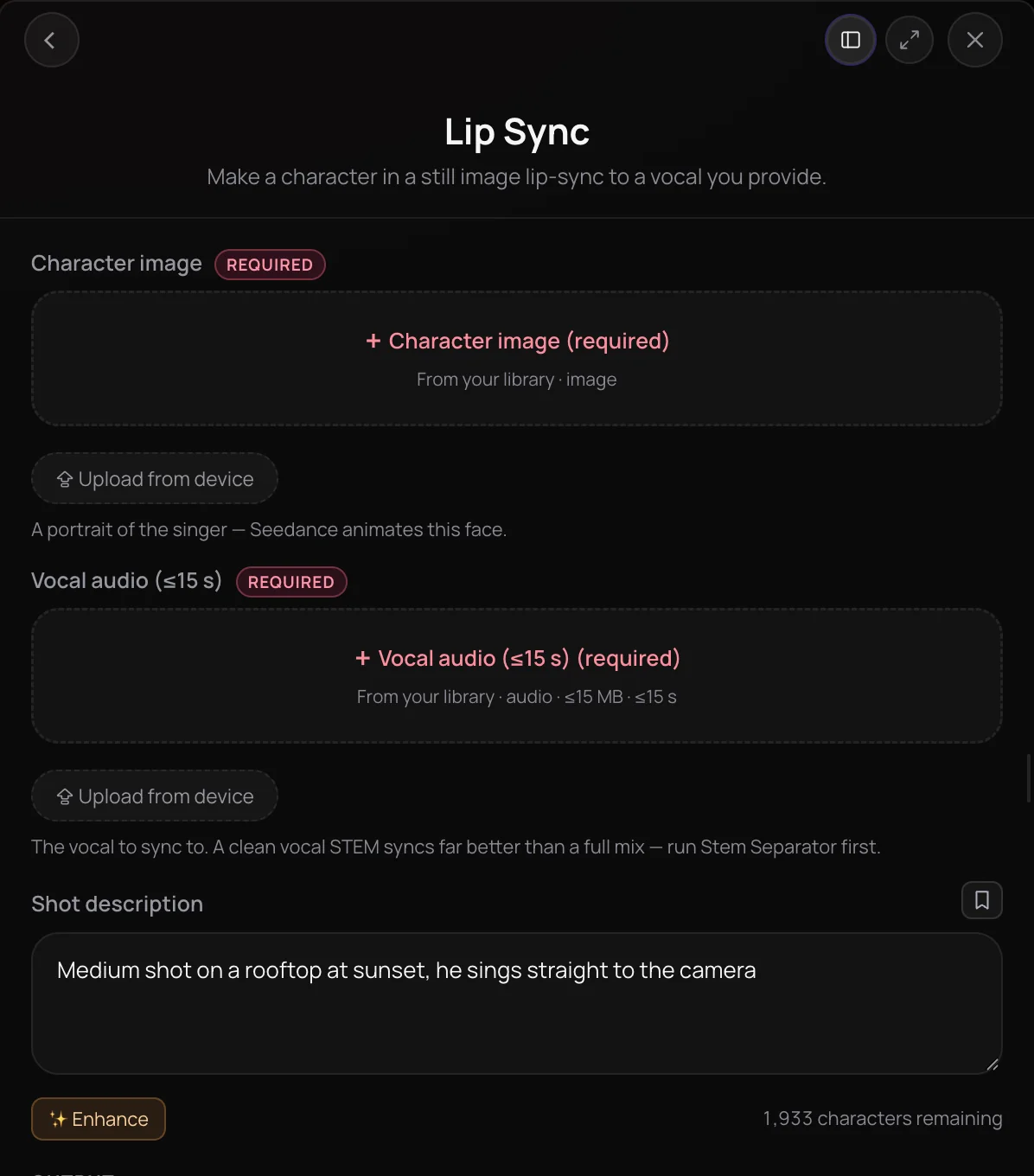
Lip Sync is Soundverse's AI lip sync tool: it turns a still character image and a short vocal into a video clip in which the character's mouth moves to your audio. It's for artists, producers and creators who want a performance shot for a release, a teaser or a vertical reel without filming one. Illustrated, painterly and anime-style characters work best, because the video model blocks realistic human faces.
See it in action
- How to Make a Lip Sync Reel with AI in Minutes | Soundverse Agent One Pick a song and upload a character, and Agent One turns them into a lip-synced vertical reel for Instagram, YouTube Shorts or TikTok.
- Lip Sync Any Video with AI, Just Ask Soundverse Agent | Soundverse AI x Seedance 2.5 Agent One makes someone on screen say or sing new words, either from a prompt or from audio you provide.
- Every AI Tool in Soundverse "Create": Songs, Vocals, SFX, Videos and More | Full Walkthrough From 3:16. The Lip Sync part of Soundverse's Create walkthrough: a portrait sings your vocal.
How it works
Open Lip Sync
Choose Lip Sync from the Create tools in AI Tools to open its panel.
Add a character and a vocal
Add a Character image of the singer and the Vocal audio, up to 15 seconds and 15 MB, from your Library or your device. A clean vocal stem syncs far better than a full mix.
Describe the shot
Write a Shot description, such as a close-up in warm studio light, then set the resolution, the aspect ratio and a duration of 4 to 15 seconds.
Click Lip sync
Agent One makes the clip in your chat, with the character's mouth moving to your vocal. Review it, then adjust the shot or the vocal and run it again if you need to.
Why use Lip Sync
One still image is enough
You don't need footage. A character image, a vocal clip and a short shot description are all Lip Sync needs to make a singing shot.
Your vocal leads
The mouth movement is generated from the audio you provide, and Lip Sync adds no generated soundtrack of its own.
Framed for any feed
Keep the default vertical 9:16 for short-form video, or switch to 16:9, 1:1, 4:3 or 3:4, at 480p, 720p or 1080p.
Direct it in plain words
Describe framing, light and performance in the Shot description, and use Enhance to build out a rough idea.
What it costs
Needs Creator or above.
- 6-second clip at 720p: 3,600 tokens at 600 tokens a second (about $8.99–$11.24 on Creator, with a top-up, or ₹359–₹449 in India); it holds 9,600 tokens when it starts.
- 6-second clip at 480p: 1,680 tokens at 280 tokens a second (about $4.20–$5.25 on Creator, with a top-up, or ₹168–₹210 in India); it holds 9,600 tokens when it starts.
- 6-second clip at 1080p: 7,500 tokens at 1,250 tokens a second (about $18.73–$23.42 on Creator, with a top-up, or ₹748–₹936 in India); it holds 9,600 tokens when it starts.
Every run holds more than Creator's 4,000 monthly tokens when it starts, so on Creator it needs a top-up. Pro includes 10,000 a month.
A clip holds its model's top rate for its length when it starts, and gives back what it doesn't use when it's done. Your balance has to cover the hold, so the hold decides whether a clip can start.
Agent One runs this tool for you, and the agent's own steps are metered on top of the tool's price: about 7 tokens a step in Lite mode, 54 in Standard mode and 128 in Pro mode, the default on paid plans.
Creator $12.49 a month, or $9.99 a month billed yearly ($119.88 a year) · Pro $31.24 a month, or $24.99 a month billed yearly ($299.88 a year) · Max from $72 a month, or $60 a month billed yearly ($720 a year).
In India (PayU): Creator ₹499 a month, or ₹399 a month billed yearly (₹4,788 a year) · Pro ₹1,299 a month, or ₹1,039 a month billed yearly (₹12,468 a year) · Max from ₹2,999 a month, or ₹2,399 a month billed yearly (₹28,788 a year).
Prices outside India are in US dollars, billed through Stripe; in India they are in rupees, billed through PayU. Monthly tokens reset each month and don't roll over.
Frequently asked questions
Is Lip Sync free?
No. Lip Sync is available on the Creator plan and above. Each run uses tokens from your plan, and higher resolutions use more tokens than lower ones. Soundverse is free to sign up and new accounts get free starter tokens, but Lip Sync itself needs a paid plan.
How many tokens does a Lip Sync clip use?
Lip Sync is priced per second of video: about 280 tokens a second at 480p, 600 at 720p and 1,250 at 1080p. The default 6-second clip at 720p uses about 3,600 tokens, plus Agent One's own charge, and a 6-second draft at 480p about 1,700. To start, a clip needs 1,600 tokens a second free, with the unused part returned when it finishes, so a 6-second clip needs about 9,600: on Creator, which adds 4,000 a month, plan on a top-up.
Where does Lip Sync fall short?
The Lip Sync panel animates a still character image, and each clip lasts 15 seconds at most, with no generated soundtrack. Sync is weaker with a full mix than with a clean vocal stem, so check each clip before you use it. Soundverse also notes that realistic faces often can't be animated, so painterly or anime-style characters are more reliable.
Can I use lip-synced videos commercially?
Lip Sync needs a paid plan, and paid plans add a commercial license; the Pricing page lists what each plan covers. On the Free plan, what you make is for personal use. Either way, you need the rights to anything you upload, including the image and the vocal, before you publish or monetize the video.
Can I lip-sync someone else's face or voice?
Only use a face and a voice you own or have permission to use. Lip Sync makes a person appear to sing words they may never have performed, so get consent before you animate a real person, and never use it to impersonate an artist. You need the rights to the image and the vocal you upload.
What files does Lip Sync accept, and how long can clips be?
Lip Sync takes a Character image in PNG, JPEG or WebP and a Vocal audio file in MP3, WAV, AAC, OGG or M4A, from your Soundverse Library or your device. The vocal can be up to 15 seconds and 15 MB, and each clip runs 4 to 15 seconds. For a longer song, make one clip per line or section.
What is Lip Sync, Soundverse's AI lip sync tool?
Lip Sync is Soundverse's AI lip sync tool for musicians and creators. It turns a still character image and up to 15 seconds of vocal into a short video in which the character's mouth moves to the audio, with a shot description, resolution, aspect ratio and a 4 to 15 second length that you choose.
How do I make a character sing with AI?
Open Lip Sync in Soundverse, add a Character image of the singer and the Vocal audio, write a Shot description, and click Lip sync. Agent One makes the clip in your chat. Real photos of people often fail, because the video model blocks realistic human faces, so a painterly or anime-style character works best. For tighter sync, use a clean vocal rather than a full mix: Soundverse's Stem Separator can split the vocal out of your song first.
Can I make a full music video with lip sync?
Yes. Lip Sync makes one short shot at a time. For a whole song, open Soundverse's AI Music Video Generator, choose Custom, select Use Existing Song, and turn on its Lip Sync toggle so the characters' lip movements follow the audio across the video.
Ready to make your character sing?
Add a character image and a short vocal, describe the shot, and get a lip-synced clip in your chat.
