Create · Free
AI lyrics writer: original lyrics for your song from one idea
Say what the song is about, pick a mood, section and genre, and get lyrics in your chat to edit or sing. Drafting from the panel is free on every plan.
1,000 free tokens to start · No card needed · Cancel paid plans anytime
Do more with Soundverse on Creator — from $9.99/mo, or ₹399/mo in India. 4,000 tokens a month. Billed $119.88 a year, or $12.49 month to month.
What you get
Past the blank page
One sentence about the story or feeling, such as a late-night drive after a breakup, is enough to get a full draft to react to.
Just the part you're missing
Write the whole song, or only the Intro, Verse, Chorus, Bridge or Outro, in one of 8 moods and 64 genres.
From words to a song
Paste the lyrics into AI Song Generator's Custom mode, which sings them word for word, or into AI Singing Generator for a vocal alone.
Who it's for
Songwriters
Turn a title, a feeling or a story into a first draft you can rewrite in your own words.
Independent artists
Write just the chorus or bridge that a half-finished song is missing.
AI Song Generator users
Draft the words first, then paste them into Custom mode to hear them sung exactly as written.
Music teachers and students
Generate one theme as a verse, a chorus and a bridge to show how each section does a different job.
Occasion and event creators
Write lyrics for a birthday, anniversary or farewell with the names and details that make it personal.
When to use it
- You have a title or a feeling but no lines yet
- Your verses work but the chorus doesn't land
- You need a bridge that changes the mood before the last chorus
- You want lyrics ready for AI Song Generator's Custom mode
- You want to see the same story in another genre or mood
What you can make with it
A chorus on its own
Pick Chorus in Section and describe the song's core idea to get a hook you can drop between your own verses.
A bridge that turns the mood
Choose Bridge with a new Mood, such as Motivational after a sad verse, to lift the song before its last chorus.
One story, two genres
Run the same theme as Country and then as Hip Hop to compare how the words and phrasing change.
Lyrics for an occasion
Put the names, the place and one shared memory into the theme for a birthday or anniversary song that feels personal.
A demo of your edit
Rework the draft line by line, then have AI Song Generator sing your edited version in Custom mode.
A Hindi version
Run the finished lyrics through Translate Lyrics into Hindi with Match syllables on, to keep the new lines singable.
Gospel and devotional lyrics
Pick Gospel or Meditative from the genre list for worship songs and calm, reflective lyrics.
Screenshots
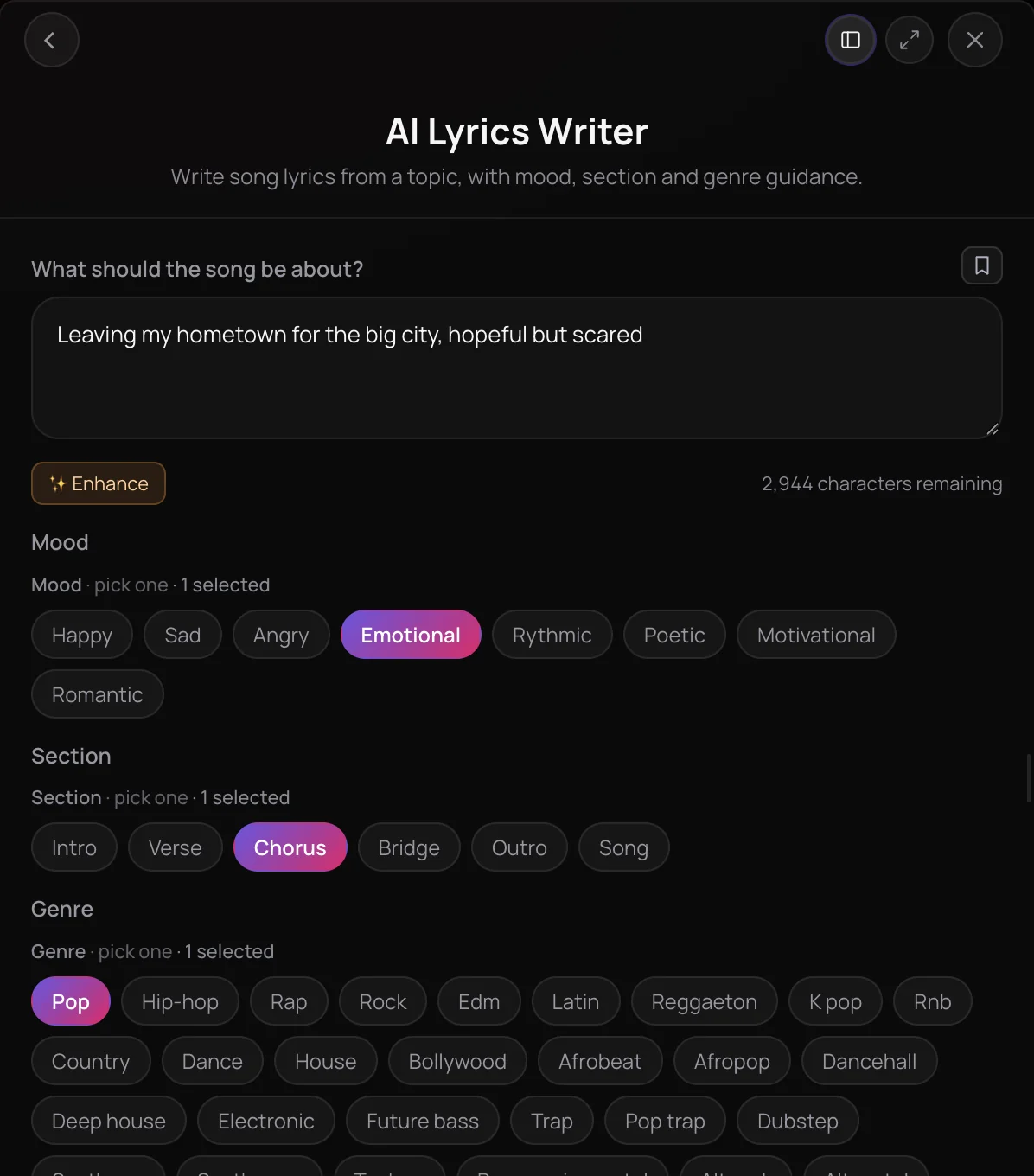
AI Lyrics Writer writes original song lyrics from a short description of what the song is about, either for a whole song or for one section such as a verse or chorus. You steer it with one mood, one section and one of 64 genres, and the lyrics arrive in your chat as text you can copy, rework or turn into a song. It's built for songwriters facing a blank page, artists who need a hook and creators who want words for a track.
See it in action
- We Walked Into Shark Tank and Generated Lyrics and Song Live On Shark Tank India, the Soundverse team turns a word from each Shark into lyrics and a song, live on stage.
- Every AI Tool in Soundverse "Create": Songs, Vocals, SFX, Videos and More | Full Walkthrough From 1:13. The AI Lyrics Writer part of Soundverse's Create walkthrough: lyrics from a topic, mood, section and genre.
How it works
Say what it's about
Open AI Lyrics Writer from AI Tools and fill in What should the song be about?, such as a late-night drive after a breakup. Enhance can expand a short idea.
Pick mood, section and genre
Optionally choose one Mood, such as Romantic or Motivational, one Section, from Intro to Outro or the whole Song, and one Genre.
Generate in Chat
Click Generate in Chat. The lyrics appear in your chat as text, ready to read and copy.
Refine or make it a song
Ask for changes in a follow-up message, or paste the lyrics into AI Song Generator's Custom mode to hear them sung.
Why use AI Lyrics Writer
Start from a theme
One sentence about the story or feeling is enough to get a full draft, so you never start from a blank page.
Whole song or one section
Pick Song for complete lyrics, or Intro, Verse, Chorus, Bridge or Outro to write just the part you're missing.
Mood and genre built in
Choose from eight moods and 64 genres, from Pop and Hip Hop to Bollywood, Afrobeat and Gospel, to set the tone of the words.
No tokens to draft
Writing lyrics in the AI Lyrics Writer panel doesn't use tokens, so you can try different themes and moods freely.
What it costs
Works on the Free plan. It uses no tokens.
- Write a set of lyrics: no tokens.
Creator $12.49 a month, or $9.99 a month billed yearly ($119.88 a year) · Pro $31.24 a month, or $24.99 a month billed yearly ($299.88 a year) · Max from $72 a month, or $60 a month billed yearly ($720 a year).
In India (PayU): Creator ₹499 a month, or ₹399 a month billed yearly (₹4,788 a year) · Pro ₹1,299 a month, or ₹1,039 a month billed yearly (₹12,468 a year) · Max from ₹2,999 a month, or ₹2,399 a month billed yearly (₹28,788 a year).
Prices outside India are in US dollars, billed through Stripe; in India they are in rupees, billed through PayU. Monthly tokens reset each month and don't roll over.
Frequently asked questions
Is AI Lyrics Writer free?
Yes. AI Lyrics Writer is available on every plan, including Free, and a lyrics run from its panel doesn't use tokens. Signing up for Soundverse is free. Turning the lyrics into audio with AI Song Generator or AI Singing Generator does use tokens from your plan.
How good are the lyrics from AI Lyrics Writer?
AI Lyrics Writer gives you a first draft to shape, not a finished song. Specific themes tend to give more specific lines, so name the story, a detail or two and who is speaking, then set a mood, section and genre. Drafts from the AI Lyrics Writer panel use no tokens, so try a few themes and keep the lines you like. Read every draft closely, and rewrite anything that sounds too close to an existing song.
Can I use AI-written lyrics commercially?
It depends on your plan. On the Free plan, what you make on Soundverse, including lyrics from AI Lyrics Writer, is for personal use. Paid plans add a commercial license; the Pricing page lists what each plan covers. Read the lyrics through before you release them, and rewrite anything that sounds too close to an existing song.
What can't AI Lyrics Writer do?
AI Lyrics Writer writes text only: it doesn't sing, compose music or set a melody. Its panel has no separate controls for syllable counts, rhyme schemes or language, and it doesn't run inside AI Studio, where its Generate in Chat button sends you to the chat. To change the language of finished lyrics, use Translate Lyrics, which can match syllables so the lines stay singable.
What is AI Lyrics Writer?
AI Lyrics Writer is Soundverse's AI lyrics writer: you describe what a song should be about, pick an optional mood, section and genre, and it writes original lyrics. AI Lyrics Writer can draft a whole song or a single part such as a verse or chorus, and the lyrics appear in your Soundverse chat, ready to copy or turn into a song.
How do I write song lyrics with AI?
Open AI Lyrics Writer and describe the song's story or feeling in the What should the song be about? box, for example a late-night drive after a breakup. Choose a mood, a section and a genre if you like, then click Generate in Chat. Read the draft, ask for changes in a follow-up message, and copy the lines you keep.
Can I turn AI Lyrics Writer's lyrics into a song?
Yes. Open AI Song Generator, switch Mode to Custom and paste the lyrics into the Lyrics box; it uses them word for word, in the style you choose. For a vocal without a backing track, paste them into AI Singing Generator instead. AI Singing Generator sings roughly the first 350 characters, about a verse and a chorus. You can also ask in the chat to turn the lyrics into a song.
How is AI Lyrics Writer different from Help me write?
Help me write is a shortcut inside AI Song Generator, AI Singing Generator and other panels that drafts lyrics straight into that panel's Lyrics box. AI Lyrics Writer is the standalone tool, with Mood, Section and Genre options, for when you want to work on the words first and decide later what to make with them.
What options does AI Lyrics Writer have?
AI Lyrics Writer's What should the song be about? box takes up to 3,000 characters. You can add one Mood, such as Happy, Sad, Emotional, Poetic, Motivational or Romantic; one Section, from Intro, Verse, Chorus, Bridge and Outro to the whole Song; and one Genre from a list of 64, such as Pop, Bollywood or Lofi.
Ready to write your next song?
Tell AI Lyrics Writer what the song is about and get original lyrics to shape into your next track.
