Create · Free
AI sound effects generator: custom sound effects from a description
Type what you hear, set a length from half a second to 30 seconds, and get a clip with a title and cover art for your film, game or podcast.
1,000 free tokens to start · No card needed · Cancel paid plans anytime
Do more with AI Sound Effects Generator on Creator — from $9.99/mo, or ₹399/mo in India. 4,000 tokens a month. Billed $119.88 a year, or $12.49 month to month.
What you get
The sound your scene needs
Describe the specific sound, from a creaking door to rain on a tin roof, instead of digging through stock libraries for something close.
A clip that fits the cut
Set the length anywhere from 0.5 to 30 seconds in half-second steps, so a click, a whoosh or a short ambience fits the moment.
Priced by the second
Effects are billed by length, so a short hit costs less than a 30-second ambience. It runs on every plan, including Free, where your first generation is free and sharing Soundverse unlocks two more.
Who it's for
Filmmakers and video editors
Get the one sound a scene is missing, described in plain words and cut to the length of the shot.
Game and app developers
Make interface, foley and ambient sounds for a build without a field recorder or a sound library.
Podcasters and YouTubers
Add whooshes, stingers and room tone between segments from a short description.
Music producers
Generate impacts, sweeps and textures to layer into a drop or a transition.
When to use it
- Your edit needs one specific sound the stock library doesn't have
- A scene needs background ambience, such as rain or a busy café
- A game prototype needs interface and foley sounds before final audio
- Your podcast needs a short transition between segments
- A track needs an impact or a sweep to mark a drop
What you can make with it
Foley, action by action
Describe each action, such as keys dropped on a wooden table or a jacket zipped up, and set each clip to the length of the shot.
Room tone and ambience
Generate clips of up to 30 seconds, such as a busy café or rain on a window, and line several up on an AI Studio track for longer scenes.
Interface sounds
Make short clicks, swipes and pops, half a second to a second long, for buttons and menus in an app or a game.
Podcast stingers
A two-second whoosh or a short impact marks the move from one segment to the next.
Sounds you can't record
Describe a small robot powering up or a portal humming open for sci-fi and fantasy scenes.
Impacts and sweeps for a drop
Generate a deep cinematic boom or a rising noise sweep to mark a drop or a scene change.
A few takes to choose from
Each run makes one clip, so run the same description a few times and keep the take that fits.
Screenshots
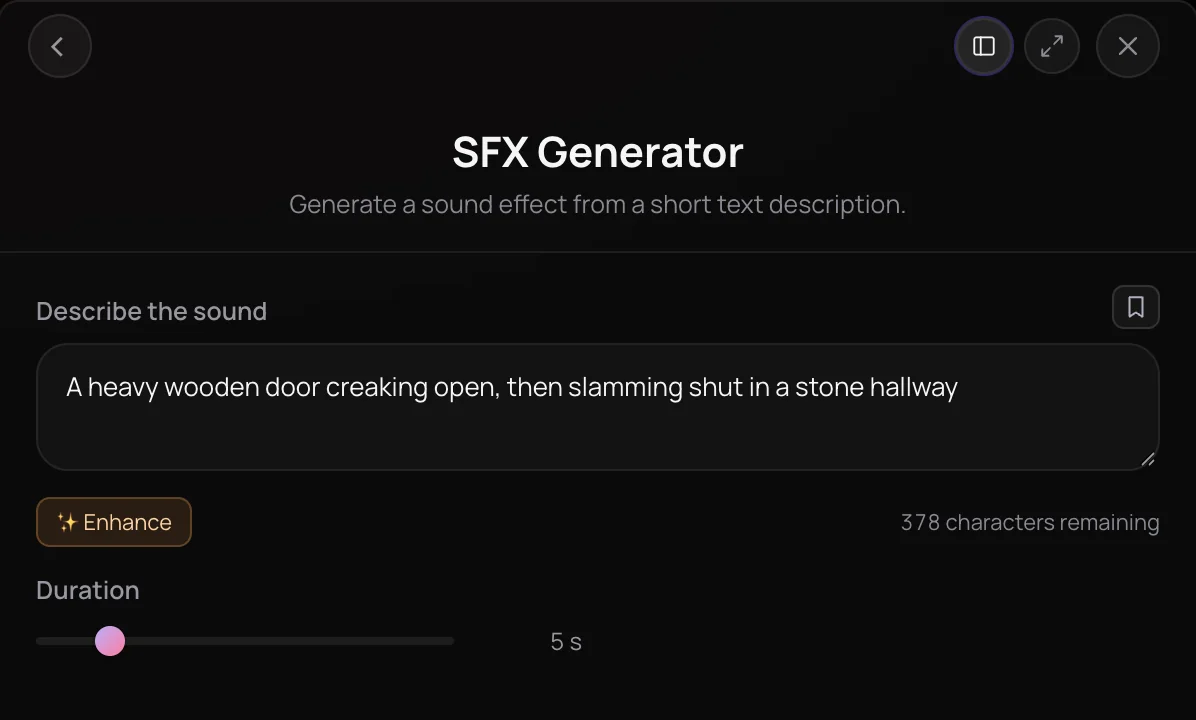
AI Sound Effects Generator turns a written description into a sound effect or foley clip between half a second and 30 seconds long. Describe the sound in up to 450 characters, set the duration, and it delivers the effect with a title and cover art, or straight onto your AI Studio timeline. It's built for filmmakers, game developers, podcasters, video editors and music producers who need a specific sound without searching stock libraries.
See it in action
- Every AI Tool in Soundverse "Create": Songs, Vocals, SFX, Videos and More | Full Walkthrough From 0:50. The AI Sound Effects Generator part of Soundverse's Create walkthrough: any sound, from a short description.
How it works
Describe the sound
Open AI Sound Effects Generator from AI Tools and write what you want in the Describe the sound box, up to 450 characters. Enhance can add detail.
Set the duration
Drag the Duration slider anywhere from 0.5 to 30 seconds, in half-second steps. It starts at 5 seconds.
Generate the effect
Click Generate in Chat. The effect arrives in your chat with a title and cover art, or on your timeline when you run it inside AI Studio.
Refine and use it
Play it back, adjust the wording or length and generate again, then download the clip or drag it into AI Studio or your Library.
Why use AI Sound Effects Generator
A specific sound, no searching
Describe the specific sound your scene needs instead of digging through stock libraries for something close.
A length you choose
Set the effect anywhere from half a second to 30 seconds, so a click, a whoosh or a longer ambience fits the moment.
Plain-language control
Shape the result by rewording the description. There are no synth patches or sound-design settings to learn.
Ready for the timeline
In AI Studio, Generate SFX drops the effect onto a track at the playhead, next to your music and dialogue.
What it costs
Works on the Free plan. New accounts get 1,000 free tokens. On the Free plan it runs through Agent One, which gives free accounts 3 runs in all; sharing unlocks the 2nd and 3rd.
- 5-second sound effect: 144 tokens at 28.8 tokens a second (about $0.36–$0.45 on Creator, or ₹14–₹18 in India).
- 30-second sound effect (the longest): 864 tokens at 28.8 tokens a second (about $2.16–$2.70 on Creator, or ₹86–₹108 in India).
Agent One runs this tool for you, and the agent's own steps are metered on top of the tool's price: about 7 tokens a step in Lite mode, 54 in Standard mode and 128 in Pro mode, the default on paid plans.
Creator $12.49 a month, or $9.99 a month billed yearly ($119.88 a year) · Pro $31.24 a month, or $24.99 a month billed yearly ($299.88 a year) · Max from $72 a month, or $60 a month billed yearly ($720 a year).
In India (PayU): Creator ₹499 a month, or ₹399 a month billed yearly (₹4,788 a year) · Pro ₹1,299 a month, or ₹1,039 a month billed yearly (₹12,468 a year) · Max from ₹2,999 a month, or ₹2,399 a month billed yearly (₹28,788 a year).
Prices outside India are in US dollars, billed through Stripe; in India they are in rupees, billed through PayU. Monthly tokens reset each month and don't roll over.
Frequently asked questions
Is AI Sound Effects Generator free?
AI Sound Effects Generator is available on every plan, including Free. Signing up for Soundverse is free and new accounts get free starter tokens; after that, each effect uses tokens based on its duration, so a two-second hit costs less than a 30-second ambience. The panel shows an estimated cost before you generate.
How realistic are the sound effects from AI Sound Effects Generator?
AI Sound Effects Generator's results depend on how specific your description is, so name the source, the action and the space, such as boots on wet gravel in a narrow alley. Each run makes one MP3 clip, so generate a few takes and keep the one that fits. AI Sound Effects Generator is made for non-musical sounds, foley and ambience; for music, beats or jingles, use AI Music Generator instead.
Can I use AI sound effects commercially?
It depends on your plan. On the Free plan, sound effects you make with AI Sound Effects Generator are for personal use. Paid plans add a commercial license; the Pricing page lists what each plan covers. Within those terms, you can download your clips and use them in a video editor, game engine or DAW.
What are the limits of AI Sound Effects Generator?
Each run generates an effect of up to 30 seconds from a description of up to 450 characters, so long ambiences and busy scenes need several clips. AI Sound Effects Generator works from text only: it can't listen to a reference sound or watch your video. To get effects timed to a video, use Video to SFX instead.
What is AI Sound Effects Generator?
AI Sound Effects Generator is Soundverse's AI sound effects generator: you describe a sound in plain words, set a duration from 0.5 to 30 seconds, and it generates the effect. Each clip from AI Sound Effects Generator lands in your Soundverse chat with a title and cover art, or on your AI Studio timeline, ready to play or download.
How do I make sound effects with AI?
Open AI Sound Effects Generator, describe the sound and its source, such as footsteps on wet gravel or a metallic sci-fi door whoosh with a low hum, and set the Duration slider. Click Generate in Chat, listen, then reword the description or change the length and run it again until it fits your scene.
How long can an AI sound effect be?
AI Sound Effects Generator makes clips from 0.5 to 30 seconds, set in half-second steps on the Duration slider, with 5 seconds as the default. The description can be up to 450 characters. For a longer background, generate several clips and line them up on a track in AI Studio.
How is AI Sound Effects Generator different from Video to SFX?
AI Sound Effects Generator makes an effect from a written description, on any plan. Video to SFX, on the Creator plan and above, takes a video you upload and generates the sound effects that match what happens on screen. Use AI Sound Effects Generator for individual sounds, and Video to SFX to score a whole clip.
What should I write in a sound effect description?
Name the source, the action and the setting, plus the character you want, for example heavy rain on a tin roof, a crowd cheering in a stadium, or distant thunder rolling over a city. Specific descriptions give AI Sound Effects Generator more to work with, and the Enhance button can add detail to a short idea.
Find the sound in your head
Describe it, set the length, and drop the effect into your project.
