Create · Free
Turn your script into a voiceover without a mic or a booth
Paste up to 3,000 characters, play the voice samples to pick one, and download the narration as an MP3. On every plan, about 120 tokens per 1,000 characters.
1,000 free tokens to start · No card needed · Cancel paid plans anytime
Do more with AI Speech Generator on Creator — from $9.99/mo, or ₹399/mo in India. 4,000 tokens a month. Billed $119.88 a year, or $12.49 month to month.
What you get
Choose a voice by ear
Every voice in the picker has a short sample to play, plus labels for its tone and accent.
Voices for your audience
Pick from American, British, Australian and Indian English narrators, and many of them also read Hindi.
Ready for your edit
Download the MP3, or generate inside AI Studio to put the narration on your timeline next to music and sound effects.
Who it's for
YouTubers and video creators
Voice a finished script with no recording setup, and regenerate a single line when the script changes.
Podcasters
Give intros, ad reads and segment links the same voice every episode, straight from text.
Game and app developers
Voice characters, tutorials and placeholder dialogue from text, with a different voice for each character.
Teachers and course creators
Narrate lessons and tutorials with voices labeled for educational and e-learning use.
Indian creators and brands
Choose an Indian English narrator, many of whom also read Hindi, for videos and ads made for Indian audiences.
When to use it
- Your script is final and you have no mic, booth or voice actor
- One line in a finished voiceover has changed
- Each character or host needs a voice of their own
- You want narration in Indian English, or in Hindi from a voice that reads it
- You need a temp read to time an edit before the final voiceover
What you can make with it
An explainer voiceover
Paste up to 3,000 characters of script, pick a voice such as Finley, an articulate anchor, and download the MP3 for your editor.
A two-host podcast intro
Generate each host's lines in a different voice, then place them on separate tracks in AI Studio to build the back-and-forth.
Lesson narration
Voices such as Eddie or Anjali, an e-learning guide, suit step-by-step lessons; split long lessons into parts of up to 3,000 characters.
A Hindi or Indian English ad read
Pick a voice marked 'also Hindi', such as Nishi, a Hindi-English storyteller, for a read made for Indian audiences.
Character lines for a game
Give each character a voice of their own, such as Kellan, tagged for characters, and generate their lines one run per character.
Audiobook passages
Read a chapter in parts of up to 3,000 characters with Prakash or Sana, both labeled audiobook narrators.
A voiceover for a vertical clip
Voices tagged for social media, such as Jade or Lawrence, fit quick Reels and Shorts reads.
A temp track to cut to
Generate a quick read of the script to edit picture against, then replace it with the final voice later.
Screenshots
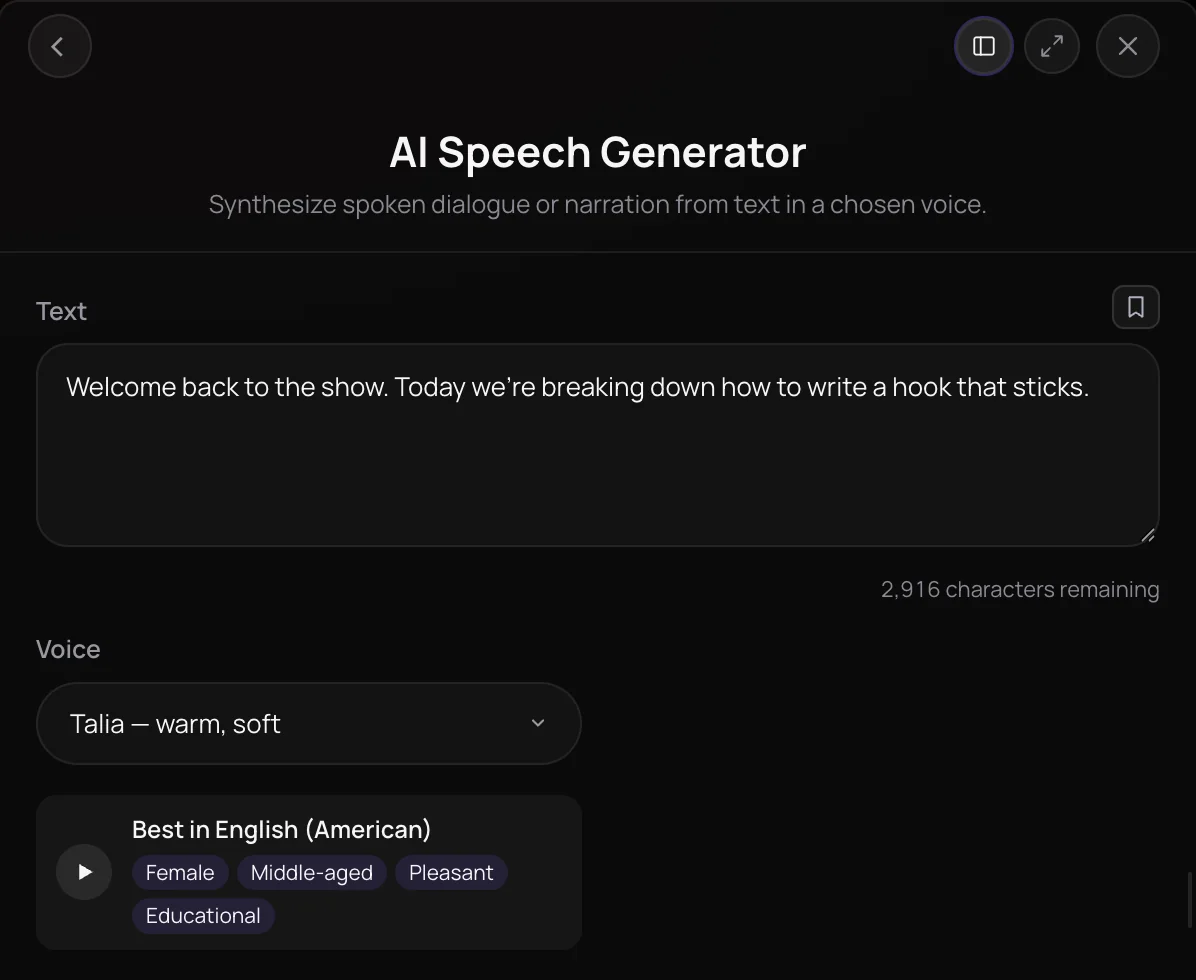
AI Speech Generator turns written text into spoken audio in one of 18 voices, with no microphone or voice actor needed. Paste up to 3,000 characters, pick a voice from warm storytellers and crisp narrators to anchors and casual hosts, and get narration you can play, download or place in AI Studio. It's built for video creators, podcasters, educators and game makers who need voiceovers and character lines.
See it in action
- Every AI Tool in Soundverse "Create": Songs, Vocals, SFX, Videos and More | Full Walkthrough From 0:39. The AI Speech Generator part of Soundverse's Create walkthrough: narration or dialogue in a chosen voice.
How it works
Paste your text
Open AI Speech Generator from AI Tools and type or paste your script into the Text box, up to 3,000 characters per run.
Choose a voice
Pick one of 18 voices from the Voice list, such as Talia, Darian, Elara or Wyatt, each labeled with its tone.
Generate the speech
Click Generate in Chat and the narration arrives in your chat as audio. Inside AI Studio, Generate in Studio puts it on your timeline instead.
Use it anywhere
Play it back, download it, find it later in your Library, or add music and sound effects around it in AI Studio.
Why use AI Speech Generator
No mic, no booth
Produce narration and character lines from text alone, without recording gear, a quiet room or a voice actor.
18 voices with a clear tone
Each voice is labeled with its character, from warm storyteller and British baritone to articulate anchor and dry, calm Aussie.
Priced by length
Runs are priced per character, so a short line costs less than a long passage, and the panel shows an estimated cost before you generate.
Built for timelines
In AI Studio, Generate Dialogue places speech on a track at the playhead, right next to your music and sound effects.
What it costs
Works on the Free plan. New accounts get 1,000 free tokens, enough for about 8 clips of 1,000 characters.
- 1,000 characters of speech: 120 tokens at 0.12 tokens a character (about $0.30–$0.37 on Creator, or ₹12–₹15 in India).
- 3,000 characters of speech (the most per run): 360 tokens at 0.12 tokens a character (about $0.90–$1.12 on Creator, or ₹36–₹45 in India).
Creator $12.49 a month, or $9.99 a month billed yearly ($119.88 a year) · Pro $31.24 a month, or $24.99 a month billed yearly ($299.88 a year) · Max from $72 a month, or $60 a month billed yearly ($720 a year).
In India (PayU): Creator ₹499 a month, or ₹399 a month billed yearly (₹4,788 a year) · Pro ₹1,299 a month, or ₹1,039 a month billed yearly (₹12,468 a year) · Max from ₹2,999 a month, or ₹2,399 a month billed yearly (₹28,788 a year).
Prices outside India are in US dollars, billed through Stripe; in India they are in rupees, billed through PayU. Monthly tokens reset each month and don't roll over.
Frequently asked questions
Is AI Speech Generator free?
AI Speech Generator is available on every plan, including Free. Signing up for Soundverse is free and new accounts get free starter tokens; after that, each run uses tokens based on how many characters you send, so longer scripts cost more. The panel shows an estimated cost before you generate.
How many tokens does AI Speech Generator use?
AI Speech Generator uses about 120 tokens per 1,000 characters, so a full 3,000-character script is about 360 tokens. It doesn't count toward the Free plan's three Agent One generations, so your 1,000 sign-up tokens cover roughly 8,000 characters of narration. The panel shows the estimated cost before you generate.
Can I hear AI Speech Generator's voices before I generate?
Yes. Every voice in AI Speech Generator's picker has a short sample you can play, with labels for its tone and accent, such as Indian or British English. Pick the voice that suits your script, generate, and listen back; if a read misses, adjust the wording or try another voice and run it again.
Can I use AI-generated speech commercially?
It depends on your plan. On the Free plan, speech you make with AI Speech Generator is for personal use. Paid plans add a commercial license; the Pricing page lists what each plan covers. Make sure you have the rights to the script you voice, whether it's your own writing or someone else's.
What are AI Speech Generator's limits?
Each AI Speech Generator run takes up to 3,000 characters and speaks them in a single voice. For a longer script, split it into parts; for a conversation between several speakers, generate each speaker's lines separately and arrange them in AI Studio. AI Speech Generator uses its built-in voices only and doesn't clone your voice or anyone else's.
What is AI Speech Generator?
AI Speech Generator is Soundverse's AI speech generator: it turns text of up to 3,000 characters into spoken audio in one of 18 built-in voices. You choose the voice, AI Speech Generator reads your script, and the result lands in your Soundverse chat or on your AI Studio timeline, ready to play or download.
How do I make a voiceover with AI?
Open AI Speech Generator, paste your script into the Text box and pick a voice that fits, such as Elara for a crisp narrator or Darian for a warm storyteller. Click Generate in Chat and download the narration, or open the tool inside AI Studio to place the voiceover on your timeline under your video and music.
Which voices does AI Speech Generator have?
AI Speech Generator has 18 voices: Talia, Darian, Elara, Eldrin, Elowen, Finley, Alicia, Sawyer, Jade, Lawrence, Maisie, Kellan, Florence, Warren, Eddie, Caleb, Baxter and Wyatt. Each is labeled with its tone in the Voice list, for example warm storyteller, British baritone, articulate anchor or dry, calm Aussie. Talia is the default voice.
Can I add music and sound effects to my narration?
Yes. In AI Studio, right-click an empty part of the timeline and use Generate Dialogue for the narration, Generate Instrumental for a music bed from AI Music Generator, and Generate SFX for effects from AI Sound Effects Generator. Each result lands on a track at the playhead, ready to mix and export together.
How is AI Speech Generator different from AI Singing Generator?
AI Speech Generator speaks your text, for narration, voiceovers and character lines. AI Singing Generator sings your lyrics in a vocal style such as pop or rap and returns an a cappella vocal. Use AI Speech Generator when the words should be spoken, and AI Singing Generator when they should be sung.
Ready to hear your words out loud?
Paste your script, pick one of 18 voices, and get narration you can download or drop into AI Studio.
