Analyze · Free
Turn any song into a prompt you can reuse, with tagged lyrics
Pick a song and get a summary, a style prompt, an instrumental prompt and section-tagged lyrics in copyable blocks. On every plan, 100 tokens a run.
1,000 free tokens to start · No card needed · Cancel paid plans anytime
Do more with Audio to Prompt on Creator — from $9.99/mo, or ₹399/mo in India. 4,000 tokens a month. Billed $119.88 a year, or $12.49 month to month.
What you get
Capture a sound in words
Get a style prompt and an instrumental prompt that describe the song's genre, mood, instruments and vocals, ready to paste into a generator.
Lyrics ready to edit
The song's lyrics come back tagged by section, such as [Verse] and [Chorus], in a block you can copy.
Charged only when it works
A run costs a flat 100 tokens whatever the song's length, and you're charged only when the listening and writing steps both succeed.
Who it's for
Producers
Capture a reference's sound as a prompt you can edit and reuse for new instrumentals.
Independent artists and songwriters
Put your own sound into words, so new songs can start from it.
Ad and brand teams
Turn a reference track into a written brief for a composer or a generator.
Indian-language creators
Run a Hindi song and get English prompts along with its lyrics, tagged by section.
When to use it
- You can hear the sound you want but can't describe it
- Your prompts in AI Song Generator keep missing the style you hear
- You're briefing someone else on a sound
- Your next song should share your last release's style
- A song's lyrics need section tags before you rework them
What you can make with it
A starting prompt from your strongest track
Run your strongest song and keep its style prompt as the starting point for the next single.
A brief for a composer
Copy the genre, mood, instruments, tempo and key it reports into a written brief for a composer or session player.
A prompt that lands
Compare the prompt it writes for a reference with the one you've been typing, and borrow the words that describe the sound.
An instrumental in a similar style
Paste the instrumental prompt into AI Music Generator for a track with no vocals in a similar style.
A demo's lyrics, reworked
Pull your demo's words out as tagged text, rewrite the weak lines, and generate the song again.
English prompts from a Hindi song
Run a Hindi or Spanish song to get English prompts plus its lyrics in the original language.
A check on a generation
Run a song you generated and see whether the description matches what you asked for.
Screenshots
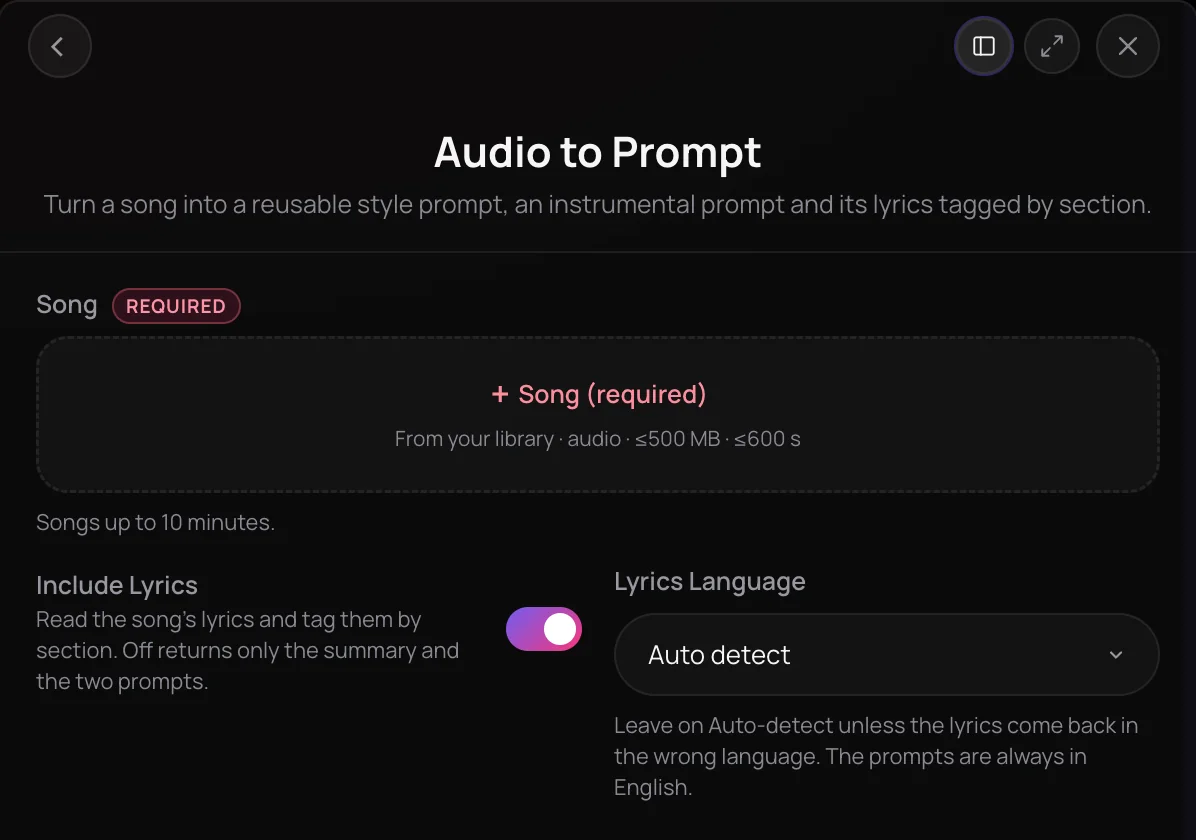
Audio to Prompt turns a song into text you can reuse: a style prompt, an instrumental prompt and the lyrics tagged by section. It's for producers, songwriters and creators who want to capture the sound of a reference track or their own demo as a prompt. It listens for genre, mood, instruments and vocals, checks tempo and key, maps the song's structure, then writes the prompts in English.
See it in action
- Every AI Tool in Soundverse “Analyze”: Tempo and Key, Audio to Prompt, Transcription and More From 0:29. The Audio to Prompt part of Soundverse's Analyze walkthrough, from input to result.
How it works
Open Audio to Prompt
Choose Audio to Prompt from the Analyze tools in AI Tools, or pick Audio to Prompt from Analyze on a song in your Library.
Pick the song
Select a song from your Library in the Song field: MP3, WAV, FLAC, AAC, OGG, M4A or MP4 audio, up to 10 minutes long.
Set the lyrics language
Leave Lyrics Language on Auto-detect, or choose the language if the lyrics come back wrong. The prompts are always written in English.
Copy your prompts
Click Generate in Chat. Step cards show each stage, then you get a short summary, followed by a style prompt, an instrumental prompt and tagged lyrics, each in a copyable block.
Why use Audio to Prompt
Prompts you can reuse
Get a style prompt for songs and an instrumental prompt for instrumentals, ready to paste into a generator or edit first.
Lyrics tagged by section
The song's own lyrics come back with section tags such as [Verse] and [Chorus], ready to edit.
Several analyses in one run
One run covers listening, tempo and key, song structure and lyrics, each shown as a step card in your chat.
Lyrics in many languages
Auto-detect the lyrics language or choose from 12, including Spanish, Hindi, Japanese, Korean and Arabic.
What it costs
Works on the Free plan. New accounts get 1,000 free tokens, enough for about 10 tracks.
- Describe one track as a prompt: 100 tokens (about $0.25–$0.31 on Creator, or ₹10–₹12 in India).
Creator $12.49 a month, or $9.99 a month billed yearly ($119.88 a year) · Pro $31.24 a month, or $24.99 a month billed yearly ($299.88 a year) · Max from $72 a month, or $60 a month billed yearly ($720 a year).
In India (PayU): Creator ₹499 a month, or ₹399 a month billed yearly (₹4,788 a year) · Pro ₹1,299 a month, or ₹1,039 a month billed yearly (₹12,468 a year) · Max from ₹2,999 a month, or ₹2,399 a month billed yearly (₹28,788 a year).
Prices outside India are in US dollars, billed through Stripe; in India they are in rupees, billed through PayU. Monthly tokens reset each month and don't roll over.
Frequently asked questions
Is Audio to Prompt free?
Audio to Prompt isn't limited to paid plans: you can run it on any plan, including Free. Each run uses tokens from your balance, and the cost is the same whatever the song's length. Soundverse is free to sign up, and new accounts get free starter tokens to try it.
How accurate is Audio to Prompt?
Audio to Prompt describes what it hears: genre, mood, instruments, production, era and vocals. Tempo and key come from the same analysis as Tempo & Key Detector and the structure from Section Analysis; if one of those steps or the lyrics can't be read, the run carries on without it. A song you make from the prompt is a new song in that style, not a copy of the original.
Can I use the prompts and lyrics commercially?
Audio to Prompt gives you a description of a song, not rights to it. The tagged lyrics are the original songwriter's words, so only reuse them if you have permission, and you need the rights to anything you upload. On the Free plan, what you make is for personal use. Paid plans add a commercial license; the Pricing page lists what each plan covers.
Where does Audio to Prompt fall short?
Audio to Prompt returns text, not audio, and it runs in chat only; it isn't available inside AI Studio. It takes songs up to 10 minutes long. An instrumental has no lyrics to return, so you get the prompts alone, and the prompts are always in English, even when the lyrics are in another language.
What is Audio to Prompt?
Audio to Prompt is a Soundverse tool that turns a song into a reusable style prompt, an instrumental prompt and its lyrics tagged by section. It listens for genre, mood and instruments, checks tempo and key, and returns the results as text in Soundverse's chat, ready to copy.
How do I turn a song into a prompt?
Open Audio to Prompt in Soundverse, select the song from your Library, leave Lyrics Language on Auto-detect and click Generate in Chat. Step cards show the listening, tempo and key, structure and lyrics stages, then a short summary arrives, followed by the style prompt, instrumental prompt and tagged lyrics in copyable blocks.
What files does Audio to Prompt accept?
Audio to Prompt takes one song from your Soundverse Library in MP3, WAV, FLAC, AAC, OGG, M4A or MP4 audio, up to 10 minutes long and 500 MB. If the song is on your device, add it to your Library first, then pick it in the Song field.
How is Audio to Prompt different from Audio Transcription?
Audio Transcription turns speech or lyrics into text, with optional word timestamps. Audio to Prompt goes further for music: along with the lyrics, tagged by section, it writes a style prompt and an instrumental prompt from the song's genre, mood, instruments, tempo and key. Use Tempo & Key Detector when you need only the tempo and key, or Section Analysis when you need only the song's sections.
Can I make a new song from the prompt?
Yes. Copy the style prompt from Audio to Prompt into Soundverse's AI Song Generator, with or without the tagged lyrics, to make a new song in that style, or paste the instrumental prompt into the AI Music Generator for an instrumental. Edit the prompt first if you want to move further from the original song.
Ready to turn a song into a prompt?
Pick a song from your Library and get a style prompt, an instrumental prompt and tagged lyrics in chat.
