Analyze · Free
AI web search: a current answer with sources you can check
Ask about trends, releases, playlists or the people behind them. Agent One runs a live search and answers in the chat with links to its sources.
1,000 free tokens to start · No card needed · Cancel paid plans anytime
Do more with Web Search on Creator — from $9.99/mo, or ₹399/mo in India. 4,000 tokens a month. Billed $119.88 a year, or $12.49 month to month.
What you get
Current information, not old memory
Each answer comes from a live web search run when you ask, so it can cover news and releases that a model's training data misses.
Facts you can verify
Answers list the pages they drew from as links, so you can check a claim before it goes into a pitch or a bio.
Recent when it matters
Ask for sources from the past day, week, month or year when only the latest information is useful.
Who it's for
Independent artists
Check current facts about playlists, festivals and releases without leaving your Soundverse chat.
Artist managers and labels
Research labels, publishers and contacts, with sources to check before you reach out.
YouTubers and content creators
See what's being talked about in your genre this week before you plan content.
Music teachers and students
Look up an artist, a genre or an instrument with sources students can open and check.
When to use it
- You need a fact that's newer than an AI model's training data
- You're about to pitch a curator and want to know what they cover
- You want an answer with sources you can open
- A bio or press note needs a date or detail confirmed
- You want recent results, such as from the past week or month
What you can make with it
Curators vetted before a pitch
Ask which blogs and curators cover your genre, then open the sources to check each one.
A fact-checked bio
Confirm a release date, a venue or an award name before it goes into your press bio.
Open calls and showcases
Look for showcases or festivals taking applications, with recency set to the past month, and check the dates on the sources.
Platform rules, sourced
Look up current rules from stores and platforms, such as AI disclosure or upload requirements, with links to the pages.
Research for a brief
Read up on a brand, a show or a game before you write music for a brief.
A contact shortlist
Follow up with Agent One on what it found, such as turning the sources into a short list of people to contact.
News before you post
Check for recent news about an artist or a release you're working with before you post about it.
A lesson with sources
Gather facts on a genre's history for a class, with every source listed so students can open it.
Screenshots
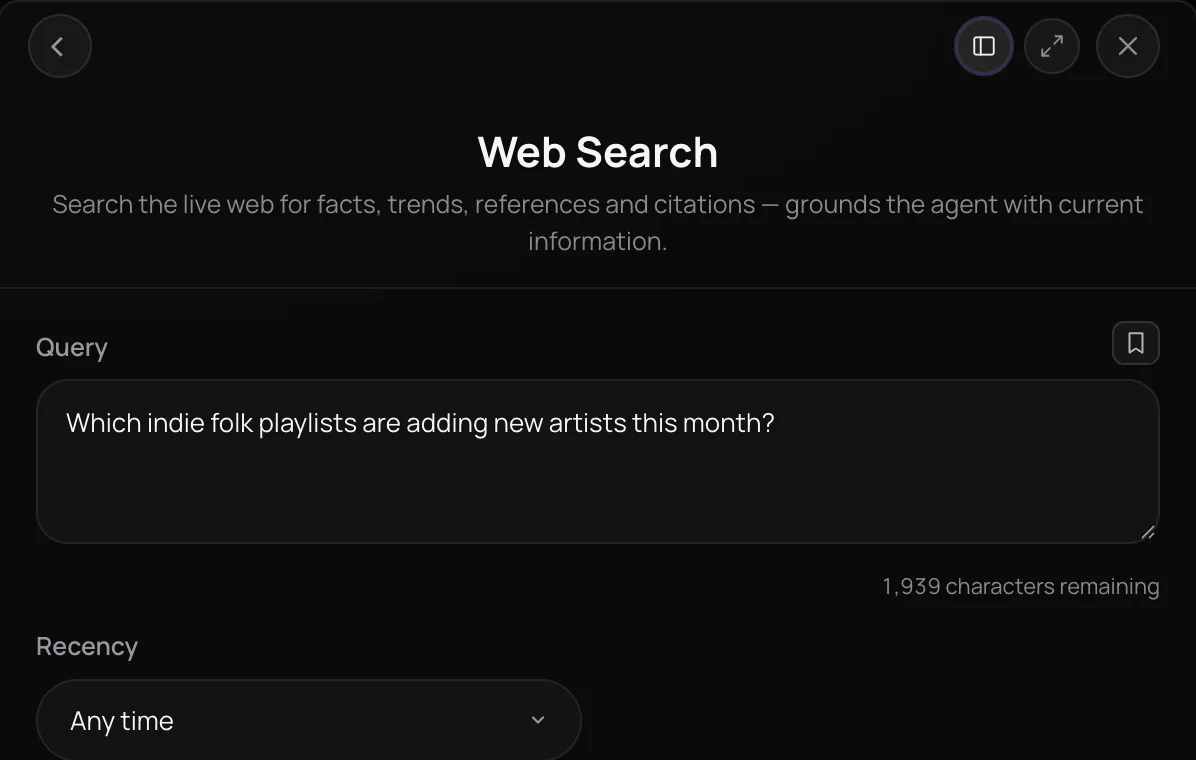
Web Search is Soundverse's AI web search: it sends your question to a live search and returns a concise answer written from what it finds, with links to the sources. It is built for artists, managers and marketers researching trends, releases, playlists and the people behind them while they work in Soundverse. Because the search runs when you ask, the answer can cover news and releases that an AI model's training data doesn't include.
See it in action
- Every AI Tool in Soundverse “Analyze”: Tempo and Key, Audio to Prompt, Transcription and More From 1:28. The Web Search part of Soundverse's Analyze walkthrough, from input to result.
How it works
Type your question
Open Web Search in the Analyze section of AI Tools and type a question, up to 2,000 characters (400 on the Free plan).
Set the recency
Keep Recency on Any time, or ask for sources from the past day, week, month or year.
Run one search
Click Generate in Chat. Agent One runs one live web search for your exact question instead of answering from memory.
Check the sources
Read the answer in the chat, then open the linked sources listed under it before you rely on a fact.
Why use Web Search
Live, not remembered
The answer comes from a web search run when you ask, so it can cover news, releases and trends that an AI model's training data misses.
Sources you can open
Answers list the pages they drew from as links, so you can check a claim before you act on it.
A recency window
Ask for sources from the past day, week, month or year when only recent information is useful.
One search per run
Each run makes one search with your exact wording, so the answer matches the question you asked.
What it costs
Works on the Free plan. New accounts get 1,000 free tokens. On the Free plan it runs through Agent One, which gives free accounts 3 runs in all; sharing unlocks the 2nd and 3rd.
- One search: 20 tokens (about $0.05–$0.06 on Creator, or ₹2 in India).
Agent One runs this tool for you, and the agent's own steps are metered on top of the tool's price: about 7 tokens a step in Lite mode, 54 in Standard mode and 128 in Pro mode, the default on paid plans.
Creator $12.49 a month, or $9.99 a month billed yearly ($119.88 a year) · Pro $31.24 a month, or $24.99 a month billed yearly ($299.88 a year) · Max from $72 a month, or $60 a month billed yearly ($720 a year).
In India (PayU): Creator ₹499 a month, or ₹399 a month billed yearly (₹4,788 a year) · Pro ₹1,299 a month, or ₹1,039 a month billed yearly (₹12,468 a year) · Max from ₹2,999 a month, or ₹2,399 a month billed yearly (₹28,788 a year).
Prices outside India are in US dollars, billed through Stripe; in India they are in rupees, billed through PayU. Monthly tokens reset each month and don't roll over.
Frequently asked questions
Is Web Search free?
Web Search is available on every Soundverse plan, including Free. Each search uses tokens from your plan, and the panel shows the estimated cost before you search. Questions can be up to 400 characters on the Free plan and up to 2,000 characters on paid plans.
Can I see where the answer came from?
Yes. Web Search lists the sources the answer drew from as links under the answer in the chat. Open them to confirm important facts, because the answer is a summary written from those pages and can still be incomplete or out of date.
How current are Web Search results?
Web Search runs a live search at the moment you ask, so results can include recent news and releases. You can ask for sources from the past day, week, month or year. The recency window is passed to the search as an instruction rather than a strict filter, so check the dates on the sources.
What can't Web Search do?
Web Search reads search results; it can't open a specific page for you, sign in to a site or fill in forms, and it doesn't search your Library. For work that needs a real browser, such as tasks inside a music platform you sign in to, use Music Business Agent instead.
Can Web Search identify a song from audio?
No. Web Search takes text questions only and doesn't listen to audio files. To find out whether a recording matches a known released track, use Copyright Checker, which identifies audio by its acoustic fingerprint and returns the title, artist and other release details when it finds a match.
What is Web Search, and how does its AI web search work?
Web Search is Soundverse's AI web search tool. It runs a live web search for your question and returns a short answer written from the results, with links to the sources it used, inside a Soundverse chat with Agent One.
How do I search the web with AI in Soundverse?
Open Web Search from the Analyze section of AI Tools, type your question and choose a Recency window if you need one. Click Generate in Chat, and Agent One runs one live search and answers in the chat with a bulleted list of source links. You can keep chatting with Agent One about what it found.
How is Web Search different from asking Agent One a question?
Agent One can answer many questions from what it already knows, which may be out of date. The Web Search panel tells Agent One to run one live web search for your exact question and cite its sources, so the answer is based on current results you can check.
Ground your next decision in current information
Ask a question and get a sourced answer from a live web search.
