Analyze · Free
Turn sung or spoken audio into text, with timing for every word
Add up to 60 minutes of audio. Audio Transcription detects the language, writes out the words and times each one for captions and lyric videos.
1,000 free tokens to start · No card needed · Cancel paid plans anytime
Do more with Audio Transcription on Creator — from $9.99/mo, or ₹399/mo in India. 4,000 tokens a month. Billed $119.88 a year, or $12.49 month to month.
What you get
Captions without typing by ear
With Word timestamps on, every word gets its own start time and every phrase a start and end, the timing captions and lyric videos need.
Lyrics and speech alike
One tool covers songs, podcasts, interviews and voice notes, with automatic language detection or one of 12 languages you choose.
Long files, no prep
Add files up to 500 MB and 60 minutes; large or lossless files are compressed for you before transcription.
Who it's for
Podcasters
Turn an episode or interview into text you can pull quotes and show notes from.
YouTubers and content creators
Get word timing for captions and lyric videos instead of typing along to the audio.
Independent artists and songwriters
Turn a recorded vocal into a lyric sheet for collaborators, releases or a lyric video.
Indian-language creators
Write out Hindi lyrics or speech, with the language detected for you or set to Hindi.
Artist managers
Turn interviews and voice notes into text for bios, press releases and meeting notes.
When to use it
- You have a vocal take but never wrote the lyrics down
- A video needs captions timed to the words
- You recorded an interview and need it as text
- You want to translate a song but only have the audio
- You improvised lyrics in a voice memo and want to keep them
What you can make with it
Lyrics from a freestyle
Transcribe an improvised take or voice memo so you can edit the words into a finished song.
Timed on-screen lyrics
Use word timestamps to place each lyric line on screen in your video editor.
Show notes from an episode
Transcribe an episode of up to an hour and pull quotes and show notes from the text.
Quotes for a press kit
Transcribe an artist interview and lift quotes for a bio or press release.
A check on a generated vocal
Transcribe a song you generated to check that the vocal sang your lyrics as written.
A transcript to translate
Copy the transcript into Translate Lyrics, add section tags, and get the song in another language.
Captions for a talking-head video
Extract the audio with Media Converter, transcribe it, and use the phrase timings for captions.
A lyric sheet for the session
Transcribe a demo, check the words, and send the lyric sheet to a singer or translator before the session.
Screenshots
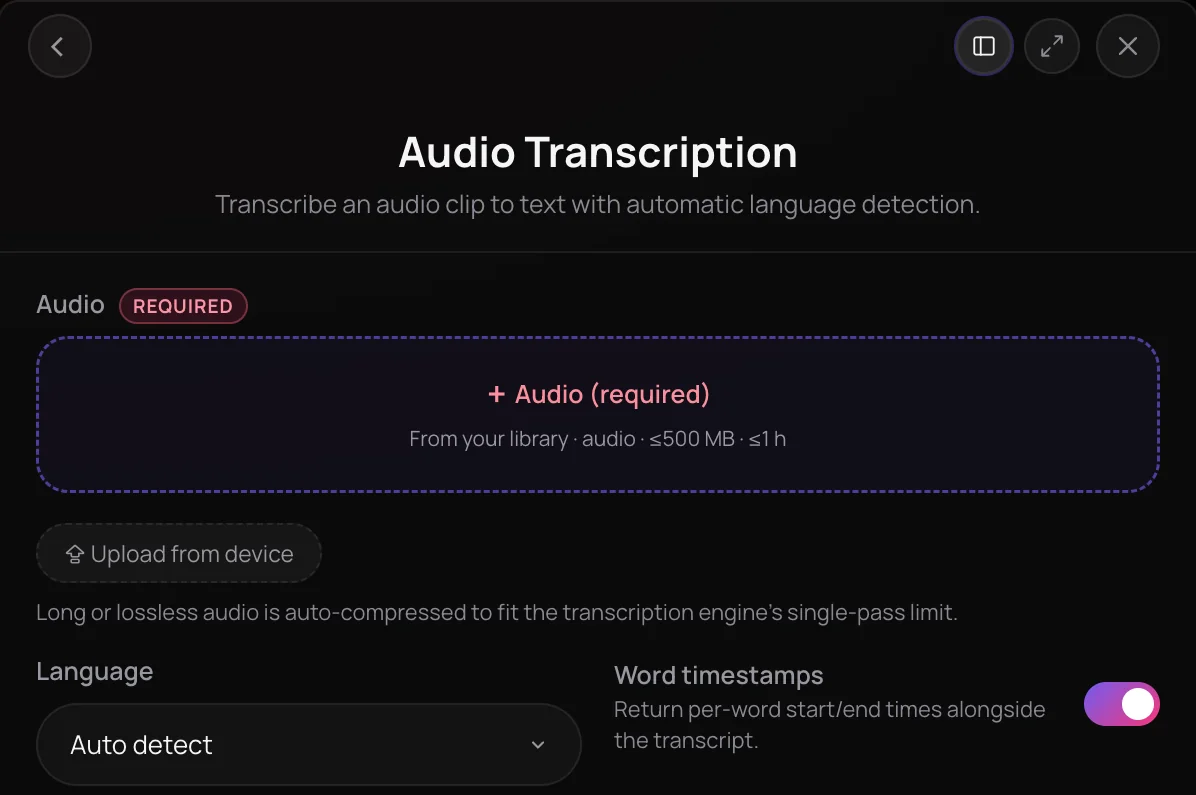
Audio Transcription is a Soundverse tool to transcribe audio to text: it writes out the sung or spoken words in a song or recording and detects the language for you. It is built for artists, podcasters and video creators who need lyric sheets, transcripts or caption timing without typing by ear. Files up to 500 MB and 60 minutes are accepted, and you can get a timestamp for every word.
See it in action
- Every AI Tool in Soundverse “Analyze”: Tempo and Key, Audio to Prompt, Transcription and More From 0:50. The Audio Transcription part of Soundverse's Analyze walkthrough, from input to result.
How it works
Add your audio
Open Audio Transcription in the Analyze section of AI Tools and pick a file from your Library or upload one, up to 500 MB and 60 minutes.
Set the language
Leave Language on Auto-detect, or choose one of 12 languages if the transcript comes back in the wrong one.
Choose word timestamps
Word timestamps is on by default and shows when each word starts, with a start and end time for each phrase. Turn it off if you only need the text.
Get your transcript
Click Generate in Chat. The transcript appears in the chat, and the timed lyrics are saved with the file.
Why use Audio Transcription
Lyrics and speech alike
Audio Transcription handles sung lyrics and spoken words, so one tool covers songs, podcasts, interviews and voice notes.
Word-level timing
With Word timestamps on, every word gets its own timestamp and every phrase a start and end time, the timing that captions and lyric videos need.
Language detection built in
The language is detected automatically, and you can force English, Spanish, Hindi, Japanese or eight other languages when needed.
Long files welcome
Add files up to 500 MB and 60 minutes. Large or lossless files are compressed automatically before transcription, so there's no need to convert them first.
What it costs
Works on the Free plan. New accounts get 1,000 free tokens. On the Free plan it runs through Agent One, which gives free accounts 3 runs in all; sharing unlocks the 2nd and 3rd.
- Transcribe one track: 50 tokens (about $0.12–$0.16 on Creator, or ₹5–₹6 in India).
A track that was already transcribed is free to transcribe again.
Agent One runs this tool for you, and the agent's own steps are metered on top of the tool's price: about 7 tokens a step in Lite mode, 54 in Standard mode and 128 in Pro mode, the default on paid plans.
Creator $12.49 a month, or $9.99 a month billed yearly ($119.88 a year) · Pro $31.24 a month, or $24.99 a month billed yearly ($299.88 a year) · Max from $72 a month, or $60 a month billed yearly ($720 a year).
In India (PayU): Creator ₹499 a month, or ₹399 a month billed yearly (₹4,788 a year) · Pro ₹1,299 a month, or ₹1,039 a month billed yearly (₹12,468 a year) · Max from ₹2,999 a month, or ₹2,399 a month billed yearly (₹28,788 a year).
Prices outside India are in US dollars, billed through Stripe; in India they are in rupees, billed through PayU. Monthly tokens reset each month and don't roll over.
Frequently asked questions
Is Audio Transcription free?
Audio Transcription is available on every Soundverse plan, including Free. A transcription uses tokens from your plan, and the panel shows the estimated cost before you start. Soundverse is free to sign up, and new accounts get free starter tokens.
How many transcriptions can I run on the Free plan?
Three to start. On the Free plan, Audio Transcription runs through Agent One, which gives free accounts three generations in total: the first is ready right away, and each of the next two unlocks when you share Soundverse. Each transcription also uses a small part of the 1,000 free tokens you get at sign-up. Paid plans lift the cap and add monthly tokens.
How accurate is Audio Transcription?
Audio Transcription reads the whole file in one pass and detects the language automatically; if detection picks the wrong one, choose the right language and run it again, because a wrong forced language garbles the text. Audio Transcription doesn't label speakers, and silent or damaged audio can return no text at all, so read the transcript through, especially names and unusual words, before you publish captions or a lyric sheet.
How long can my audio be?
Audio Transcription accepts files up to 500 MB and 60 minutes long, in MP3, WAV, AAC, OGG, M4A, MP4 audio or FLAC format. Large or lossless files are compressed automatically before transcription, so you don't need to shrink them yourself. You need the rights to anything you upload.
Does Audio Transcription identify different speakers?
No. Audio Transcription doesn't separate or label speakers, so an interview or podcast comes back as one transcript without speaker names. A silent or damaged file can also fail without returning any text. For a conversation with several voices, add the speaker names yourself after transcribing.
What is Audio Transcription, and can it transcribe audio to text?
Audio Transcription is a Soundverse tool that lets you transcribe audio to text, whether the words are sung or spoken. It detects the language automatically, accepts files up to 500 MB and 60 minutes, and can return a timestamp for every word.
How do I transcribe a song's lyrics?
Open Audio Transcription in Soundverse, pick the song from your Library or upload it, and click Generate in Chat. Agent One posts the lyrics as text in the chat and saves the timed lyrics with the file. For a song already in your Library, you can also open its menu and choose Analyze, then Transcribe Lyrics.
Which languages does Audio Transcription support?
Audio Transcription detects the language automatically. You can also force one of 12 languages: English, Spanish, French, German, Italian, Portuguese, Hindi, Japanese, Korean, Mandarin, Arabic or Russian. Only force a language when you're sure of it, because a wrong choice, such as Hindi on English audio, produces garbled text.
Can I get timestamps for each word?
Yes. Word timestamps is on by default, and Audio Transcription then shows when every word starts, plus a start and end time for each phrase, the timing you need for captions, subtitles and lyric videos. Turn it off in the panel if you only want the text of the recording.
Can I translate the lyrics after transcribing?
Yes. Copy the transcript into Translate Lyrics to translate it into one of 11 languages, with an option to keep each line singable. Add section tags such as [Verse] and [Chorus] first if you want them carried through, because Audio Transcription doesn't add section tags.
Ready to transcribe your audio?
Turn sung or spoken words into text, with optional timing for every word.
