Create · Free to try
MIDI to song: hear your melody sung with your own lyrics
Add a .mid melody and your lyrics. Soundverse sings them in a complete song that follows your tune, with a title and cover art. No singer needed.
1,000 free tokens to start · No card needed · Cancel paid plans anytime
Unlock more of MIDI to Song Generator with Creator — from $9.99/mo, or ₹399/mo in India. 4,000 tokens a month. Billed $119.88 a year, or $12.49 month to month.
What you get
Built around your melody
The song is built to follow the melody in your .mid file, with your lyrics sung exactly as you wrote them.
A song, not a MIDI playback
You get a complete, sung track with a title and cover art, ready to download or open in AI Studio.
Start on the Free plan
Soundverse v6 runs on the Free plan: your first generation is free and sharing Soundverse unlocks two more. Creator adds Soundverse v7 and Soundverse v8, and Pro adds Soundverse v9.
Who it's for
Producers working in a DAW
Export the lead line as a .mid and hear it sung with your lyrics, without booking a singer.
Composers who write in notation
Export a melody from your notation app as MIDI and hear it as a sung song.
Topline writers
Turn a written topline into a sung demo for a pitch or a co-write.
Music teachers and students
Hear a melody written for a lesson or an assignment sung with lyrics, from one .mid file.
When to use it
- Your melody already lives in a DAW or a notation app as MIDI
- You want to hear a topline sung before you book a singer
- You've turned a recording into MIDI with Audio to MIDI and cleaned up the notes
- You want to test new lyrics on a melody that's already written
What you can make with it
A sung demo from a DAW lead
Solo the lead melody, export 5 to 60 seconds of it as a .mid, add your lyrics and get a sung song back.
Fix the notes, then sing
Convert a rough recording with Audio to MIDI, correct the notes in AI Studio's piano roll, export the clip as MIDI and run it here.
Same melody, new words
Keep one .mid and try two sets of lyrics to hear which phrasing fits the notes.
A topline pitch with vocals
Send an artist or a co-writer a sung version of your topline instead of a piano demo.
A melody from notation
Write the tune in your notation app, export it as MIDI and hear it sung with lyrics.
Lyrics drafted for you
If the words aren't ready, Help me write drafts lyrics you can edit before the song is made.
Screenshots
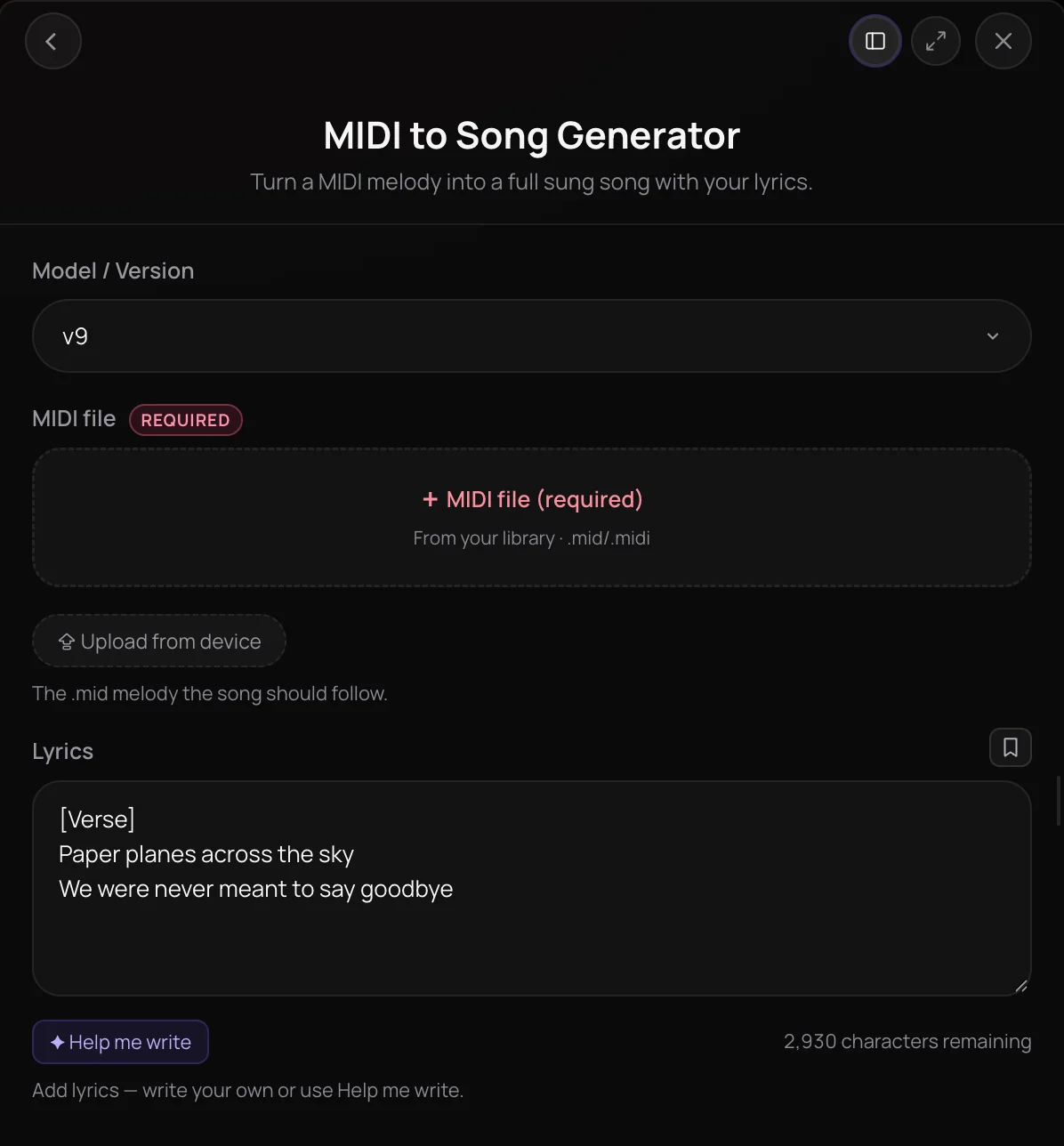
MIDI to Song Generator turns a .mid melody and the lyrics you write into a complete, sung song that follows your tune. It's built for producers, composers and songwriters who already have a melody in their DAW and want to hear it as a song without booking a singer. You get the finished song in chat with a title and cover art, ready to download or open in AI Studio.
See it in action
- Every AI Tool in Soundverse "Create": Songs, Vocals, SFX, Videos and More | Full Walkthrough From 1:36. The MIDI to Song Generator part of Soundverse's Create walkthrough: a MIDI melody becomes a sung song.
How it works
Export your melody as MIDI
Save the melody you want sung as a .mid file, from your DAW or with Audio to MIDI. Aim for 5 to 60 seconds of melody.
Add the MIDI file
Open MIDI to Song Generator and pick the .mid under MIDI file, from your Library or your device.
Write the lyrics
Add the words in Lyrics, or click Help me write to draft them. Lyrics are required and are sung exactly as written.
Generate the song
Click Generate in Chat. The song arrives with a title and cover art, ready to play, download or open in AI Studio.
Why use MIDI to Song Generator
Your melody, sung
The song is built to follow the melody in your MIDI file, with your lyrics sung over it.
A song, not a MIDI render
You get a complete, sung track with a title and cover art, not General MIDI playback of your notes.
Fits a DAW workflow
Write the melody in your DAW, export a .mid, and bring the finished song back into your session as audio.
Lyrics on your terms
Write every word yourself or start from Help me write and edit, and the lyrics are sung exactly as written.
What it costs
Free plan: Soundverse v6. Soundverse v7 and Soundverse v8 need Creator; Soundverse v9 needs Pro. New accounts get 1,000 free tokens, enough for about 3 songs. On the Free plan it runs through Agent One, which gives free accounts 3 runs in all; sharing unlocks the 2nd and 3rd.
- Song with Soundverse v6: 300 tokens (about $0.75–$0.94 on Creator, or ₹30–₹37 in India).
- Song with Soundverse v7: 400 tokens (about $1.00–$1.25 on Creator, or ₹40–₹50 in India).
- Song with Soundverse v8: 400 tokens (about $1.00–$1.25 on Creator, or ₹40–₹50 in India).
- Song with Soundverse v9: 500 tokens (about $1.25–$1.56 on Pro, or ₹52–₹65 in India).
Agent One runs this tool for you, and the agent's own steps are metered on top of the tool's price: about 7 tokens a step in Lite mode, 54 in Standard mode and 128 in Pro mode, the default on paid plans.
Creator $12.49 a month, or $9.99 a month billed yearly ($119.88 a year) · Pro $31.24 a month, or $24.99 a month billed yearly ($299.88 a year) · Max from $72 a month, or $60 a month billed yearly ($720 a year).
In India (PayU): Creator ₹499 a month, or ₹399 a month billed yearly (₹4,788 a year) · Pro ₹1,299 a month, or ₹1,039 a month billed yearly (₹12,468 a year) · Max from ₹2,999 a month, or ₹2,399 a month billed yearly (₹28,788 a year).
Prices outside India are in US dollars, billed through Stripe; in India they are in rupees, billed through PayU. Monthly tokens reset each month and don't roll over.
Frequently asked questions
Is MIDI to Song Generator free?
MIDI to Song Generator runs on the Free plan with the entry-level model, while the newer models need the Creator plan or above. Each song uses tokens from your plan, and new accounts get free starter tokens. On the Free plan, what you make is for personal use. Paid plans add a commercial license; the Pricing page lists what each plan covers.
How closely does MIDI to Song Generator follow my melody?
MIDI to Song Generator builds the song around the melody in your .mid file and sings your lyrics over it, so a clear, single melody line gives it the most to follow. Export just the 5 to 60 seconds you want sung rather than a full multi-instrument arrangement, and write lyrics that fit the phrasing. Each run makes one song, so adjust the lyrics or the MIDI and generate again if a take misses.
Can I choose the genre, instruments or mood?
No. MIDI to Song Generator has no genre, instrument or mood field, so the MIDI melody and your lyrics are its only inputs. To describe the style in words, use AI Song Generator, which takes a style prompt, or Similar Song Generator, which follows the style of a reference track.
Can MIDI to Song Generator sing lyrics in any language?
Not every language yet. MIDI to Song Generator can turn down lyrics in some languages, such as French, German or Hindi written in Latin letters, and stops with a message instead of a song. If that happens, try the lyrics in English, or use AI Song Generator, which sings in more languages but doesn't follow your MIDI melody.
What is MIDI to Song Generator?
MIDI to Song Generator is a Soundverse tool that turns a .mid melody into a complete song that follows it, sung with lyrics you write. Soundverse delivers the finished song in chat with a title and cover art, ready to play, download or open in AI Studio.
How do I turn a MIDI file into a song with AI?
Open MIDI to Song Generator and pick your .mid file under MIDI file, from your Library or your device. Write the words in Lyrics, or use Help me write to draft them, then click Generate in Chat. MIDI to Song Generator builds a sung song that follows the MIDI melody and sings your lyrics exactly as written.
What MIDI files can I use?
MIDI to Song Generator takes one .mid or .midi file per run. MIDI to Song Generator reads 5 to 60 seconds of melody, and because a MIDI file has no audio length the panel can't check that for you, so export just the melody you want sung, 5 to 60 seconds of it. You need the rights to anything you upload.
Do I need lyrics for MIDI to Song Generator?
Yes. Lyrics are required, because MIDI to Song Generator has no style prompt and the MIDI carries the composition, not the words. You can write up to 3,000 characters, or 400 on the Free plan, or click Help me write to draft lyrics you can edit. MIDI to Song Generator always produces a sung song, not an instrumental.
Can I use MIDI to Song Generator inside AI Studio?
Not on the timeline. MIDI to Song Generator runs in chat, so opening it from AI Studio sends Create to an Agent One chat instead. Once the song is ready, open it in AI Studio from its result card to edit it, extend it or mix it with the rest of your project.
What if my melody is a recording, not a MIDI file?
Convert it first with Audio to MIDI, which transcribes a recording into MIDI and saves the .mid to your Library, ready to pick in MIDI to Song Generator. Or skip MIDI entirely: Melody to Song Generator takes a hummed, sung or played clip of 5 to 60 seconds and builds the song from that.
Turn your MIDI into a finished song
Add a .mid melody and your lyrics, and hear them come back as a complete, sung song.
