Create · Creator+
Multi-scene video generator: plan each shot, get one stitched video
Describe up to 10 scenes, pin first and last frames, and set each from 4 to 15 seconds. Agent One films them in order. On the Creator plan and above.
1,000 free tokens to start · No card needed · Cancel paid plans anytime
Unlock Multi-Scene Video Builder with Creator — from $9.99/mo, or ₹399/mo in India. 4,000 tokens a month. Billed $119.88 a year, or $12.49 month to month.
What you get
A sequence, not a single shot
Plan up to 10 scenes, each with its own description and length, and decide what happens in every shot.
Start and end on your images
Pin a first frame, and a last frame if you like, so each scene begins and lands on an image you chose.
One cut or every clip
Choose Single video for the scenes joined in order, or Multiple videos for each scene as its own file to arrange yourself.
Who it's for
Filmmakers and storyboard artists
Turn a storyboard into moving shots, one scene per panel, in the order you planned.
Musicians
Build a sequence of shots for a music video, then cut it to your song in AI Studio.
Ad and brand teams
Plan a short product sequence shot by shot, from the opening image to the final frame.
Content creators
Tell a short story in up to 10 scenes instead of a single clip.
When to use it
- You've storyboarded a sequence and know what each shot shows
- You need a before-and-after transition
- One shot isn't enough to tell the story
- You want each shot as its own file to edit yourself
What you can make with it
Storyboard to motion
Use each storyboard panel as a scene's first frame and describe what happens in the shot.
Before and after
Start a scene on the 'before' image and end it on the 'after' image with a first and a last frame.
A three-shot product teaser
Plan a wide opening, a close-up and a final hero shot as three scenes of 4 to 8 seconds each.
One character across scenes
Start several scenes on images of the same character so they look alike from shot to shot.
Scenes cut to your song
Choose Multiple videos, then place the clips on a video lane in AI Studio over your song and cut them to the music.
A short trailer
Build a teaser for a game, a film or an event from up to 10 planned scenes in one run.
Screenshots
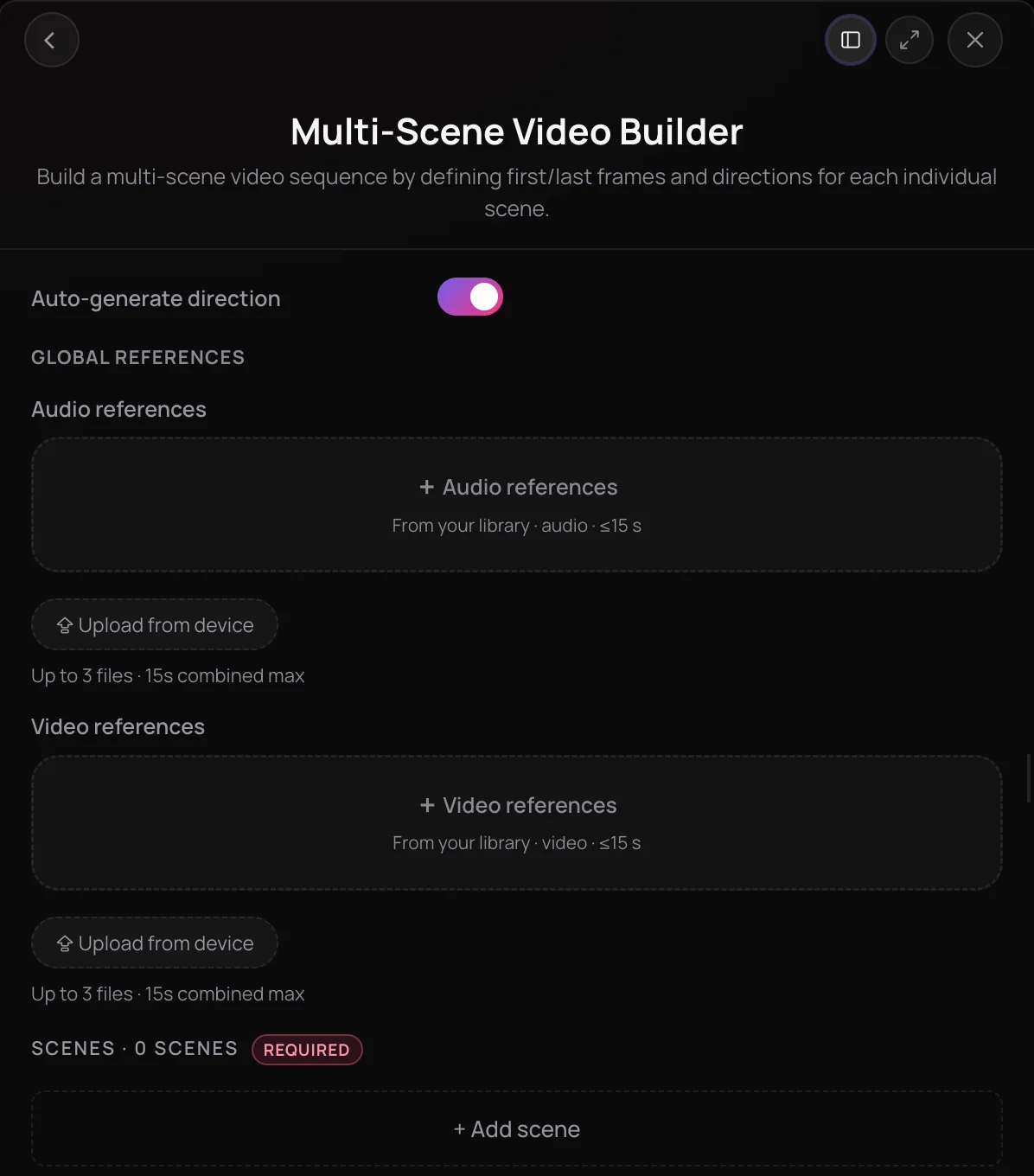
Multi-Scene Video Builder is a multi-scene video generator in Soundverse: you plan up to 10 scenes, each with its own description, optional first and last frames and a length of 4 to 15 seconds. Agent One films the scenes in order, then joins them into one continuous video or hands you each clip separately. It's built for musicians, filmmakers and creators who want a sequence with a planned shape, not a single shot.
See it in action
- Every AI Tool in Soundverse "Create": Songs, Vocals, SFX, Videos and More | Full Walkthrough From 3:04. The Multi-Scene Video Builder part of Soundverse's Create walkthrough: a video built scene by scene.
How it works
Set the direction
Open Multi-Scene Video Builder under Create in AI Tools. Leave Auto-generate direction on, or turn it off to describe the characters, environment, camera movement and story for the whole video.
Add your scenes
Click + Add scene for each shot, up to 10. Give each scene a description, a first frame or both, and set its duration from 4 to 15 seconds.
Pin the frames
Add a first frame to set where a scene starts and an optional last frame to set where it ends. The last frame unlocks once the scene has a first frame.
Choose the output and create
Pick Single video for one stitched cut or Multiple videos for one file per scene, then click Create. Agent One films each scene in turn and delivers the result in your chat.
Why use Multi-Scene Video Builder
Scene-level control
Every scene gets its own description, frames and duration, so you decide what happens in each shot and for how long.
Start and end on your images
First and last frames set where a shot begins and lands, and reusing the same character or place in your frames helps keep it consistent from scene to scene.
One cut or separate clips
Get a single video with the scenes joined in order, or every scene as its own file to arrange yourself.
Auto or hand-written direction
Leave direction on auto and let your scene descriptions lead, or turn it off to set the characters, environment, camera movement and story for the whole video.
What it costs
Needs Creator or above.
- One 5-second shot, Seedance 2.0 at 720p: 3,000 tokens at 600 tokens a second (about $7.49–$9.37 on Creator, with a top-up, or ₹299–₹374 in India); it holds 8,000 tokens when it starts.
A video costs the sum of its shots, each at its model's rate.
A run holds more than Creator's 4,000 monthly tokens when it starts, so on Creator it needs a top-up. Pro includes 10,000 a month.
A clip holds its model's top rate for its length when it starts, and gives back what it doesn't use when it's done. Your balance has to cover the hold, so the hold decides whether a clip can start.
Agent One runs this tool for you, and the agent's own steps are metered on top of the tool's price: about 7 tokens a step in Lite mode, 54 in Standard mode and 128 in Pro mode, the default on paid plans.
Creator $12.49 a month, or $9.99 a month billed yearly ($119.88 a year) · Pro $31.24 a month, or $24.99 a month billed yearly ($299.88 a year) · Max from $72 a month, or $60 a month billed yearly ($720 a year).
In India (PayU): Creator ₹499 a month, or ₹399 a month billed yearly (₹4,788 a year) · Pro ₹1,299 a month, or ₹1,039 a month billed yearly (₹12,468 a year) · Max from ₹2,999 a month, or ₹2,399 a month billed yearly (₹28,788 a year).
Prices outside India are in US dollars, billed through Stripe; in India they are in rupees, billed through PayU. Monthly tokens reset each month and don't roll over.
Frequently asked questions
Is Multi-Scene Video Builder free?
No. Multi-Scene Video Builder is available on the Creator plan and above. Every scene is its own video generation, and video is charged by the second, so each run uses tokens for every scene and more or longer scenes cost more. Creating a Soundverse account is free, but the Free plan doesn't include video generation.
How many tokens does a multi-scene video use?
Multi-Scene Video Builder bills each scene by the second, about 600 tokens a second at the default 720p, so a default 8-second scene is about 4,800 tokens. Joining scenes adds a small stitching charge, and Agent One, which runs the scenes, adds its own. To start, a scene needs 1,600 tokens a second free, with the unused part returned when it finishes, so a default scene needs about 12,800: more than Creator's 4,000 or Pro's 10,000 a month. Plan on a top-up, or Max, which starts at 25,000.
How do I keep a character consistent across scenes?
Multi-Scene Video Builder generates each scene separately, so the most reliable way to keep a character or place consistent is to give the scenes first frames that show it. Describing the same character and setting in each scene helps too, and with Auto-generate direction off you can describe the characters and environment once for the whole video.
Can I use a multi-scene video commercially?
Because Multi-Scene Video Builder needs a paid plan, your videos come with that plan's commercial license; the Pricing page lists what each plan covers. You need the rights to anything you upload or pick as input, including every image you use as a first or last frame.
What can't Multi-Scene Video Builder do?
Multi-Scene Video Builder doesn't edit footage you already have, and it caps a run at 10 scenes of up to 15 seconds each. Scenes are generated one after another, so a long sequence takes longer than a single clip. To edit an existing clip, use AI Video Generator; to build a video around a finished song, use AI Music Video Generator.
What is Multi-Scene Video Builder, Soundverse's multi-scene video generator?
Multi-Scene Video Builder is a multi-scene video generator in Soundverse: you plan up to 10 scenes, each with a description, optional first and last frames and a length of 4 to 15 seconds. Agent One generates the scenes in order and joins them into one video, or returns each scene as its own clip.
How many scenes can I add, and how long can each be?
Multi-Scene Video Builder takes up to 10 scenes per run. Each scene has its own duration slider from 4 to 15 seconds, with 8 seconds as the default, so the longest sequence is ten 15-second scenes. If you only need one shot, AI Video Generator is the simpler tool.
Do I need a first and last frame for every scene?
No. Each scene in Multi-Scene Video Builder needs either a description or a first frame, and Create stays unavailable until every scene has one of them. A last frame is optional and only becomes available after you add a first frame. Frames are images you pick from your Library, and you need the rights to any image you use.
Does Multi-Scene Video Builder stitch the scenes together?
Yes, if you choose Single video as the Output Mode: Multi-Scene Video Builder joins the scenes in order into one continuous video. Choose Multiple videos to get each scene as its own clip instead. Results appear in your Agent One chat.
Ready to build your sequence?
Plan your scenes, pin the frames that matter, and let Agent One film them and join them into one video.
