Assist & learn · Free
AI music for beginners: a plan and starter prompts for your goal
Pick your level, role, goal and genre. Agent One explains which Soundverse tools to use and in what order, then gives you prompts to paste back.
1,000 free tokens to start · No card needed · Cancel paid plans anytime
Do more with Onboarding Agent on Creator — from $9.99/mo, or ₹399/mo in India. 4,000 tokens a month. Billed $119.88 a year, or $12.49 month to month.
What you get
Know where to start
Get the tools for your goal in the order to use them, whether that's a full song, stems, a voice or DNA model, or music for a video.
Prompts ready to paste
Each session ends with starter prompts, three by default and up to eight, written to paste straight back into the chat.
Guidance at your pace
Choose Quick start, Balanced or Deep dive guidance, in a Friendly, Concise, Technical or Encouraging tone.
Who it's for
First-time music makers
Get the tools for your first song in the order to use them, with starter prompts ready to send.
Video creators
Learn which tools get music onto your footage by choosing Score a video as your goal.
Producers new to Soundverse
See where stems, voice models and DNA fit into the way you already work.
Labels onboarding a team
Give a new team member a starting plan matched to their role and level.
Hobbyists
Explore at your own pace, with guidance as short or as deep as you want.
When to use it
- You've just signed up and don't know which tool to open first
- You know what you want to make but not which tools get you there
- A teammate is new to Soundverse and needs a starting point
- You want starter prompts written for your genre
- You'd rather answer one question at a time than read a long guide
What you can make with it
A first-song plan
Set Experience Level to First-time and Main Goal to Make a full song for the steps from an idea to a finished track.
Starter prompts for your genre
Pick a Genre Focus such as Lo-fi, Cinematic or R&B and get between one and eight prompts written for it.
A route to scoring a video
Choose Video Creator as your role and Score a video as your goal to see which tools put music under your footage.
Where stems fit
Pick Generate stems as your goal to learn which stem tools to use and when.
A plan to train a voice or DNA
Choose Train a voice/DNA to see what to prepare and which training tool to open first.
A technical briefing
Set Experience Level to Pro and Tone to Technical for a short, specific rundown instead of a beginner walkthrough.
A quick start or a deep dive
Choose Quick start for the essentials, or Deep dive for more detail on each step.
A map before a lesson
Pick Explore & learn for an overview of what you can make, then open the Teaching Agent to learn a technique in depth.
Screenshots
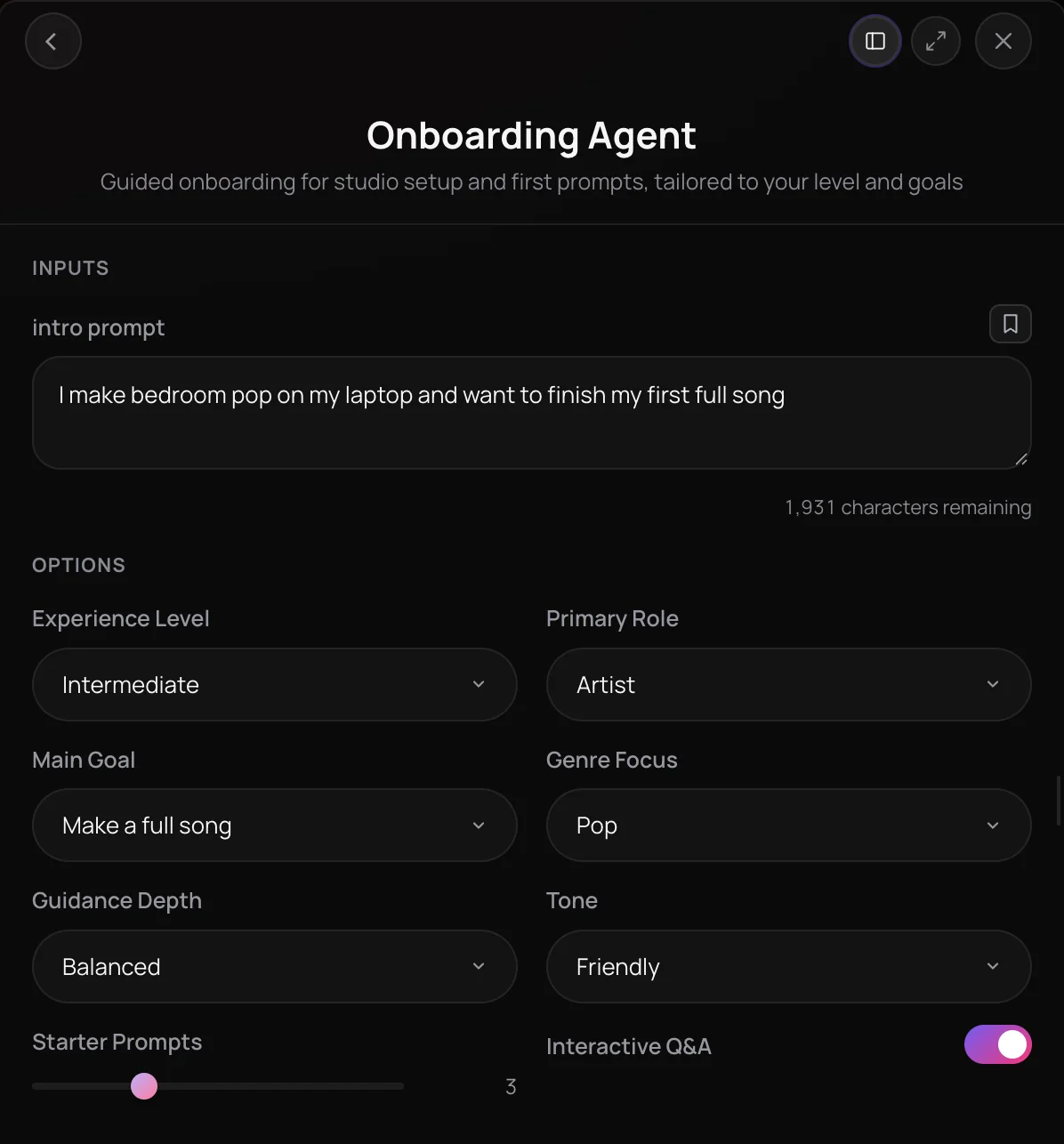
Onboarding Agent is Soundverse's guide to AI music for beginners, and for anyone new to the platform. Tell it your experience level, role, main goal and genre, and it explains which tools get you to that goal fastest and in what order. You also get between one and eight starter prompts, three by default, to paste straight back to Agent One.
How it works
Open the Onboarding Agent
Find Onboarding Agent under Assist & Learn in AI Tools. Optionally, write a line about yourself and what you want to make.
Say where you're starting
Pick your Experience Level, Primary Role, Main Goal and Genre Focus, such as a first-time artist who wants a full pop song.
Shape the guidance
Choose Guidance Depth and Tone, set how many starter prompts you want from 1 to 8, and turn Interactive Q&A on or off.
Get your plan in the chat
Press Generate in Chat. Agent One explains which tools to use and in what order, then gives you starter prompts to paste back.
Why use Onboarding Agent
A plan for your goal
Whether you want a full song, stems, a voice or DNA model, or music for a video, you get the tools that lead there and the order to use them in.
Prompts you can use
Each session ends with starter prompts, three by default and up to eight, written to paste straight back into the chat.
Your pace, your tone
Choose Quick start, Balanced or Deep dive guidance, in a Friendly, Concise, Technical or Encouraging tone.
One question at a time
With Interactive Q&A on, Agent One asks one question at a time when it needs something from you, instead of a long questionnaire. Turn it off to get everything in one message.
What it costs
Works on the Free plan. New accounts get 1,000 free tokens to start. On the Free plan it runs through Agent One, which gives free accounts 3 runs in all; sharing unlocks the 2nd and 3rd.
- Guided first session, Lite agent: from 7 tokens (from about $0.02 on Creator, or ₹1 in India).
Creator $12.49 a month, or $9.99 a month billed yearly ($119.88 a year) · Pro $31.24 a month, or $24.99 a month billed yearly ($299.88 a year) · Max from $72 a month, or $60 a month billed yearly ($720 a year).
In India (PayU): Creator ₹499 a month, or ₹399 a month billed yearly (₹4,788 a year) · Pro ₹1,299 a month, or ₹1,039 a month billed yearly (₹12,468 a year) · Max from ₹2,999 a month, or ₹2,399 a month billed yearly (₹28,788 a year).
Prices outside India are in US dollars, billed through Stripe; in India they are in rupees, billed through PayU. Monthly tokens reset each month and don't roll over.
Frequently asked questions
Is the Onboarding Agent free?
The Onboarding Agent runs as an Agent One conversation, so it uses tokens from your plan like any other chat message. Soundverse is free to sign up and new accounts get free starter tokens. The tools you try next have their own costs, and on the Free plan what you make is for personal use; paid plans add a commercial license, as the Pricing page lists.
Does the Onboarding Agent use my free generations?
Not for the walkthrough itself. On the Free plan, Agent One includes three generations: the first right away and two more when you share Soundverse. A reply that only explains and suggests, like the Onboarding Agent's plan and starter prompts, doesn't use one up, though you need one available to send a message. A generation counts when Agent One makes something, such as a song from a starter prompt. Every message uses tokens from your plan.
What can't the Onboarding Agent do?
The Onboarding Agent is a guided conversation: it explains and suggests, and it doesn't change your account or Studio settings for you. For a hands-on result, paste a starter prompt back to Agent One or open the recommended tool yourself.
What is the Onboarding Agent, Soundverse's guide to AI music for beginners?
Onboarding Agent is Soundverse's guide to AI music for beginners and anyone new to the platform. Soundverse hands your experience level, role, goal and genre to Agent One, which explains the tools that get you there in order and gives you starter prompts to paste back into the chat.
How do I start making music with AI as a beginner?
Open the Onboarding Agent, set Experience Level to First-time or Beginner, choose Make a full song as your Main Goal and pick a Genre Focus. Press Generate in Chat, and the Onboarding Agent explains which Soundverse tools to use in what order, then gives you starter prompts. Paste one back into the chat and Agent One gets to work on it.
What goals can the Onboarding Agent plan for?
The Onboarding Agent's Main Goal menu covers five starting points: make a full song, generate stems, train a voice or DNA model, score a video, or explore and learn. It pairs that goal with your role, from artist, producer or label to video creator, hobbyist or explorer, and a genre focus such as pop, hip-hop, EDM, lo-fi, cinematic, rock or R&B.
Can I change how detailed the guidance is?
Yes. The Onboarding Agent's Guidance Depth runs from Quick start through Balanced to Deep dive, and Tone can be Friendly, Concise, Technical or Encouraging. You also choose how many starter prompts you get, from one to eight, and whether Agent One asks you questions one at a time or delivers the whole walkthrough in one message.
What should I do after the Onboarding Agent?
Paste one of the Onboarding Agent's starter prompts back into the chat and Agent One starts on it, or open a recommended tool, such as the AI Song Generator or Stem Separator, from AI Tools. If you would rather learn a technique in depth first, the Teaching Agent explains music, songwriting and production topics with quizzes and audio examples.
How is the Onboarding Agent different from the Teaching Agent?
The Onboarding Agent helps you get started on Soundverse: it maps your goal to the right tools and gives you starter prompts. The Teaching Agent teaches music itself, such as theory, songwriting or mixing, through explanations, quizzes, learning paths and audio examples. Use the Onboarding Agent on day one and the Teaching Agent when you want to learn a technique.
New to Soundverse?
Tell the Onboarding Agent your goal and get a tool plan and starter prompts in the chat.
