AI models · Creator+
Seedance 2.5 clips up to 30 seconds, guided by your images and audio
Make 4 to 30 second clips at 480p or 720p from up to 30 images, 10 videos and 10 audio clips, or change a clip you have with Seedance 2.5 Edit.
1,000 free tokens to start · No card needed · Cancel paid plans anytime
Unlock Seedance 2.5 with Creator — from $9.99/mo, or ₹399/mo in India. 4,000 tokens a month. Billed $119.88 a year, or $12.49 month to month.
What you get
A whole chorus in one shot
Seedance 2.5 renders up to 30 seconds, so a chorus or a lip-synced verse fits in a single clip.
Guided by your references
Up to 30 images, 10 videos and 10 audio clips keep characters, motion and sound on brief.
Change a clip without reshooting
Seedance 2.5 Edit re-renders a 4 to 30 second clip with the change you describe and leaves the original untouched.
Who it's for
Independent artists
Make a character sing a full verse or chorus, up to 30 seconds, from a portrait and your vocal.
Content creators and YouTubers
Do the character-replacement trend with your own selfie and a reference clip.
Video editors
Restyle a clip you already shot, from day to night or one outfit to another, without filming it again.
Music video makers
Shoot longer single takes guided by many reference images, videos and audio clips.
When to use it
- Your shot needs to run longer than 15 seconds
- You have a portrait and a vocal and want the character to sing
- A clip is right except for one thing, like the weather or an outfit
- You have lots of reference images of a character or a place
- You want to join the character-replacement trend with your own photo
What you can make with it
A lip-synced chorus
Add a portrait as a reference image and up to 30 seconds of vocal as reference audio, using only a face and voice you have permission to use. Split the vocal out with Stem Separator first for a cleaner sync.
Character replacement from a selfie
Add your selfie as a reference image and a clip as a reference video, then ask for the person in the image to replace the people in the clip.
Day turned to night
In Seedance 2.5 Edit, turn a daytime street scene into night, with lit signs and wet roads.
A new outfit
Describe only the change, such as a red jacket instead of a blue one, and the edit keeps your clip's length and framing.
A 30-second single take
Set the length as high as 30 seconds so a whole chorus plays out without a cut.
Scenes built from many references
Load up to 30 reference images, plus videos and audio clips, so characters, places and sounds stay on brief.
A chosen first and last frame
Turn on Use first / last frame; the first frame sets the framing for the whole clip.
Lip-sync music videos
In AI Music Video Generator, turn on Lip Sync and leave the model on Auto, and it picks Seedance 2.5.
Screenshots
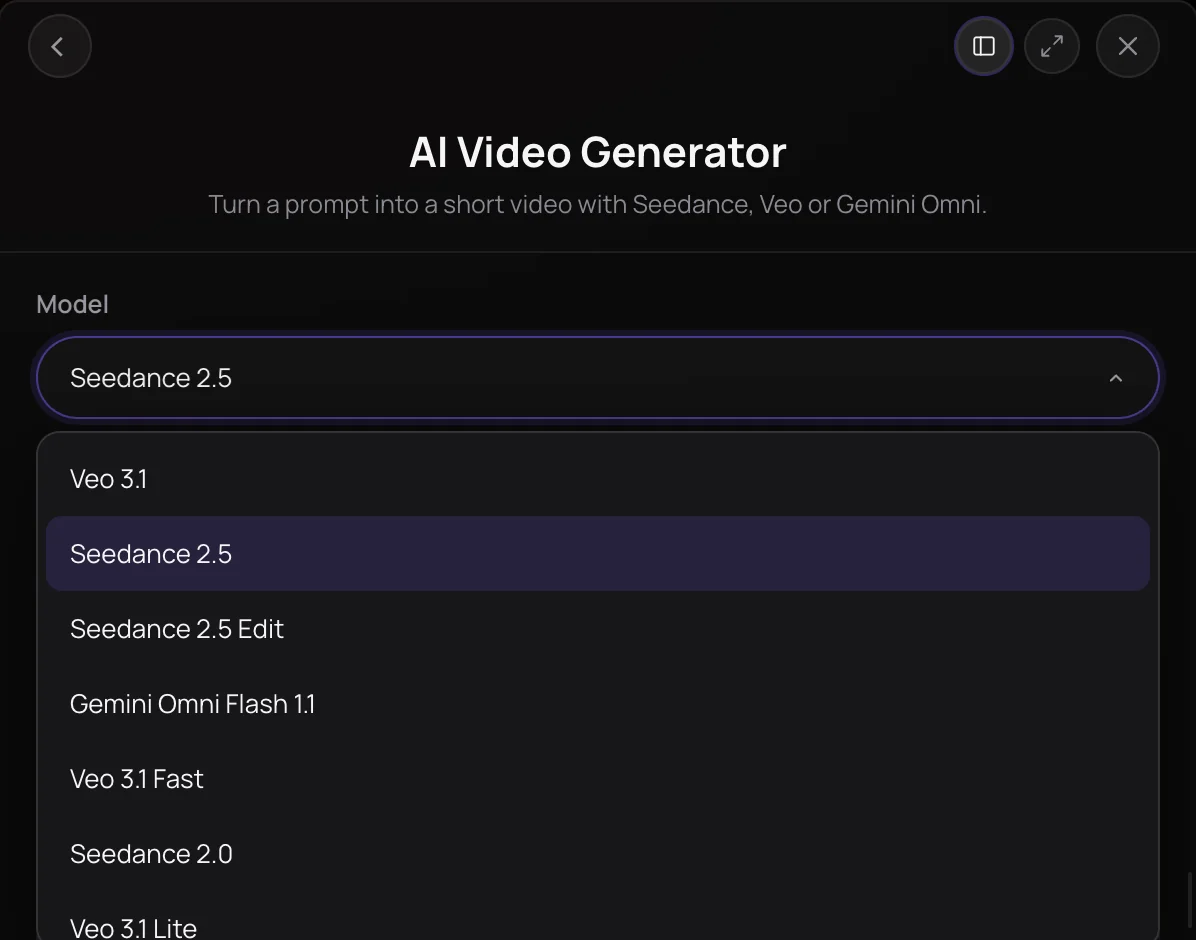
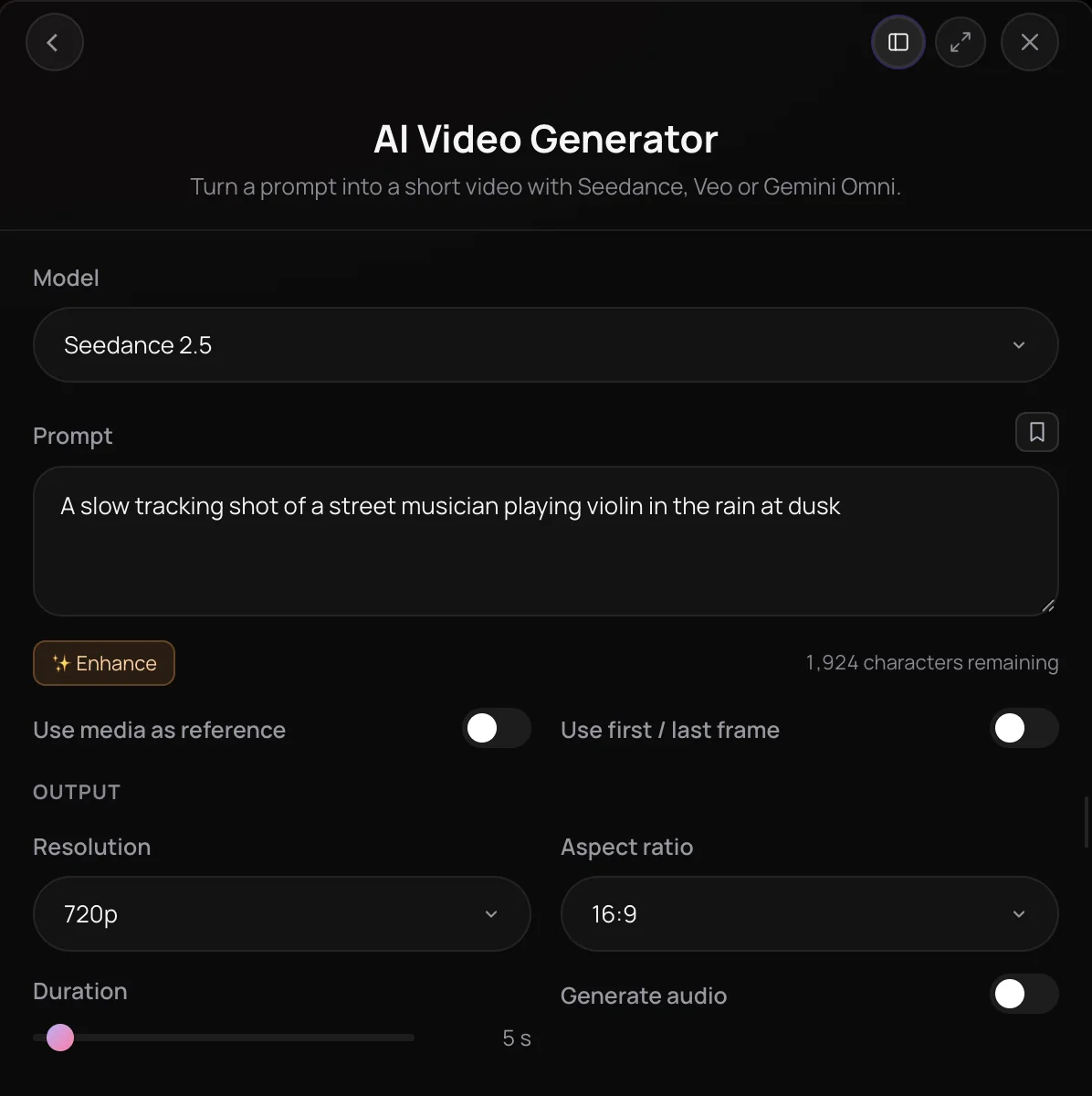
Seedance 2.5 is ByteDance's newer Seedance video model, and in Soundverse it makes 4 to 30 second clips at 480p or 720p from a prompt, a first and last frame, or up to 30 reference images, 10 reference videos and 10 audio clips. Its variant, Seedance 2.5 Edit, re-renders a clip you already have with the change you describe and keeps the clip's length and framing. It's for creators making longer shots, character-led scenes and lip-synced performances.
See it in action
- New AI Models on Soundverse: Google Lyria 3.5, Veo 3.1, Seedance 2.5 and More One Halloween brief run through each new model on Soundverse, Seedance 2.5 and Seedance 2.5 Edit among them, with every result shown as it came back.
- How to Do the Viral Character Replacement Trend with AI | Soundverse AI x Seedance | AI Music Video Seedance 2.5 in AI Video Generator turns every person in a scene into the same person from one selfie, the viral character-replacement trend.
What you can do
Seedance 2.5
New clips of 4 to 30 seconds at 480p or 720p, in six aspect ratios, on the Creator plan and above.
Reference media (Creator+)
Up to 30 reference images, 10 reference videos and 10 audio clips, each video or audio clip up to 30 seconds. The prompt is optional when you add references.
- Put the person in the reference image into this video; there are three people and all of them should be this person
Lip-sync (Creator+)
Add a portrait as a reference image and a vocal as reference audio, and the character lip-syncs for up to 30 seconds.
First and last frame (Creator+)
Turn on Use first / last frame to start and end on images you choose; the first frame sets the framing.
Seedance 2.5 Edit
Change one thing in a clip you already have, on the Creator plan and above.
Describe the change (Creator+)
Write only what should change, such as the weather, the time of day or an outfit.
- Make it night with neon signs reflecting on wet streets
- Change the jacket to red
The clip to edit (Creator+)
One MP4 of 4 to 30 seconds and up to 200 MB from your Library. The edit keeps its length and aspect ratio.
Sound (Creator+)
With Generate audio on, Seedance 2.5 Edit makes a new soundtrack; with it off, the result is silent.
How it works
Pick Seedance 2.5 or Edit
Open AI Video Generator under Create in AI Tools. In the Model menu, choose Seedance 2.5 for a new clip or Seedance 2.5 Edit to change a clip you have.
Describe the scene or change
For Seedance 2.5, describe the scene in the prompt. For Seedance 2.5 Edit, describe only the change, such as "make it snow" or "change the jacket to red".
Add your media
Add reference images, video and audio from your Library, or turn on Use first / last frame. For an edit, pick an MP4 of 4 to 30 seconds and up to 200 MB from your Library.
Set the output and generate
Choose 4 to 30 seconds, 480p or 720p, an aspect ratio and Generate audio, then click Generate in Chat; an edit keeps its clip's length and shape. The video lands in your chat and in Videos.
Why use Seedance 2.5
Clips up to 30 seconds
Seedance 2.5 renders any whole length from 4 to 30 seconds, twice the longest Seedance 2.0 clip, so a full verse or chorus can fit in one shot.
Far more references
Guide Seedance 2.5 with up to 30 reference images, 10 reference videos and 10 audio clips, with each video or audio clip up to 30 seconds.
Lip-sync for a whole verse
Add a portrait as a reference image and a vocal as reference audio, and the character lip-syncs for up to 30 seconds. AI Music Video Generator picks Seedance 2.5 on Auto when the singer lip-syncs.
Edit without reshooting
Seedance 2.5 Edit changes one thing in a clip you already have and saves the result as a new video named after the original, which stays untouched.
What it costs
Needs Creator or above.
- 5-second clip at 720p: 2,775 tokens at 555 tokens a second (about $6.93–$8.66 on Creator, or ₹277–₹346 in India); it holds 3,330 tokens when it starts.
- 5-second clip at 480p: 1,235 tokens at 247 tokens a second (about $3.08–$3.86 on Creator, or ₹123–₹154 in India); it holds 3,330 tokens when it starts.
From reference media, and for edits, the rates are 296 and 666 tokens a second.
A clip holds its model's top rate for its length when it starts, and gives back what it doesn't use when it's done. Your balance has to cover the hold, so the hold decides whether a clip can start.
Agent One runs this tool for you, and the agent's own steps are metered on top of the tool's price: about 7 tokens a step in Lite mode, 54 in Standard mode and 128 in Pro mode, the default on paid plans.
Creator $12.49 a month, or $9.99 a month billed yearly ($119.88 a year) · Pro $31.24 a month, or $24.99 a month billed yearly ($299.88 a year) · Max from $72 a month, or $60 a month billed yearly ($720 a year).
In India (PayU): Creator ₹499 a month, or ₹399 a month billed yearly (₹4,788 a year) · Pro ₹1,299 a month, or ₹1,039 a month billed yearly (₹12,468 a year) · Max from ₹2,999 a month, or ₹2,399 a month billed yearly (₹28,788 a year).
Prices outside India are in US dollars, billed through Stripe; in India they are in rupees, billed through PayU. Monthly tokens reset each month and don't roll over.
Good to know
No 1080p
Seedance 2.5 and Seedance 2.5 Edit render 480p or 720p. For 1080p, use Seedance 2.0 or Veo 3.1.
Edits don't keep the original sound
Seedance 2.5 Edit makes a new soundtrack or none, and it can't make a clip longer.
Content filter
Prompts involving real people, brand names or song lyrics can be blocked.
Frequently asked questions
Is Seedance 2.5 free?
No. Seedance 2.5 and Seedance 2.5 Edit are available on the Creator plan and above, and each run uses tokens per second: about 247 at 480p or 555 at 720p, and about 296 or 666 when references guide the clip or for an edit, which is billed on the source clip's length. AI Video Generator shows the estimate before you generate, and runs made in chat also go through Agent One, which adds at least 128 tokens in its default Pro mode, or 7 in Lite mode.
How good is Seedance 2.5?
Judge Seedance 2.5 on your own scene. In October 2026, Soundverse posted a video that runs one Halloween brief through each of its new models, Seedance 2.5 and Seedance 2.5 Edit included, and shows exactly what came back, and a short tutorial shows Seedance 2.5 doing the character-replacement trend from one selfie. Try a prompt at 480p first, then run the one that works at 720p.
Can I use Seedance 2.5 videos commercially?
Seedance 2.5 runs on paid Soundverse plans, and paid plans include a commercial license; the Pricing page lists what each plan covers. You need the rights to every image, video, vocal and source clip you add. Only lip-sync or show a face or voice you own or have permission to use. Seedance 2.5's content filter can block prompts that involve real people, brand names or song lyrics.
What can't Seedance 2.5 do?
Seedance 2.5 renders only 480p or 720p, not 1080p. Lip-sync needs a portrait, since audio alone isn't accepted. Seedance 2.5 Edit doesn't keep the source clip's own sound, can't use reference images, a first frame or lip-sync audio, and can't make a clip longer; to extend a clip of up to 10 seconds, ask Agent One to use Gemini Omni Flash 1.1.
What is Seedance 2.5?
Seedance 2.5 is ByteDance's newer Seedance video model, available in Soundverse's AI Video Generator together with its editing variant, Seedance 2.5 Edit. In Soundverse, Seedance 2.5 makes 4 to 30 second clips at 480p or 720p from a prompt, a first and last frame, or up to 30 reference images, 10 videos and 10 audio clips.
What is Seedance 2.5 Edit?
Seedance 2.5 Edit is the version of Seedance 2.5 that changes a video you already have instead of making a new one. Pick an MP4 of 4 to 30 seconds and up to 200 MB from your Library, describe the change, such as making it night or turning a jacket red, and Seedance 2.5 Edit re-renders the clip at 480p or 720p with the same length and aspect ratio.
How is Seedance 2.5 different from Seedance 2.0?
Seedance 2.5 makes longer clips, from 4 to 30 seconds against 4 to 15, and takes more references: up to 30 images, 10 videos and 10 audio clips against 9, 3 and 3. Seedance 2.0 renders up to 1080p, while Seedance 2.5 stops at 720p. Seedance 2.0 stays the default in AI Video Generator, so pick Seedance 2.5 when you need its length or references.
How do I use Seedance 2.5 in Soundverse?
Open AI Video Generator, choose Seedance 2.5 or Seedance 2.5 Edit in the Model menu, add your prompt and media, and click Generate in Chat. You can also right-click a video lane in AI Studio and choose Generate Video, or ask Agent One by name, such as "make a 20 second clip with Seedance 2.5". Seedance 2.5 is available on the Creator plan and above.
Can Seedance 2.5 make a character lip-sync?
Yes. Add a portrait of the character as a reference image and the vocal as reference audio, up to 30 seconds per clip, and Seedance 2.5 animates the mouth to it. A clean vocal from Stem Separator syncs more reliably than a full mix. For a full performance video, AI Music Video Generator picks Seedance 2.5 on Auto when Lip Sync is on. Only use a face and voice you have permission to use.
Ready to try Seedance 2.5?
Open AI Video Generator and pick Seedance 2.5 for a new clip, or Seedance 2.5 Edit to change one you already have.
