Create · Creator+
Video to sound effects: SFX timed to the action in your clip
Pick a video and get footsteps, doors, engines and impacts that match what's on screen, one clip per sound or a full effects bed. On Creator and above.
1,000 free tokens to start · No card needed · Cancel paid plans anytime
Unlock Video to SFX with Creator — from $9.99/mo, or ₹399/mo in India. 4,000 tokens a month. Billed $119.88 a year, or $12.49 month to month.
What you get
No sound-library hunting
Video to SFX finds the action on screen and generates effects to match, so you don't search a library for every footstep and door.
Sounds that land on the frame
One clip per detected sound is placed at its moment, and in AI Studio each effect lands on the timeline locked to the picture.
Know the cost before you run it
In Magic mode, finding the sounds uses no tokens. In AI Studio you see each detected sound and the token price before you confirm.
Who it's for
Film and video editors
Get footsteps, doors and impacts placed where they happen on screen instead of syncing each one by hand.
Animation and motion designers
Add sound to animation that has none, matched to what moves on screen.
Game and app teams
Sound up gameplay captures and trailers with effects matched to the action.
Short-form creators
Add sound effects to Reels, Shorts and TikTok edits in one run.
Ad and brand teams
Put product sounds and impacts under an ad cut, timed to the picture.
When to use it
- A clip came out silent, from your camera or from AI Video Generator
- Your cut needs foley before the final mix
- You want a full effects bed but need to keep the original dialogue
- You have a long video to sound up, one part at a time
What you can make with it
Sound for silent AI clips
Give clips from AI Video Generator footsteps, engines and impacts that match what happens on screen.
Effects around the dialogue
Run Standard with Keep dialogue on an interview or a scene, so the speech stays and new effects sit around it.
Compare up to four beds
Ask Standard for up to four takes of the same range and keep the one that suits the edit.
Steer the character of the sound
In Standard, add a short prompt such as 'gritty and industrial' or 'soft and cartoonish'.
Score only the scene you need
Set Start and End around one scene so a run covers just that range.
Straight from your Library
Right-click a video in your Library and choose Create, then Generate SFX from Video, to open the tool with it loaded.
Gameplay and trailer cuts
Run a gameplay capture or a trailer cut through Video to SFX for impacts and movement sounds placed at their moments.
Screenshots
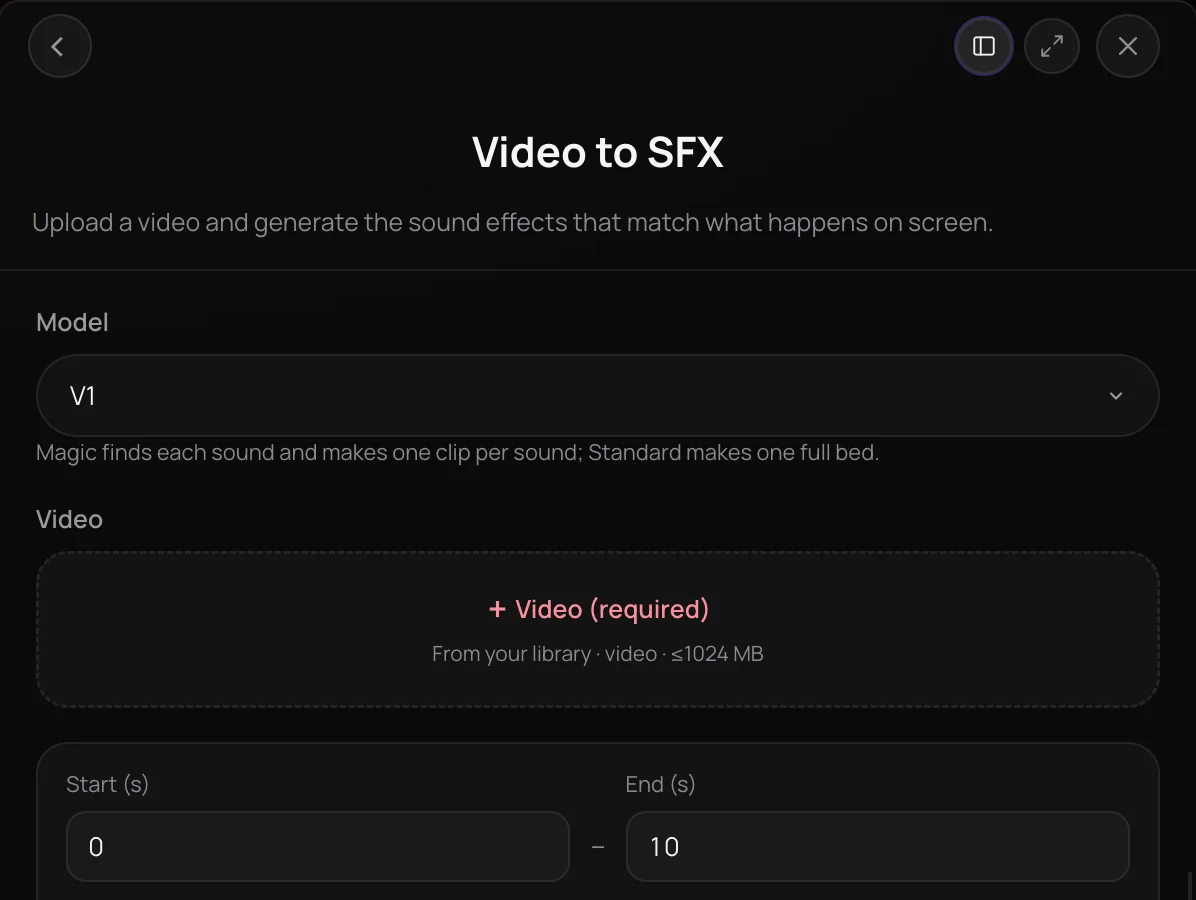
Video to SFX is Soundverse's video to sound effects tool: pick a video and it generates effects that match the action on screen. It's for filmmakers, editors, animation and game teams, and creators making Reels, Shorts and ads who need footsteps, doors, engines and impacts without searching a sound library. Get one clip per detected sound, placed at its moment, or a full sound-effects bed in up to four takes.
See it in action
- Sound Designers Are Shocked: AI Adds Every Sound Effect to Your Video | Soundverse AI Studio A video goes into AI Studio, which detects the action on screen and places matching effects on the timeline, from footsteps and doors to engines and impacts.
- Every AI Tool in Soundverse "Create": Songs, Vocals, SFX, Videos and More | Full Walkthrough From 1:02. The Video to SFX part of Soundverse's Create walkthrough: sound effects matched to your video.
How it works
Pick your video
Open Video to SFX from the Create tools in AI Tools and select an MP4, WebM or MOV video from your Library, or choose Generate SFX from Video on a Library video.
Set the range
Set Start and End to the part you want scored. One run covers up to 300 seconds, and the panel tells you what a longer video leaves out.
Choose Magic or Standard
Magic finds each sound and makes one clip per sound at its moment. Standard makes a full effects bed in up to 4 takes, with an optional prompt and Keep dialogue.
Click Generate in Chat
Agent One runs Video to SFX and returns the sound-effect audio files in your chat, separate from your video, so you can place them in your edit.
Why use Video to SFX
Timed to the action
Magic places each sound at the moment it happens. In AI Studio, every effect lands on the timeline locked to the picture.
No tokens to detect, clear price
In Magic mode, finding the sounds uses no tokens. In AI Studio you see each detected sound and the exact token price before you confirm.
Keeps the dialogue
Turn on Keep dialogue in Standard mode to keep the clip's own speech, with the new effects placed around it.
Long videos in parts
In AI Studio, Standard can score a video longer than 300 seconds in consecutive parts on the same tracks, and a part that doesn't finish isn't charged.
What it costs
Needs Creator or above.
- 10-second video, 1 take: 350 tokens at 35 tokens a second per take (about $0.87–$1.09 on Creator, or ₹35–₹44 in India).
- 10-second video, 1 take, model v2: 525 tokens at 52.5 tokens a second per take (about $1.31–$1.64 on Creator, or ₹52–₹65 in India).
On the first model, keeping the video's dialogue adds 28 tokens a second; model v2 includes it.
Agent One runs this tool for you, and the agent's own steps are metered on top of the tool's price: about 7 tokens a step in Lite mode, 54 in Standard mode and 128 in Pro mode, the default on paid plans.
Creator $12.49 a month, or $9.99 a month billed yearly ($119.88 a year) · Pro $31.24 a month, or $24.99 a month billed yearly ($299.88 a year) · Max from $72 a month, or $60 a month billed yearly ($720 a year).
In India (PayU): Creator ₹499 a month, or ₹399 a month billed yearly (₹4,788 a year) · Pro ₹1,299 a month, or ₹1,039 a month billed yearly (₹12,468 a year) · Max from ₹2,999 a month, or ₹2,399 a month billed yearly (₹28,788 a year).
Prices outside India are in US dollars, billed through Stripe; in India they are in rupees, billed through PayU. Monthly tokens reset each month and don't roll over.
Frequently asked questions
Is Video to SFX free?
No. Video to SFX is available on the Creator plan and above. Each run uses tokens from your plan, priced by the seconds of video scored, the number of takes and, in Magic mode, the sounds it finds. Detecting the sounds in Magic mode uses no tokens. Soundverse is free to sign up, and new accounts get free starter tokens.
How many tokens does Video to SFX use?
In Standard mode, Video to SFX is priced by the second: about 35 tokens per second of video for each take, so a 10-second clip with one take is about 350 tokens, and Keep dialogue adds about 28 a second. The newer v2 model in the Model menu costs about 52.5 a second per take, with Keep dialogue included. Magic is priced by the sounds it finds, and finding them uses no tokens. Runs from the chat also add Agent One's own charge.
How good are the sound effects from Video to SFX?
Video to SFX matches effects to what it sees, so clear on-screen action, such as footsteps, doors, engines and impacts, gives it the most to work with. Standard makes up to 4 takes of a full effects bed, so you can compare them and keep the one that fits, and Magic makes one clip per detected sound. If Magic finds no distinct sounds in part of a video, Soundverse suggests Standard instead.
Can I use the sound effects commercially?
Video to SFX needs a paid plan, and paid plans add a commercial license; the Pricing page lists what each plan covers. On the Free plan, what you make is for personal use. You need the rights to anything you upload, including the video you score and any dialogue you keep in the mix.
Where does Video to SFX fall short?
Video to SFX scores at most 300 seconds per run and returns sound-effect audio, not a finished video with the effects mixed in. Magic can find no distinct sounds in part of a video; Soundverse then suggests Standard. It doesn't write music or dialogue either: for a full score, use Describe and Generate Audio in AI Studio.
What is Video to SFX, Soundverse's video to sound effects tool?
Video to SFX is Soundverse's video to sound effects tool. It looks at a video you pick, finds the action on screen and generates matching sound effects, either one clip per detected sound placed at its moment or a full sound-effects bed for the whole range, up to 300 seconds per run.
How do I add sound effects to a video with AI?
Open Video to SFX in Soundverse, select your video from your Library, set Start and End, choose Magic or Standard, and click Generate in Chat. In AI Studio, right-click a video clip, open AI Tools and choose Generate SFX from video; after a detect step that uses no tokens, you confirm the sounds and the price, and each effect lands on a track under your video.
What videos does Video to SFX accept, and how long can they be?
Video to SFX takes MP4, WebM or MOV video from your Soundverse Library, up to 1 GB. Each run scores up to 300 seconds, which you set with Start and End. In AI Studio, Standard mode can also score a longer clip in consecutive parts, up to 20 parts.
What's the difference between Magic and Standard?
In Video to SFX, Magic finds each sound in the video and makes one clip per sound, placed at its moment. Standard makes one full sound-effects bed for the whole range in up to 4 takes, and adds an optional prompt and Keep dialogue. The newer v2 model in the Model menu runs Standard only.
How is Video to SFX different from the AI Sound Effects Generator?
Soundverse's AI Sound Effects Generator makes one effect from a text description of up to 450 characters, 0.5 to 30 seconds long. Video to SFX starts from your footage instead: it detects what happens on screen and times the effects to the picture, so you don't have to describe or place each sound yourself.
Ready to hear your video?
Pick a video, choose Magic or Standard, and get sound effects timed to the action on screen.
