Edit & enhance · Creator+
Add the missing part to your song, from drums to an instrumental
Pick a source track, choose a stem and describe it. AI Stem Generator makes one new part that fits, as its own audio track. On the Creator plan and above.
1,000 free tokens to start · No card needed · Cancel paid plans anytime
Unlock AI Stem Generator with Creator — from $9.99/mo, or ₹399/mo in India. 4,000 tokens a month. Billed $119.88 a year, or $12.49 month to month.
What you get
Music for your a cappella
Upload a vocal, keep Stem on Instrumental and describe a style to get a backing track built around your singing.
Built around your track
Every stem is generated to fit the source you pick, from a bassline to strings or brass that lift a chorus.
Mix it your way
You get the new stem on its own, not a mixed song, so you set its level and effects in AI Studio or your DAW.
Who it's for
Singers
Get music built around a vocal you recorded, from a full backing to a single instrument.
Songwriters
Add a rhythm section or strings under a guitar or piano demo without booking players.
Producers and beatmakers
Generate the layer a track is missing, from a bassline to brass, made to fit what's already there.
Bands
Sketch a missing member's part, such as bass or keys, so a demo has every part in place.
When to use it
- You have a vocal take and no music under it
- Your demo is one instrument and needs drums and bass
- The chorus needs strings or brass that you can't play
- A beat is missing a bassline
- You want a sung part over an instrumental you already have
What you can make with it
A voice memo turned demo
Turn a phone recording of a hook into a demo by generating an Instrumental stem in the style you describe.
A rhythm section in two runs
Generate Drums, then Bass, under a guitar or piano recording, and balance them in AI Studio.
Strings for the last chorus
Select the final chorus in AI Studio and generate Strings for just that range.
A vocal over your instrumental
Pick Vocals, add lyrics and a vocal gender, and get a sung part generated to fit your instrumental.
Several takes to choose from
Generate two or three bass stems with different descriptions and keep the one that fits the track.
Horns with no horn section
Add a brass or woodwind layer to a track when you have no players to call.
An arrangement, layer by layer
Start from one recording and add drums, bass, keys and strings in separate runs, checking each against the last.
Movement for a flat groove
Add a Percussion stem under a groove that feels too plain, and set its level against the drums.
Screenshots
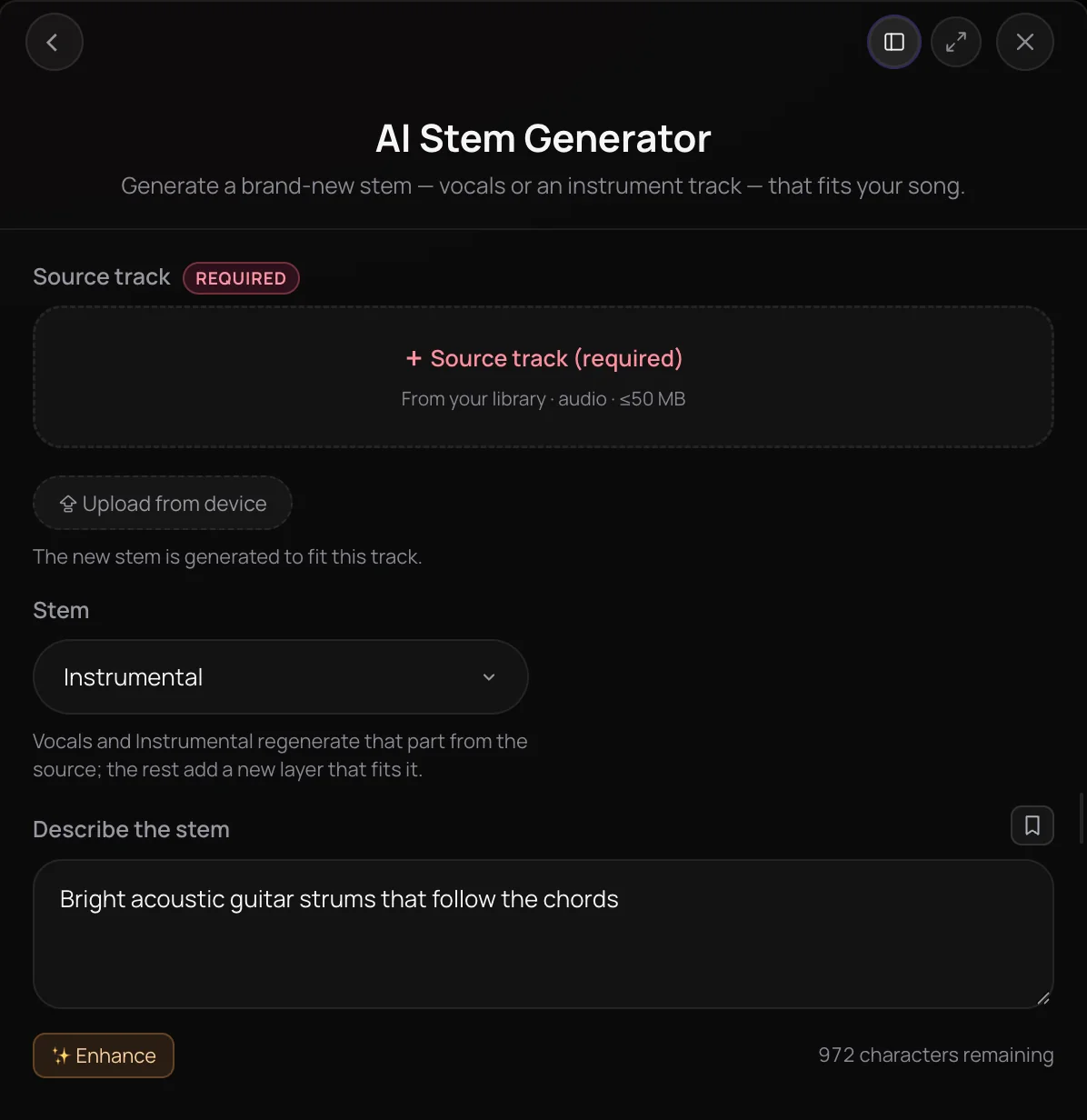
AI Stem Generator is a Soundverse tool that creates one new part for a song you already have, from drums, bass or strings to a full instrumental for an a cappella. It's built for singers, songwriters and producers whose demo is missing a layer. You get the new stem as its own audio track, not a mixed song, so you can balance it against your track in AI Studio or your DAW.
See it in action
- How to Generate Instrumental Music for Your Vocals with AI | Soundverse AI Stem Gen A tutorial on generating an instrumental for your vocals, in the style you choose, with AI Stem Generator.
- Every AI Tool in Soundverse “Edit”: Inpainting, Stems, Voice Swap, Remix and More | Full Walkthrough From 1:52. The AI Stem Generator part of Soundverse's Edit walkthrough, from input to result.
How it works
Add your source track
Open AI Stem Generator and pick the song the new part should fit under Source track, from your Library or your device.
Choose the stem
In the Stem menu, pick Instrumental, Vocals, Drums, Bass, Guitar, Keyboard, Percussion, Strings, Synth, FX, Brass or Woodwinds.
Describe the sound
Optionally describe the stem in Describe the stem, such as a punchy breakbeat or warm strings. For Vocals, add Lyrics and pick a Vocal gender.
Generate and mix it in
Click Generate in Chat and the stem arrives with a title and cover art. Opened from a clip in AI Studio, it lands on a track under that clip.
Why use AI Stem Generator
Built around your track
Every stem is generated to fit the source you pick, so you add a layer to the song you have instead of starting over.
Twelve kinds of stem
Choose Instrumental or Vocals, or one of ten instrument layers, from drums and bass to brass, woodwinds and FX.
Music for your a cappella
Upload a vocal, keep Stem on Instrumental and describe a style to get a backing track built around your singing.
Just the new part
You get the stem on its own, not a mixed song, so you set its level and effects in AI Studio or your own DAW.
What it costs
Needs Creator or above. Soundverse v9 needs Pro.
- Stem with Soundverse v6: 300 tokens (about $0.75–$0.94 on Creator, or ₹30–₹37 in India).
- Stem with Soundverse v7: 400 tokens (about $1.00–$1.25 on Creator, or ₹40–₹50 in India).
- Stem with Soundverse v8: 400 tokens (about $1.00–$1.25 on Creator, or ₹40–₹50 in India).
- Stem with Soundverse v9: 500 tokens (about $1.25–$1.56 on Pro, or ₹52–₹65 in India).
Agent One runs this tool for you, and the agent's own steps are metered on top of the tool's price: about 7 tokens a step in Lite mode, 54 in Standard mode and 128 in Pro mode, the default on paid plans.
Creator $12.49 a month, or $9.99 a month billed yearly ($119.88 a year) · Pro $31.24 a month, or $24.99 a month billed yearly ($299.88 a year) · Max from $72 a month, or $60 a month billed yearly ($720 a year).
In India (PayU): Creator ₹499 a month, or ₹399 a month billed yearly (₹4,788 a year) · Pro ₹1,299 a month, or ₹1,039 a month billed yearly (₹12,468 a year) · Max from ₹2,999 a month, or ₹2,399 a month billed yearly (₹28,788 a year).
Prices outside India are in US dollars, billed through Stripe; in India they are in rupees, billed through PayU. Monthly tokens reset each month and don't roll over.
Frequently asked questions
Is AI Stem Generator free, and can I use the stems commercially?
AI Stem Generator is available on the Creator plan and above, and each stem uses tokens from your plan. Soundverse is free to sign up, and new accounts get free starter tokens. Paid plans add a commercial license; the Pricing page lists what each plan covers. You need the rights to anything you upload, including your source track.
How well will a stem from AI Stem Generator fit my song?
AI Stem Generator generates each stem to fit the source track you pick and returns it as its own audio file rather than a mix, so you can judge it in context. Each run comes out differently: describe the sound in Describe the stem, such as a punchy breakbeat or warm strings, listen against your track, and generate again or change the description if the part doesn't sit right.
What can't AI Stem Generator do?
AI Stem Generator makes one new part per run and doesn't separate the parts already in your song; Stem Separator does that. It returns only the new stem, not a finished mix, so you balance it against your track yourself. To make a whole instrumental from a text prompt with no source track, use AI Music Generator instead.
What is AI Stem Generator?
AI Stem Generator is a Soundverse tool that creates one new part, such as drums, bass, strings, a vocal or a full instrumental, generated to fit a song you already have. You pick a source track, choose the stem type and describe the sound, and Soundverse returns that part as its own audio track.
How is AI Stem Generator different from Stem Separator?
AI Stem Generator makes new audio, while Stem Separator splits a finished mix into the parts it already contains. Use Stem Separator to pull the vocals, drums or bass out of a song. Use AI Stem Generator when the part you need doesn't exist yet, such as a bassline under a piano idea or an instrumental for an a cappella.
How do I make an instrumental for my vocals with AI?
Add your vocal take to AI Stem Generator as the Source track, leave Stem on Instrumental and describe the style you want, for example acoustic, lo-fi, R&B or EDM. AI Stem Generator then generates the instrumental part from your source, so the music is built around your singing. You need the rights to the vocal you upload.
What stems can AI Stem Generator create?
AI Stem Generator offers twelve stem types: Instrumental, Vocals, Drums, Bass, Guitar, Keyboard, Percussion, Strings, Synth, FX, Brass and Woodwinds. Instrumental and Vocals regenerate that part from your source track, and the other ten add a brand-new layer that fits it. For a Vocals stem you can write Lyrics of up to 3,000 characters and choose a Female, Male or Any vocal gender.
What files does AI Stem Generator accept?
AI Stem Generator takes one source track per run, picked from your Soundverse Library or uploaded from your device. It accepts MP3, WAV, FLAC, AAC, OGG, M4A and MP4 audio files up to 50 MB. A source is always required, because every stem is generated to fit it. You need the rights to anything you upload.
Can I use AI Stem Generator inside AI Studio?
Yes. In AI Studio, right-click a clip or a selected range, open AI Tools and choose Generate Stem. AI Stem Generator opens with that audio as its source, and the new stem lands on a track under it, so you can mix it against the rest of your project straight away.
Add the part your song is missing
Pick a source track, choose a stem and describe it, and AI Stem Generator builds a new layer that fits.
