Edit & enhance · Creator+
Rewrite one part of a song and keep the rest as it was
Select a section on the waveform and give it new lyrics or style tags. Get the full song back with only that part changed. On the Creator plan and above.
1,000 free tokens to start · No card needed · Cancel paid plans anytime
Unlock Inpainting with Creator — from $9.99/mo, or ₹399/mo in India. 4,000 tokens a month. Billed $119.88 a year, or $12.49 month to month.
What you get
Fix a line, keep the take
Everything outside the section you select stays as it was, so changing one line doesn't cost you the parts you like.
New words, sung as written
On the default model, replacement lyrics are sung word for word, which suits a changed line or a cleaner word.
Vocals out, music in
Turn on Instrumental and pick style tags to replace a sung passage with music, up to about a minute at a time.
Who it's for
Songwriters
Change one line or a chorus after the song is made, without giving up the takes you like.
Independent artists
Fix a word or a line before release instead of generating the whole track again.
Producers
Swap a sung passage for music, or rewrite an instrumental section with new style tags.
Wedding and event creators
Put names, a date or an inside joke into a custom song by rewriting only the lines that need them.
Content creators
Swap a word that doesn't suit your audience for a clean one before the song goes into a video.
When to use it
- One line in an otherwise good song is wrong
- A word needs to change for a clean or personalized version
- A sung bridge would work better as an instrumental break
- The melody of a verse works but its words don't
- Generating the whole song again would lose the parts you like
What you can make with it
Personalized lines
Rewrite a line with the couple's names, a team name or a date, and keep the rest of the song as it was.
A clean edit
Select the line with an explicit word and replace it with a clean one for radio, school or family events.
A new verse, same chorus
Select a verse, up to about a minute long, and give it new words while the chorus stays as it was.
An instrumental break
Swap a sung bridge for a break with no vocals by turning on Instrumental and choosing tags for it.
A retake on one line
If a word came out unclear, select just that line and generate it again, reworded if needed.
Updated details
Change a year, a place or a product name in a lyric without remaking the track.
Options for one line
Run the same section with two or three different lyrics and compare the takes before you choose.
A bigger rewrite in parts
For a larger change, work through the song a section at a time, about a minute per run.
Screenshots
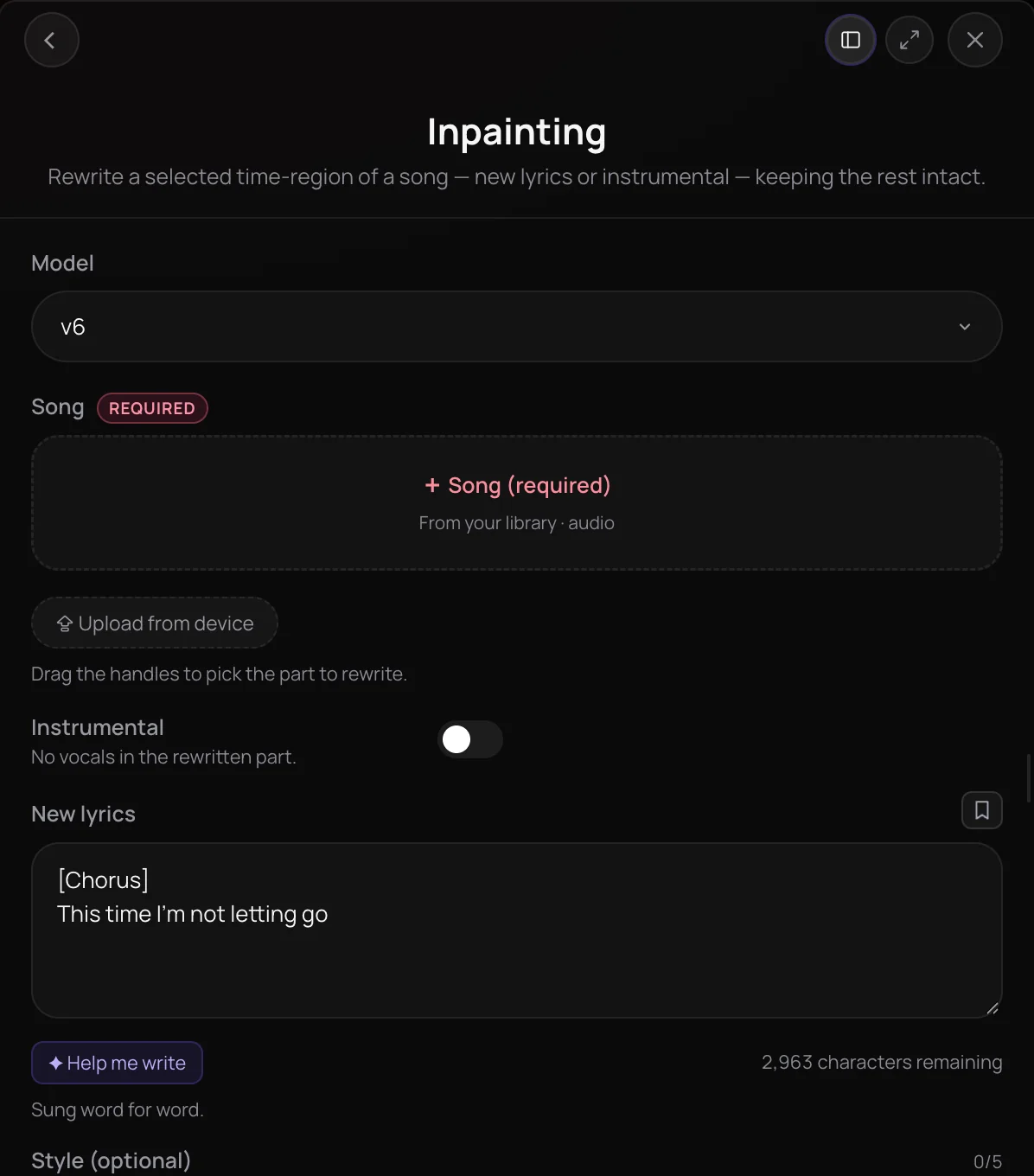
Inpainting is Soundverse's AI music inpainting tool: it regenerates a section of a song you select and keeps the rest as it was. It's for songwriters and producers who want to change a line, a chorus or an instrumental passage without remaking the whole track. You mark the section on the waveform, add new lyrics or style tags, and get back the full song with only that section rewritten.
See it in action
- Every AI Tool in Soundverse “Edit”: Inpainting, Stems, Voice Swap, Remix and More | Full Walkthrough From 0:12. The Inpainting part of Soundverse's Edit walkthrough, from input to result.
How it works
Add your song
Pick a song from your Library or upload one as MP3, WAV, AAC, OGG, M4A or FLAC. In AI Studio, you can also right-click a selected range and choose Inpaint with Song or Inpaint with Instrumental.
Select the section
Drag the handles on the song's waveform to mark the part to rewrite. The selection starts on the first 30 seconds of the song.
Add lyrics or style tags
Type the new lyrics and, if you like, up to 5 style tags; on the default model the lyrics are sung word for word. Turn on Instrumental for a section with no vocals, then pick at least one style tag.
Create and compare
Click Generate in Chat and Agent One returns the full song with the section replaced, sometimes in more than one version. Compare it with the original and run it again with different lyrics or tags if you need to.
Why use Inpainting
Only the selection changes
Everything outside the section you select stays as it was, so fixing one part doesn't cost you the parts you like.
New words, sung as written
On the default model, replacement lyrics are sung word for word, which suits a changed line or a cleaner word.
Instrumental rewrites too
Switch on Instrumental and describe the part with style tags to replace a passage with music and no vocals.
Tags the model understands
On the default model, you pick tags from a fixed list of thousands of style words instead of typing free text.
What it costs
Needs Creator or above.
- Rewrite one section: 200 tokens (about $0.50–$0.62 on Creator, or ₹20–₹25 in India).
- Rewrite a section with ElevenMusic v2.5, 3-minute song: 720 tokens at 4 tokens a second (about $1.80–$2.25 on Creator, or ₹72–₹90 in India).
With ElevenMusic v2.5 the price counts every second of the song, not just the rewritten part.
Agent One runs this tool for you, and the agent's own steps are metered on top of the tool's price: about 7 tokens a step in Lite mode, 54 in Standard mode and 128 in Pro mode, the default on paid plans.
Creator $12.49 a month, or $9.99 a month billed yearly ($119.88 a year) · Pro $31.24 a month, or $24.99 a month billed yearly ($299.88 a year) · Max from $72 a month, or $60 a month billed yearly ($720 a year).
In India (PayU): Creator ₹499 a month, or ₹399 a month billed yearly (₹4,788 a year) · Pro ₹1,299 a month, or ₹1,039 a month billed yearly (₹12,468 a year) · Max from ₹2,999 a month, or ₹2,399 a month billed yearly (₹28,788 a year).
Prices outside India are in US dollars, billed through Stripe; in India they are in rupees, billed through PayU. Monthly tokens reset each month and don't roll over.
Frequently asked questions
Is Inpainting free?
No. Inpainting is available on the Creator plan and above, and each run uses tokens from your plan. Soundverse itself is free to sign up, and new accounts get free starter tokens for the tools on the Free plan. The Pricing page lists what each plan includes.
Will the rewritten section match the rest of my song?
Inpainting regenerates only the section you select and returns the whole song, so the music around it stays as it was. On the default model, the new lyrics are sung word for word and the style tags come from a fixed list, so choose tags that describe the part you want. Compare the result with the original, and run Inpainting again with different lyrics or tags if a take doesn't sit right.
Can I use the edited song commercially?
On the Free plan, what you make on Soundverse is for personal use. Paid plans add a commercial license; the Pricing page lists what each plan covers. Inpainting itself needs the Creator plan or above, and you need the rights to any song you upload and edit.
How long a section can Inpainting rewrite?
On the default model, Inpainting rewrites up to about a minute at a time, and much longer selections have failed. For a bigger change, rewrite the song in shorter sections, or use AI Remix to rework the whole track in a new style. A selection that runs past the end of the song is trimmed to fit rather than refused.
Do I have to write new lyrics?
On the default model, yes for a sung section: Inpainting sings the new lyrics word for word, and style tags are optional. With Instrumental on, no lyrics are sent and you pick at least one style tag, up to 5, to describe the part. The other model in the picker can leave the lyrics empty and re-sing the words already there.
What is AI music inpainting?
Inpainting is Soundverse's AI music inpainting tool, which regenerates a section of a song you select and keeps everything else unchanged. In Soundverse, you mark the section on the song's waveform and give it new lyrics, or switch to Instrumental and describe it with style tags.
How do I change part of a song with AI?
Open Inpainting in Soundverse AI Tools and add the song from your Library or your device. Drag the handles on its waveform to select the section, type the new lyrics or turn on Instrumental and pick style tags, and click Generate in Chat. Agent One returns the full song with only that section rewritten.
What files does Inpainting accept?
Inpainting takes one song from your Library or your device as an MP3, WAV, AAC, OGG, M4A or FLAC file. The whole song is the input, and only the section you select on its waveform is regenerated. You need the rights to anything you upload.
How is Inpainting different from Extend Music?
Inpainting rewrites a section inside a song and keeps everything outside that section the same. Extend Music, another Soundverse tool, adds new material to the start or end of a track, so the song gets longer. Use Inpainting to change what's already there, and Extend Music when you need more of it.
Ready to rewrite part of a song?
Select the section, add new lyrics or style tags, and keep everything else as it was.
