Edit & enhance · Free
AI voice swap: hear your song in a new voice, same performance
Add a vocal or a full song, pick a Community, Public or your own trained voice, and get the same take back in that voice. Runs on every plan, Free included.
1,000 free tokens to start · No card needed · Cancel paid plans anytime
Do more with Voice Swap on Creator — from $9.99/mo, or ₹399/mo in India. 4,000 tokens a month. Billed $119.88 a year, or $12.49 month to month.
What you get
Your take, a new voice
Voice Swap changes the voice, not the performance, so the phrasing and timing of the take you recorded carry through.
Works on finished mixes
Give it a full song and Voice Swap separates the lead vocal, converts it and remixes it over the original backing track.
Fit it to the song
Shift the pitch up to 24 semitones either way, add reverb, and set the backing from 12 dB quieter to 6 dB louder.
Who it's for
Songwriters
Try a topline in another voice type before you decide who should sing it.
Independent artists
Re-sing demos in your own trained voice model instead of recording each one again.
Producers
Audition other voices on a finished mix without asking the singer for a new take.
Ad and brand teams
Try a scratch jingle in several voice models before you book a singer.
When to use it
- The performance is right, but the voice isn't
- You wrote a song for a different voice type than your own
- A demo sits too high or too low for your voice
- You've trained your voice model and want older demos in it
- You're choosing between a few voices for one part
What you can make with it
A demo for another voice type
Swap your guide vocal into a voice model that matches the voice type you're writing for, and shift the pitch to suit it.
Your trained voice on old demos
After training your voice with Train Voice Model, re-sing demos a collaborator sang for you, with their OK.
A new voice on a Soundverse song
Change the voice on a song you made with AI Song Generator while its melody and timing stay the same.
Jingle auditions
Convert one scratch vocal into a few voice models and play them back to back for the team.
An octave up or down
Shift the pitch by 12 semitones to hear a part an octave higher or lower in the new voice.
The right feel, a new tone
When a scratch vocal has the right feel but the wrong tone, swap it instead of re-recording.
A vocal-forward demo
Turn Instrumental Mix down so the new voice sits on top of the backing when you share a demo.
Screenshots
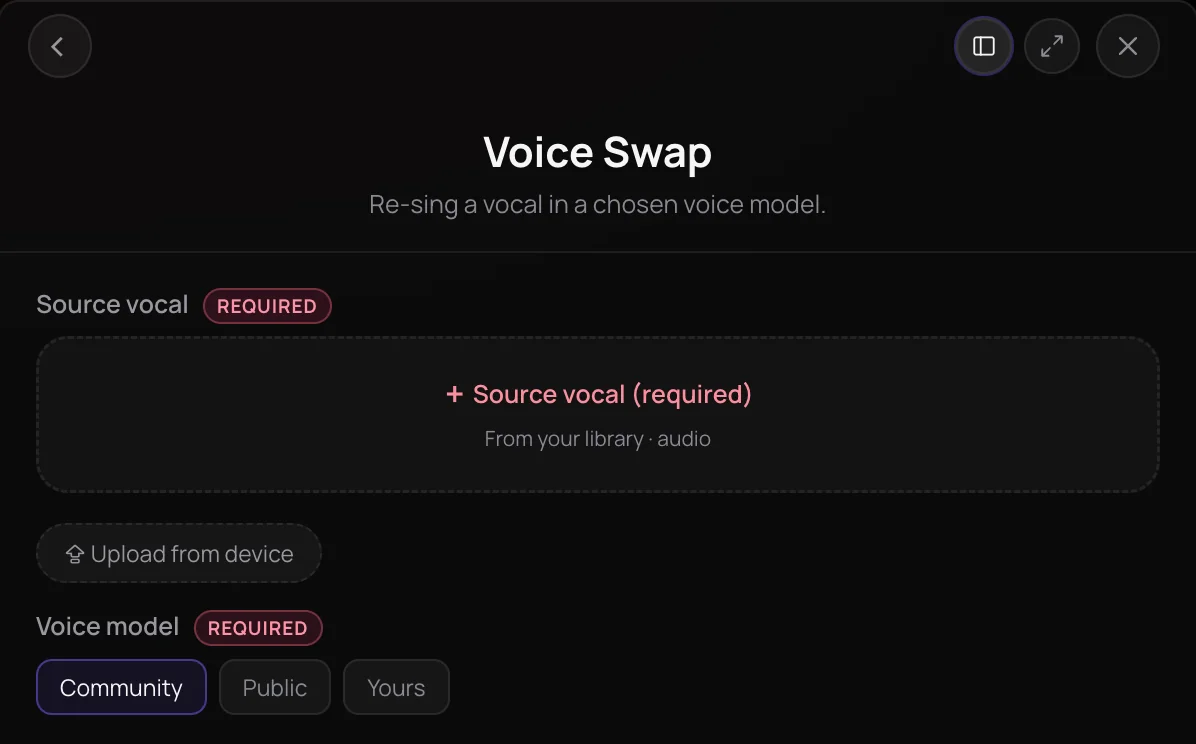
Voice Swap is Soundverse's AI voice swap tool: it re-sings a vocal in a different voice model while keeping the original performance. It's for singers, producers and songwriters who want to hear a part in another voice, or in their own trained voice, without recording it again. Give it a vocal or a full song, pick a voice, and you get the same song back with the lead sung in the new voice.
See it in action
- How to Train Your Own AI Voice Model, Then Use It in Voice Swap | Soundverse AI Train a voice model on at least 10 minutes of your own clean vocals, then pick it in Voice Swap to re-sing a track in your voice.
- Every AI Tool in Soundverse “Edit”: Inpainting, Stems, Voice Swap, Remix and More | Full Walkthrough From 2:18. The Voice Swap part of Soundverse's Edit walkthrough, from input to result.
How it works
Add your source vocal
Pick a vocal or a full song from your Library or upload one, up to 50 MB, as MP3, WAV, AAC, OGG or M4A. On a full song, Voice Swap separates the lead vocal for you.
Choose a voice model
Browse the Community, Public and Yours tabs and pick the voice to convert into. Yours holds the voice models you trained with Train Voice Model.
Set pitch, reverb and mix
Shift the pitch up to 24 semitones either way, add reverb, and use Instrumental Mix to bring the backing track up or down against the new vocal.
Create and compare
Click Generate in Chat and the converted track appears in your chat, named after the source song in the new voice. Play it against the original, or try another voice on the same take.
Why use Voice Swap
The performance stays yours
Voice Swap changes the voice, not the take, so the performance you recorded carries through in the new voice.
Works on finished songs
Give it a full mix and the lead vocal is separated, converted and remixed over the original backing track.
Use your own trained voice
Train a voice with Train Voice Model, then pick it under Yours to re-sing any of your tracks in it.
Control the blend
Pitch, Reverb and Instrumental Mix let you fit the new vocal to the song without leaving the panel.
What it costs
Works on the Free plan. New accounts get 1,000 free tokens, enough for about 6 voice swaps.
- Swap the voice on one track: 150 tokens (about $0.37–$0.47 on Creator, or ₹15–₹19 in India).
Creator $12.49 a month, or $9.99 a month billed yearly ($119.88 a year) · Pro $31.24 a month, or $24.99 a month billed yearly ($299.88 a year) · Max from $72 a month, or $60 a month billed yearly ($720 a year).
In India (PayU): Creator ₹499 a month, or ₹399 a month billed yearly (₹4,788 a year) · Pro ₹1,299 a month, or ₹1,039 a month billed yearly (₹12,468 a year) · Max from ₹2,999 a month, or ₹2,399 a month billed yearly (₹28,788 a year).
Prices outside India are in US dollars, billed through Stripe; in India they are in rupees, billed through PayU. Monthly tokens reset each month and don't roll over.
Frequently asked questions
Can I use Voice Swap on the Free plan?
Yes. Voice Swap runs on every Soundverse plan, including Free, and each swap costs 150 tokens, so the 1,000 tokens new accounts get at sign-up cover six. Voice Swap runs on its own, not through Agent One, so it doesn't use Agent One's free generations. You can swap into Community and Public voice models on any plan; training your own voice for the Yours tab takes Train Voice Model, which needs the Creator plan or above.
How natural does a Voice Swap result sound?
Voice Swap keeps your performance and changes only the voice, so the result follows the timing and phrasing of the take you add. A clean lead vocal gives Voice Swap the clearest input; on a full mix it separates the lead first, and backing vocals are left out. If the new voice sits too high or low, shift the Pitch, and try other voice models on the same take to compare.
Can I release a song made with Voice Swap?
On the Free plan, what you make on Soundverse is for personal use. Paid plans add a commercial license; the Pricing page lists what each plan covers. With Voice Swap, you need the rights to the vocal you convert and permission to use the voice you convert it into.
Whose voices can I use with Voice Swap?
Only voices that are yours or that you have permission to use. Voice Swap offers Community and Public voice models plus the models you trained yourself, and the vocal you convert must be one you have the rights to. Never use Voice Swap to impersonate a real person or to make them appear to sing something they didn't agree to.
Does Voice Swap convert backing vocals?
No. On a full song, Voice Swap converts only the lead vocal, and the separated backing vocals are left out of the result, since they would still be in the original singer's voice. The instrumental is remixed under the new lead, and the Instrumental Mix slider sets its level, from 12 dB quieter to 6 dB louder.
What is Voice Swap?
Voice Swap is a Soundverse AI voice swap tool that re-sings a vocal in a different voice model while keeping the original performance. You give Soundverse a vocal or a full song, pick a voice from the Community, Public or Yours tabs, and get the same song back in the new voice.
How do I swap the voice in a song with AI?
Open Voice Swap in Soundverse AI Tools and add the song or vocal from your Library or your device. Pick a voice model, set Pitch, Reverb and Instrumental Mix if you need them, and click Generate in Chat. On a full song, Voice Swap separates the lead vocal, converts it and remixes it over the original backing track.
Can I use my own voice in Voice Swap?
Yes. Train your voice with Train Voice Model, which needs at least 10 minutes of clean, dry solo recordings, and the finished model appears under the Yours tab in Voice Swap. Then any vocal you add can be re-sung in your voice. Train Voice Model needs the Creator plan or above.
What files does Voice Swap accept?
Voice Swap takes one audio file from your Library or your device, up to 50 MB, as MP3, WAV, AAC, OGG or M4A. It can be a solo vocal or a full song, because Voice Swap separates the lead vocal from a mix before converting it. You need the rights to anything you upload.
Is Voice Swap free?
Voice Swap is not free to run: each conversion uses tokens from your plan. Soundverse itself is free to sign up, and new accounts get free starter tokens for the tools on the Free plan. The Pricing page lists which plans include Voice Swap.
Hear your song in a new voice
Add a vocal or a full song, pick a voice model, and get the same performance back in that voice.
