Edit & enhance · Free to try
Extend music: make your track longer without stitching clips
Add up to 85 seconds of instrumental per run, or continue a vocal song from new lyrics, and get the whole track back. Works on the Free plan.
1,000 free tokens to start · No card needed · Cancel paid plans anytime
Unlock more of Extend Music with Creator — from $9.99/mo, or ₹399/mo in India. 4,000 tokens a month. Billed $119.88 a year, or $12.49 month to month.
What you get
The length your edit needs
Add up to 85 seconds of new instrumental per run, after the end or before the start, and extend the result again to keep going.
One track, nothing to stitch
You get the original and the new part back as one track, with a title and cover art, ready to play or download.
Another verse for your song
Write lyrics for the next part, and Extend Song continues your vocal song from the end.
Who it's for
YouTubers and content creators
Stretch a track to cover the full length of a video instead of looping it or cutting it short.
Podcasters
Lengthen an intro bed or add an outro so music can run under a whole segment.
Producers
Grow a short instrumental idea into a longer piece with an intro, more music or an outro.
Songwriters and independent artists
Add another verse to a finished song by writing its lyrics and letting Extend Song pick up from the ending.
DJs
Add a longer intro or outro to a track so it's easier to mix in and out.
When to use it
- Your track is shorter than the video it has to cover
- A song ends after one chorus and needs another verse
- A track starts too abruptly and needs an intro
- A short idea needs to run for a few minutes
- You love a generation, but it stops too early
What you can make with it
Music that fits the edit
Extend an instrumental a run at a time until it covers your whole video, then trim the end with Media Converter.
A mix-in intro
Add new music before the start of a track to give yourself a longer intro to mix in over.
Verse two
Give a song that ends too soon a second verse: write only the new lines, and Extend Song carries the song on from the end.
An outro under the credits
Add a closing section to your theme so it can play out under credits or a sign-off.
A bigger ending
Write a prompt for a fuller final section, with strings or bigger drums, to give an instrumental a lift at the end.
A longer bed for streams
Extend a short piece several times to get a longer background track for a livestream or a study video.
A processional that lasts
Lengthen an entrance or processional track so it covers the full walk at a wedding or event.
Screenshots
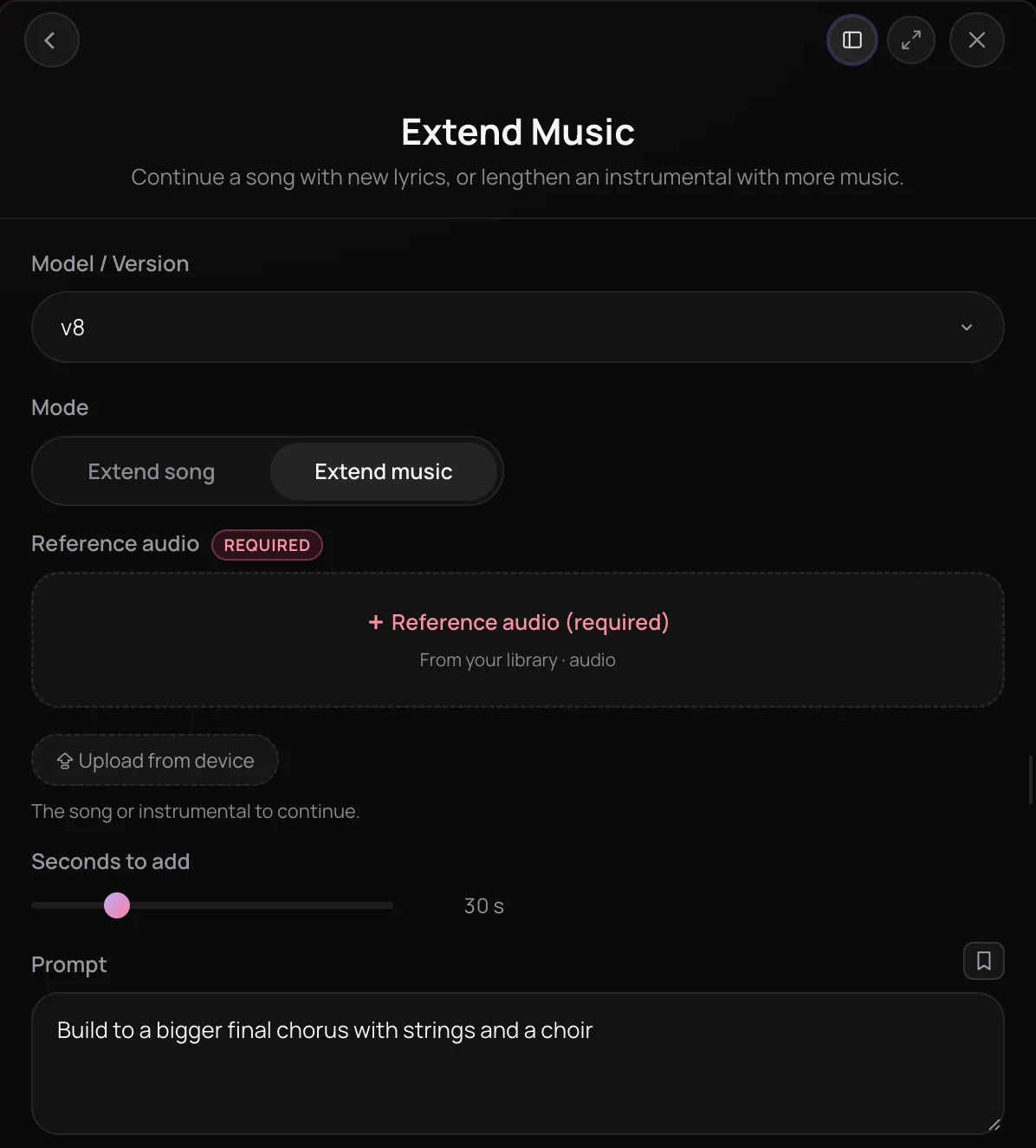
Extend Music is the Soundverse tool to extend music you've made or uploaded: it lengthens an instrumental with newly generated music, or continues a vocal song from new lyrics. It's for creators and producers who need a longer cut for a video, a fuller arrangement or another verse. You get back the full track, the original plus the new part, with a title and cover art.
See it in action
- Need more room to express your sound? A quick look at extending a track in Soundverse, recorded in the 2024 interface.
- Every AI Tool in Soundverse “Edit”: Inpainting, Stems, Voice Swap, Remix and More | Full Walkthrough From 0:36. The Extend Music part of Soundverse's Edit walkthrough, from input to result.
How it works
Add your track
Pick a song or instrumental from your Library or upload one as MP3, WAV, AAC, OGG or M4A. You can also choose Edit, then Extend, on a song in your Library.
Choose Extend Music or Song
Use Extend Music to lengthen an instrumental, or Extend Song to continue a song that has vocals.
Describe what comes next
For Extend Music, set Seconds to add and, if you like, describe the new part, such as a soaring lead and lush pads. For Extend Song, write lyrics for the new part only.
Pick a side and create
Choose End of audio or Start of audio, though Extend Song continues from the end on most versions. Click Generate in Chat, and Agent One returns the full track with the new part, a title and cover art.
Why use Extend Music
Two ways to extend
Extend Music adds instrumental music, and Extend Song continues a vocal song from the lyrics you write for the next part.
The whole track comes back
You get the original plus the new part as one track, not a separate clip to stitch on.
Steer the new section
Describe the new part's style, mood or instruments, or leave the prompt empty to continue in the track's own style.
Add before or after
Extend Music can add new music after the end or before the start, so you can build an intro as well as an outro.
What it costs
Free plan: extend instrumentals, and songs with Soundverse v6. Extending a song with Soundverse v7 or Soundverse v8 needs Creator. New accounts get 1,000 free tokens. On the Free plan it runs through Agent One, which gives free accounts 3 runs in all; sharing unlocks the 2nd and 3rd.
- Extend an instrumental: 200 tokens (about $0.50–$0.62 on Creator, or ₹20–₹25 in India).
- Extend a song with Soundverse v6: 300 tokens (about $0.75–$0.94 on Creator, or ₹30–₹37 in India).
- Extend a song with Soundverse v7 or Soundverse v8: 400 tokens (about $1.00–$1.25 on Creator, or ₹40–₹50 in India).
Soundverse v9 can't extend songs yet.
Agent One runs this tool for you, and the agent's own steps are metered on top of the tool's price: about 7 tokens a step in Lite mode, 54 in Standard mode and 128 in Pro mode, the default on paid plans.
Creator $12.49 a month, or $9.99 a month billed yearly ($119.88 a year) · Pro $31.24 a month, or $24.99 a month billed yearly ($299.88 a year) · Max from $72 a month, or $60 a month billed yearly ($720 a year).
In India (PayU): Creator ₹499 a month, or ₹399 a month billed yearly (₹4,788 a year) · Pro ₹1,299 a month, or ₹1,039 a month billed yearly (₹12,468 a year) · Max from ₹2,999 a month, or ₹2,399 a month billed yearly (₹28,788 a year).
Prices outside India are in US dollars, billed through Stripe; in India they are in rupees, billed through PayU. Monthly tokens reset each month and don't roll over.
Frequently asked questions
Is Extend Music free?
Each extension uses tokens from your balance, and Extend Song's newer model versions need the Creator plan or above. Soundverse is free to sign up, and new accounts get free starter tokens. The Pricing page lists what each plan includes and which model versions it unlocks.
Can I extend music on the Free plan?
Yes. On the Free plan, Extend Music costs 200 tokens a run and Extend Song on Soundverse v6 costs 300, from the 1,000 tokens new accounts get at sign-up. From the chat, both run through Agent One, which adds a small charge and gives Free accounts three generations in total: the first right away, and each of the next two when you share Soundverse. Extend Song on Soundverse v7 or Soundverse v8 needs the Creator plan, and Soundverse v9 can't extend.
Will the new part sound like the rest of my track?
Extend Music continues in the track's own style when you leave the prompt empty, or follows a prompt you write for the new part, such as a soaring lead and lush pads. Each run is a new take, so listen across the join, and if it doesn't fit, extend the original again with a different prompt. Extend Song continues a vocal song from the lyrics you write for the next part, from the end on most versions.
Can I use an extended track commercially?
On the Free plan, what you make on Soundverse is for personal use. Paid plans add a commercial license; the Pricing page lists what each plan covers. If you extend a track you uploaded, you need the rights to that original audio, whichever Extend Music mode you use.
What can't Extend Music do?
Extend Music mode is instrumental only, so it won't add vocals; use Extend Song to continue a song with singing. Extend Song needs lyrics for the new part, because it takes no style prompt, and on most versions it can only continue from the end, not add an intro before the start.
What is Extend Music?
Extend Music is a Soundverse tool that makes a track longer: it adds newly generated music to an instrumental, or continues a vocal song from new lyrics. Soundverse returns the whole track, the original plus the new part, so you can extend music you generated or uploaded without stitching clips together.
How do I extend a song with AI?
Open Extend Music in Soundverse AI Tools, or choose Edit, then Extend, on a song in your Library. Pick Extend Song, write lyrics for the new part only, and click Generate in Chat. Agent One continues the song from the end and returns the full track, the original plus the new part, with a title and cover art.
How much longer can Extend Music make a track?
In Extend Music mode, each run adds up to 85 seconds of new instrumental music, and you can extend the result again to keep going. Extend Song works differently: it continues a vocal song from the end, using the lyrics you write for the next part, and returns the original plus the new section.
Can I extend music I uploaded?
Yes. Extend Music works on any track in your Library, whether you made it on Soundverse or uploaded it from your device as MP3, WAV, AAC, OGG or M4A. Use Extend Music for instrumentals and Extend Song for songs with vocals. You need the rights to anything you upload.
How is Extend Music different from Inpainting?
Extend Music adds new material to the start or end of a track, so the result is longer. Inpainting, another Soundverse tool, rewrites a section inside the song, such as a line or a chorus, and keeps everything outside that section the same. Use Extend Music when you need more song, and Inpainting to change what's there.
Ready to make your track longer?
Pick a song or instrumental, say how it should continue, and get the full extended track back.
