Edit & enhance · Free to try
Stem separator: split your song into vocals, drums, bass and more
Choose 2 stems for vocals and backing, 6 for the main instruments, or a maximum split with every part on its own and a MIDI file for each.
1,000 free tokens to start · No card needed · Cancel paid plans anytime
Unlock more of Stem Separator with Creator — from $9.99/mo, or ₹399/mo in India. 4,000 tokens a month. Billed $119.88 a year, or $12.49 month to month.
What you get
Vocals and backing in one run
The 2-stem split gives you the vocal and the backing track, ready for a remix, a karaoke version or a cover.
Every instrument to work with
Six stems split out vocals, drums, bass, guitar, piano and other. The maximum split, on Creator and above, puts every part on its own with a MIDI file for each.
Files your DAW can use
Pick WAV or FLAC for lossless 2- and 6-stem splits, or MP3 when size matters. In AI Studio, the stems land on their own tracks.
Who it's for
DJs
Pull the vocal and the instrumental from tracks you have the rights to for edits and live sets.
Producers
Get the drums, bass or vocal out of a mix to sample, rebalance or remix.
Music teachers and students
Solo a part to learn it by ear, or mute it and play along with the rest.
Content creators and podcasters
Use the backing of your own song under a voiceover by splitting out the vocal.
Independent artists
Split a finished mix back into parts when the session files are gone.
When to use it
- You need a song's vocal or instrumental on its own
- You want to learn one part that's buried in a mix
- A remix or edit needs the vocal or the drums by themselves
- Your track's mix needs fixing and the project files are lost
- You want each part's notes as MIDI without working them out by ear
What you can make with it
Your song's backing under narration
Split your own song into 2 stems and use the backing under a voiceover or a video.
A rebalance without the session
Split the final bounce into 6 stems and rebalance the parts in AI Studio when the original project is gone.
The bass line, up close
Solo the bass stem to hear the part clearly before you transcribe it or play it.
Classroom play-alongs
Split a song you're licensed to use into 6 stems, so a student can mute their instrument and play that part.
A part on new sounds
Take a stem's MIDI file from the maximum split and play the line on a different instrument in your DAW.
A vocal for a new beat
Split out the vocal of your own track and build a different production under it.
What's crowding the mix
Listen to each stem alone to find which part is crowding the mix.
A vocal reference for another tool
Separate the lead vocal from one of your own songs and use it as the reference in Similar Singing Generator.
Screenshots
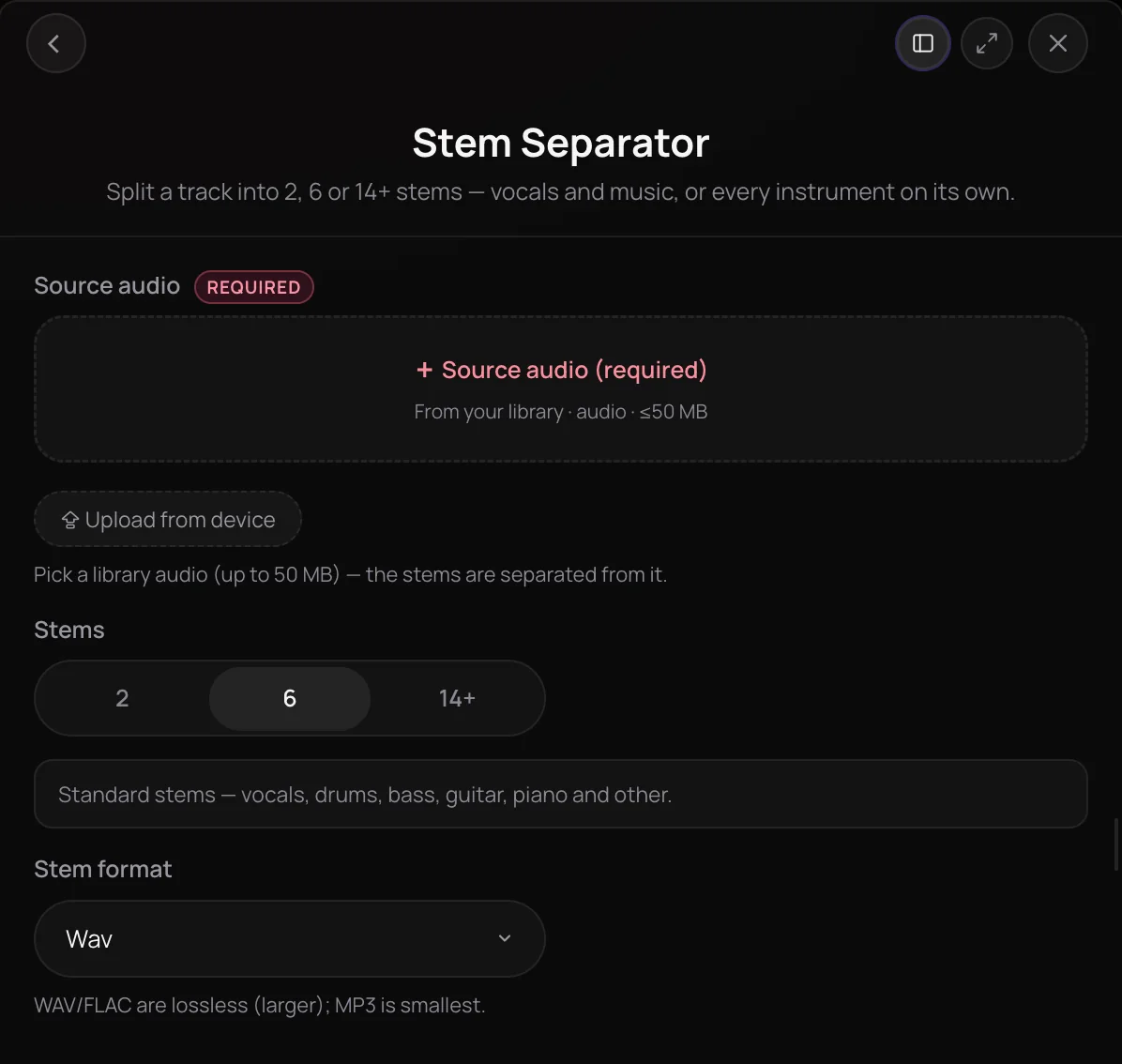
Stem Separator is Soundverse's AI stem separator: it splits a mixed song into separate stems you can edit, remix or practice with. It's for producers, DJs, musicians and creators who need a clean vocal, a backing track or individual instruments. Choose 2 stems for vocals and backing, 6 for vocals, drums, bass, guitar, piano and other, or the maximum split, which puts every part on its own with a MIDI file for each.
See it in action
- Unlock the power of stem separation with Soundverse! A quick 2024 tutorial on isolating vocals, instruments and beats from a track, shown in Soundverse's earlier interface.
- Every AI Tool in Soundverse “Edit”: Inpainting, Stems, Voice Swap, Remix and More | Full Walkthrough From 1:28. The Stem Separator part of Soundverse's Edit walkthrough, from input to result.
How it works
Add your song
Pick a song from your Library or upload one, up to 50 MB, as MP3, WAV, FLAC, AAC, OGG or M4A.
Choose how many stems
Pick 2 for vocals and the backing track, or 6 for vocals, drums, bass, guitar, piano and other. The highest option is the maximum split, with every part on its own and a MIDI file for each.
Pick a stem format
For 2 or 6 stems, choose WAV or FLAC for lossless files, or MP3 for the smallest ones. The maximum split always comes as WAV files plus MIDI.
Create and use the stems
Click Generate in Chat and Agent One returns each stem as its own file in your chat. In AI Studio, the stems land on their own tracks below the clip.
Why use Stem Separator
Three sizes of split
Go from a quick vocal and backing split to a detailed one with every part on its own.
MIDI with the maximum split
The maximum split adds a MIDI file for each stem, so you can edit or re-voice the notes in your DAW.
Lossless when you need it
Choose WAV or FLAC for full-quality 2- and 6-stem splits, or MP3 when file size matters more.
Runs where you work
Start it from AI Tools, from a song's menu in your Library, or on a clip in AI Studio, where the stems land on their own tracks.
What it costs
Free plan: 2 and 6 stems. 14+ stems with MIDI need Creator. New accounts get 1,000 free tokens, enough for about 3 splits. On the Free plan it runs through Agent One, which gives free accounts 3 runs in all; sharing unlocks the 2nd and 3rd.
- 6 stems: 300 tokens (about $0.75–$0.94 on Creator, or ₹30–₹37 in India).
- 2 stems (vocals and music): 200 tokens (about $0.50–$0.62 on Creator, or ₹20–₹25 in India).
- 14+ stems with MIDI: 800 tokens (about $2.00–$2.50 on Creator, or ₹80–₹100 in India).
Agent One runs this tool for you, and the agent's own steps are metered on top of the tool's price: about 7 tokens a step in Lite mode, 54 in Standard mode and 128 in Pro mode, the default on paid plans.
Creator $12.49 a month, or $9.99 a month billed yearly ($119.88 a year) · Pro $31.24 a month, or $24.99 a month billed yearly ($299.88 a year) · Max from $72 a month, or $60 a month billed yearly ($720 a year).
In India (PayU): Creator ₹499 a month, or ₹399 a month billed yearly (₹4,788 a year) · Pro ₹1,299 a month, or ₹1,039 a month billed yearly (₹12,468 a year) · Max from ₹2,999 a month, or ₹2,399 a month billed yearly (₹28,788 a year).
Prices outside India are in US dollars, billed through Stripe; in India they are in rupees, billed through PayU. Monthly tokens reset each month and don't roll over.
Frequently asked questions
Is Stem Separator free?
Every Stem Separator split uses tokens from your plan, and the maximum split, with a MIDI file for each stem, needs the Creator plan or above. Soundverse itself is free to sign up, and new accounts get free starter tokens for the tools on the Free plan. The Pricing page lists what each plan includes.
What quality are the stems from Stem Separator?
Stem Separator gives you lossless stems when you need them: WAV or FLAC for 2- and 6-stem splits, and WAV with a MIDI file for each part in the maximum split. Stem Separator can only separate what's already in your mix, so start from your highest-quality copy, such as a WAV master instead of a compressed MP3, and listen to each stem before you use it in a release.
Can I use the stems commercially?
On the Free plan, what you make on Soundverse is for personal use. Paid plans add a commercial license; the Pricing page lists what each plan covers. Stems separated from a song you upload are still covered by that song's rights, so you need the rights to anything you upload.
Can Stem Separator create a part that isn't in the song?
No. Stem Separator only splits the audio that's already in your song, so it can't add or regenerate a part, and only the maximum split includes MIDI. To create a new vocal or instrument layer that fits the track, use AI Stem Generator, another Soundverse tool.
What is Stem Separator?
Stem Separator is Soundverse's AI stem separator, which splits a mixed song into separate stems such as vocals, drums, bass and other instruments. On Soundverse you can split a song into 2 stems, 6 stems or a maximum split with every part on its own and a MIDI file for each, and every stem comes back as its own file.
How do I separate stems from a song with AI?
Open Stem Separator in Soundverse AI Tools and add a song from your Library or your device, up to 50 MB. Choose 2 stems, 6 stems or the maximum split, pick WAV, FLAC or MP3 for the smaller splits, and click Generate in Chat. Agent One returns each stem as its own file in your chat.
How many stems can Stem Separator split a song into?
Stem Separator offers three sizes. 2 stems gives you the vocals and the backing track, and 6 stems gives vocals, drums, bass, guitar, piano and other. The maximum split puts every part on its own, adding parts such as flute, FX, strings, synth, keys, and brass and woodwinds, with a MIDI file for each stem.
What files does Stem Separator accept?
Stem Separator takes one song up to 50 MB as MP3, WAV, FLAC, AAC, OGG or M4A, picked from your Library or uploaded from your device. For 2 or 6 stems you choose WAV, FLAC or MP3 output, and the maximum split always comes as WAV plus MIDI. You need the rights to anything you upload.
Can I separate stems inside AI Studio?
Yes. In AI Studio, open a clip's AI Tools menu and choose Separate Stems to run Stem Separator on it. The stems land on new tracks below the clip, ready to mix, so you can turn parts up, down or off without leaving your project.
Ready to split your track?
Add a song, choose how many stems you need, and get every part back as its own file.
