Studio & stage · Free to try
Record, generate, mix and export a song in your browser
AI Studio puts 8 instruments, 28 effects and 21 AI tools on one timeline. The studio uses no tokens; only AI generation does.
1,000 free tokens to start · No card needed · Cancel paid plans anytime
Do more with AI Studio on Creator — from $9.99/mo, or ₹399/mo in India. 8 AI Studio projects with 8 tracks each; WAV, stems and 1080p export. Billed $119.88 a year, or $12.49 month to month.
What you get
Idea to finished track in one place
Record, play instruments and generate parts on the same timeline, then export audio, stems or video without switching apps.
Mixing and mastering at no token cost
28 effects, Mix One's genre templates and Mastering One's loudness targets run in your browser on every plan.
Help when you want it
Invite collaborators by email or link, or ask Agent One for a bassline or a cleaner mix; everyone in the project sees changes as they happen.
Who it's for
Producers and beatmakers
Program drums, bass and synths, record takes and mix in a browser, with AI parts when you want them.
Songwriters and independent artists
Take a generated song or a voice memo to a finished, mastered track in one place.
Video creators
Build music, effects and visuals on the same timeline as your video, then export audio or video.
Bands and remote collaborators
Work on one project together, live, instead of emailing stems back and forth.
When to use it
- A generated song needs your own parts on top
- You want to record vocals over a beat without installing a DAW
- Your mix sounds muddy and you want to see which tracks clash
- Your song needs to reach a streaming loudness before release
- A video and its music need to be built on one timeline
What you can make with it
A beat from scratch
Program drums on Drum Kit One's 16 pads and an 808 line on Bass One from your computer keyboard, then arrange the clips.
Hum it into MIDI
Sing or hum a line into VocalMIDI One, and it becomes notes you can edit in the piano roll.
Chords in key
Drag a key-aware progression from Chord One onto an instrument track to start a song from its harmony.
A Bollywood or Punjabi mix
Type your tracks, then start Mix One from the Filmi / Bollywood or Punjabi / Desi Pop template to place each one on its frequency and pan map.
A master for streaming
Set Mastering One to your genre and a loudness target, press Master, then export with the Streaming -14 LUFS setting.
Stems for a mix engineer
On the Creator plan and above, export one file per track in a ZIP, with or without each track's effects.
A visualizer for your song
Render an audio-reactive visual to MP4 in 16:9 for YouTube or 9:16 for Reels.
Your vocals over an AI song
Open an Agent One song in AI Studio, arm a track and record harmonies or ad-libs over it.
A score under your video
Put your video on the video lane and build music and effects on the tracks below; on Creator and above, Describe and Generate Audio can start the soundtrack for you.
Screenshots
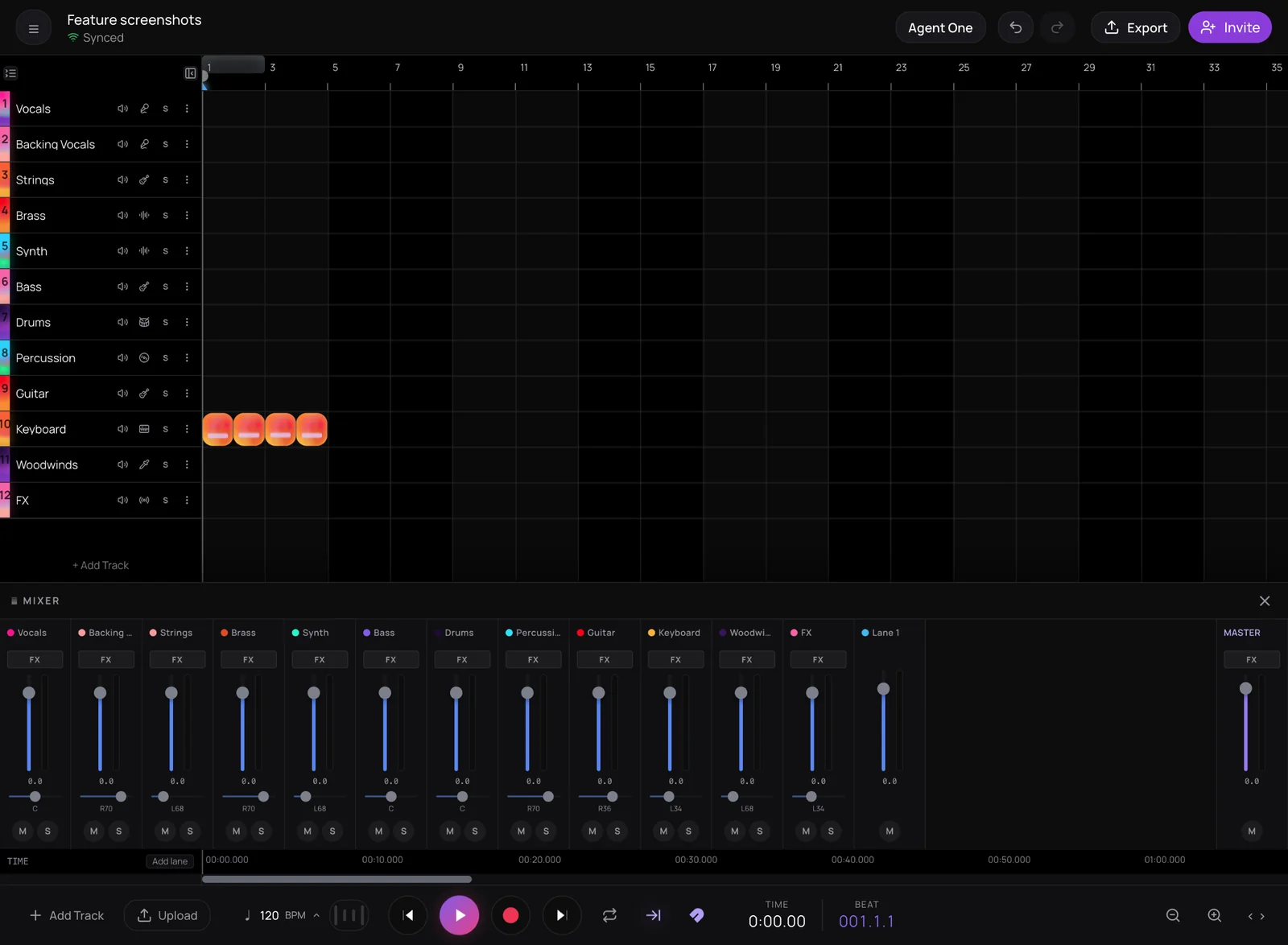
AI Studio is Soundverse's AI music studio: a multitrack timeline in your browser for audio, MIDI, video and image tracks, with AI generation built into the timeline. It's for songwriters, producers, beatmakers and video creators who want to record, arrange, generate and mix in one place, alone or together. The studio itself, including eight instruments, 28 effects, Mix One and Mastering One, uses no tokens; only AI generation does.
See it in action
- Introducing Soundverse AI Studio: Instruments, Effects and Real-Time Collaboration in Your Browser A two-minute tour of AI Studio's built-in instruments, effects and real-time collaboration, all running in the browser with nothing to install.
- How to Make a Christmas Song from Scratch with AI, Then a Music Video Starring Your Pet | Soundverse A Christmas song built in AI Studio from one piano loop, with AI stems, vocals, Mix One and Mastering One, then a music video exported at 1080p.
- Introducing Soundverse AI Studio, Now Working with Agent | Collaborative AI DAW for Musicians AI Studio with Agent One built in: ask for a part, a track or an arrangement change, and it lands on your timeline, ready to edit.
- Figma for Music Creation: Real-Time Collaboration in Soundverse AI Studio (Collaborative AI DAW) Invite people into an AI Studio session and build a track together, with every edit and generated stem showing up on everyone's screen.
What you can do
Record and play
Capture takes and play parts as you would in any studio.
Multitrack recording
Arm any number of audio and MIDI tracks and record from the playhead. Each audio track records its own input, with live monitoring.
MIDI from keys or a controller
Play instruments from the on-screen keys or your computer keyboard; Synth One, Bass One, Drum Kit One and Sampler One also take a Web MIDI controller. Edit notes and velocity in the piano roll.
Your files, in and out
Import audio such as MP3, WAV, OGG, M4A and AAC, video such as MP4, MOV, WebM, MKV and AVI, and images for the image lane. Bring in a MIDI file from your Library, or export a clip as MIDI.
Eight built-in instruments
Every instrument runs in your browser, on every plan, at no token cost.
Synth One and Bass One
A wavetable synth with over 100 factory presets for pads, keys, leads and plucks, and a bass synth with 41 presets for sub, 808, acid and reese sounds.
Drum Kit One and Sampler One
A 16-pad drum synth with 10 kits, and a sampler that plays any audio across the keyboard, as a one-shot, or cut into 16 slices.
Guitar One and Chord One
A playable 6, 7 or 8-string guitar with 52 presets, and key-aware chord progressions you can drag onto any instrument track.
Visual One and VocalMIDI One
Play chords with your hands through your webcam, using hand tracking that runs in your browser, or sing, hum or beatbox straight into MIDI.
Generate on the timeline
21 AI tools that put their results on your tracks, never over an existing clip.
Music, songs and vocals
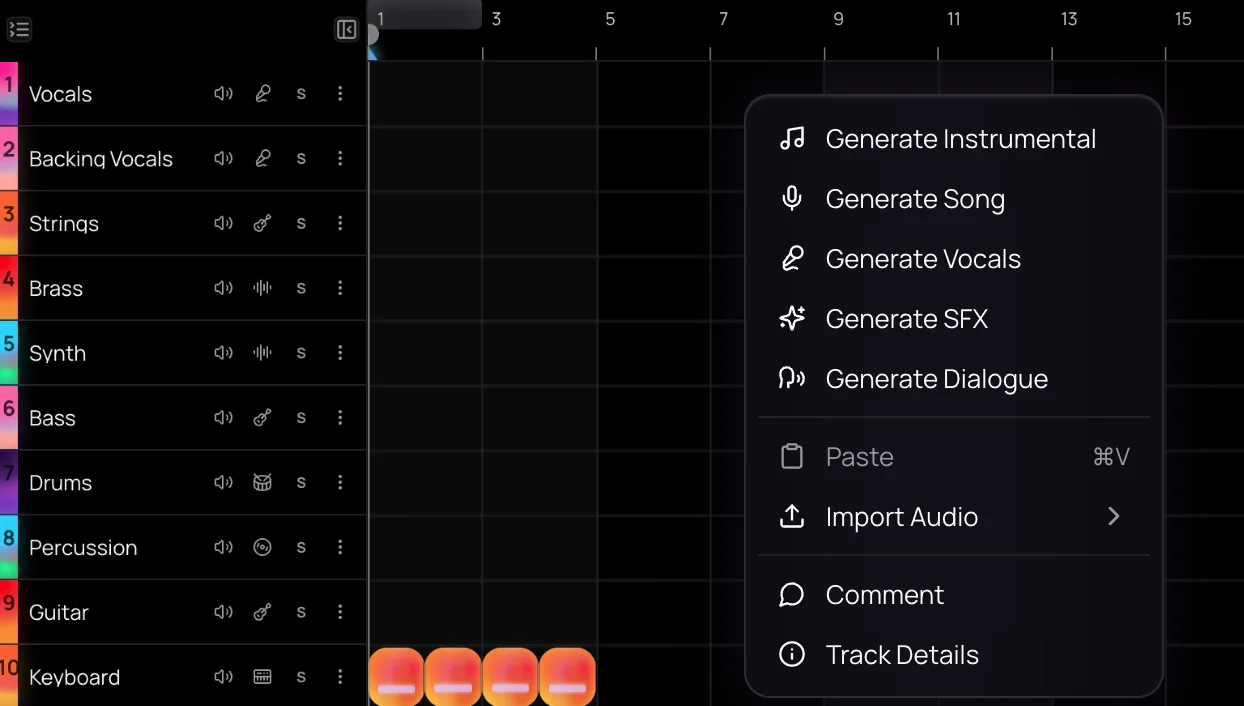
Right-click an empty range to generate an instrumental, a song or vocals at the playhead. Free uses Soundverse v6; Creator adds Soundverse v7 and Soundverse v8, and Pro adds Soundverse v9.
- Warm lo-fi piano loop, 85 BPM
- Female vocal hook over this beat, R&B
Extend a clip
Right-click a clip and choose Extend Music to continue it with new music, or switch the panel to Extend Song to add a sung part with new lyrics.
Rewrite, remix or match (Creator+)
Rewrite one section with Inpainting, remix a clip into another style, or make similar music, songs or vocals from a reference clip.
Stems as tracks (Creator+)
Generate one new stem, such as drums or strings, that fits your song, or split a song into 14+ stems that land on their own tracks.
Sound effects, speech and images
Generate sound effects, spoken dialogue and images for the image lane, right where you need them.
- Thunder rolling in the distance, 6 seconds
Audio to MIDI
Turn a recording into MIDI, with one track per instrument it detects, played on Studio instruments you can edit.
Kept if you leave
If you leave while something is generating, the result still saves to your Library, and it lands on the timeline the next time you open the project in the same browser within 24 hours.
Edit and arrange
Everyday timeline work, with tempo help built in.
Clips and tracks
Split, trim, fade, duplicate and move clips, shift pitch by up to 12 semitones either way, and reorder, mute and solo tracks.
Tempo and key detection
Imported audio is analyzed for tempo and key. Follow tempo fits a clip to the project tempo and keeps its key, and Stretch changes its length from 0.25× to 4×.
Automation
Draw volume, pan and effect-parameter curves that play back and export with the mix.
Mix and master
Effects, Mix One and Mastering One run in your browser, at no token cost.
28 effects and chain presets
EQ, compression, limiting, reverbs, delays, saturation, tape and vinyl character, live pitch correction, de-essing and more, plus 34 one-click chain presets for vocals, guitar, drums, bass and keys.
Mix One
Places each typed track on a frequency and pan map from 18 genre templates, shows where tracks mask each other and can fix tone problems it detects. What you hear is what you export.
Mastering One
Pick a genre and a loudness target, from Club −7 to Broadcast −23 LUFS, then press Master: it listens to two seconds of your mix and sets its own controls.
Analysis One
Ten meters in one window, including spectrum, LUFS loudness, true peak, stereo correlation and a goniometer.
Score and edit video
Music and picture on the same timeline.
Video and image lanes
Put video and images on their own lanes above your tracks. Free projects get one video lane; paid plans set no lane limit.
Describe and Generate Audio (Creator+)
Soundverse describes a video, plans sound effects, music and dialogue, shows the token cost, then fills new tracks. Describing a video needs Creator.
Video to SFX (Creator+)
Sound effects matched to what happens on screen, timed to the picture and placed on their own tracks.
Visualizer
Render an audio-reactive visual for your song to MP4, from 10 scenes, in 16:9, 9:16, 1:1 or 4:5.
Work together
Everyone in one project, editing the same timeline live.
Invite by email or link
The owner and Admins invite people by email as Editor, Viewer or Admin, or turn on a link that lets anyone view or edit; an invite to a new email lasts 7 days.
Cursors, comments and chat
See who's active and where each person's named cursor is, pin comments to a track at a bar, and chat with files you can drag onto the timeline.
Calls inside the project
Start an audio or video call with up to three people who are online.
Agent One in the studio
Ask in plain words; the change lands on the timeline for everyone in the project.
Parts on request
Agent One writes MIDI beats, basslines, chords, pads and leads, each on its own track with a fitting instrument.
- Add a funky bassline that fits this song
- Add strings that play along with the chorus
Arrangement and mix edits
Agent One moves, trims and splits clips, cuts bars and closes the gap, and sets volume, pan, effects, EQ and instrument sounds.
- Cut bars 9 to 17 and close the gap
- More reverb on the vocal and a brighter pad
Generations in place
When Agent One generates audio, it reserves a lane, and the result lands there when it's ready.
What it costs
Edits to the timeline use no tokens; each Agent One request uses tokens as it does in chat, and on Free it runs in Lite mode and counts toward your three free Agent One generations.
How it works
Open or start a project
Click Studio in the sidebar to open your latest project, or start a new one with the Quick start panel for importing, uploading or recording a first file. Open in AI Studio on an Agent One song brings it here too.
Add tracks, sounds and takes
Click Add Track for an audio or MIDI track, drag files in, or arm tracks and press Record. Open Instruments to load Synth One, Drum Kit One or another instrument and play it from your computer keyboard or a MIDI keyboard.
Generate on the timeline
Right-click an empty part of a track to generate an instrumental, a song, vocals, sound effects or dialogue, or right-click a clip for AI Tools such as Extend Music, Remix Track or Separate Stems. Results land on the timeline as new clips.
Mix, master and export
Add effects in Track Details, balance tracks in the Mixer or Mix One, and master with Mastering One on the master track. Then click Export for audio, stems or video.
What each plan includes
| What | Free | Creator | Pro | Max |
|---|---|---|---|---|
| AI Studio projects (Max allows 30 per Max level. Enterprise plans have no project or track cap.) | 3 | 8 | 20 | 30 to 150 |
| Tracks per project (Each instrument uses one track; the master bus and video lanes don't count. A shared project follows its owner's plan.) | 3 | 8 | 20 | 30 to 150 |
| Video lanes per project | 1 | No plan limit | No plan limit | No plan limit |
| Instruments, effects, Mix One, Mastering One | Included, 0 tokens | Included, 0 tokens | Included, 0 tokens | Included, 0 tokens |
| Audio export (Export options follow your own plan, even in someone else's project.) | MP3 | MP3, WAV, FLAC, AAC, OGG | MP3, WAV, FLAC, AAC, OGG | MP3, WAV, FLAC, AAC, OGG |
| Stems export | Not included | WAV, FLAC or MP3 in a ZIP | WAV, FLAC or MP3 in a ZIP | WAV, FLAC or MP3 in a ZIP |
| Video export | Up to 720p | Up to 1080p | Up to 4K | Up to 4K |
| AI tools on the timeline (AI tools use tokens at each tool's price.) | Music, songs, vocals, sound effects, speech, images, Extend, Melody to Song, Voice Swap, Voice to Instrument, Audio to MIDI | All 21, adding video, Stem Generator, 14+ stems, remix, similar and inpainting | All 21 | All 21 |
| Song model in AI Song and AI Music | Soundverse v6 | Up to Soundverse v8 | Up to Soundverse v9 | Up to Soundverse v9 |
| Agent One in the top bar | Lite mode | Lite, Standard, Pro | Lite, Standard, Pro | Lite, Standard, Pro |
| Tokens | 1,000 once, at sign-up | 4,000 a month | 10,000 a month | 25,000 to 125,000 a month |
| Commercial use (The Pricing page lists what each plan's license covers.) | Personal use only | Commercial license | Commercial license | Commercial license |
Why use AI Studio
The studio costs no tokens
Recording, editing, the eight instruments, 28 effects, Mix One, Mastering One and export all run in your browser on every plan. Only AI generation uses tokens.
Generation where you edit
21 AI tools put songs, vocals, stems, sound effects, images and video straight onto your tracks as clips you can trim, move and mix. A result never overwrites a clip.
Mixing and mastering by genre
Mix One places each track by frequency and pan from 18 genre templates, including Filmi / Bollywood and Punjabi / Desi Pop. Mastering One listens to your mix and sets itself toward a loudness target.
Collaborators and Agent One, live
Invite people by email or link and see their edits as they happen. Agent One joins the same way, writing MIDI parts and adjusting the mix when you ask.
What it costs
Free plan: 3 projects with 3 tracks each and 1 video lane, with MP3 and 720p export. The studio itself uses no tokens; AI on the timeline costs what each tool costs.
Included on every plan, with no tokens: all 8 instruments; all 28 rack effects; Mix One, for automatic mixing (Auto-Place and Fix tone); Mastering One, for automatic mastering (the ✦ Master button); and Analysis One, for loudness, peak and spectrum meters.
- Record, edit, arrange and export: no tokens.
Free: 3 AI Studio projects with 3 tracks each and 1 video lane; MP3 and 720p export.
Creator: 8 AI Studio projects with 8 tracks each; WAV, stems and 1080p export.
Pro: 20 AI Studio projects with 20 tracks each; export up to 4K.
Max: 30 AI Studio projects with 30 tracks each on Max ×1, rising by 30 a level to 150 on Max ×5.
AI on the timeline, at each tool's price
- AI Song Generator — Song with Soundverse v6: 300 tokens (about $0.75–$0.94 on Creator, or ₹30–₹37 in India).
- AI Music Generator — Instrumental with Soundverse v6: 300 tokens (about $0.75–$0.94 on Creator, or ₹30–₹37 in India).
- AI Sound Effects Generator — 5-second sound effect: 144 tokens at 28.8 tokens a second (about $0.36–$0.45 on Creator, or ₹14–₹18 in India).
- Extend Music — Extend an instrumental: 200 tokens (about $0.50–$0.62 on Creator, or ₹20–₹25 in India).
- Audio to MIDI — 3-minute track: 440 tokens at 2.44 tokens a second (about $1.10–$1.37 on Creator, or ₹44–₹55 in India).
- Video to SFX — 10-second video, 1 take: 350 tokens at 35 tokens a second per take (about $0.87–$1.09 on Creator, or ₹35–₹44 in India).
Six of the 21 AI tools on the timeline. Each costs what it costs on its own page, and runs a month count its price alone.
Creator $12.49 a month, or $9.99 a month billed yearly ($119.88 a year) · Pro $31.24 a month, or $24.99 a month billed yearly ($299.88 a year) · Max from $72 a month, or $60 a month billed yearly ($720 a year).
In India (PayU): Creator ₹499 a month, or ₹399 a month billed yearly (₹4,788 a year) · Pro ₹1,299 a month, or ₹1,039 a month billed yearly (₹12,468 a year) · Max from ₹2,999 a month, or ₹2,399 a month billed yearly (₹28,788 a year).
Prices outside India are in US dollars, billed through Stripe; in India they are in rupees, billed through PayU. Monthly tokens reset each month and don't roll over.
Good to know
No third-party plugins
Instruments and effects are built in; AI Studio doesn't load VST or AU plugins.
Simple recording
Recording has no count-in, punch-in or take comping.
Browser export limits
Export runs in your browser and is blocked for projects longer than 15 minutes or with more than 24 tracks.
Video export needs WebCodecs
Video export uses your browser's built-in video and audio encoders, which current desktop versions of Chrome and Edge include.
Pitch correction is live only
VocalTune One corrects pitch as you listen, but exports are dry.
Automation covers effects
You can automate volume, pan and effect parameters, but not instrument knobs.
Viewers can still edit
The Viewer role and Can view links don't lock the timeline, so invite only people you'd trust to edit it.
Calls without screen sharing
Calls take up to three other people who are online and don't include screen sharing.
Frequently asked questions
Is AI Studio free?
Yes. AI Studio, Soundverse's AI music studio, is included on every plan, including Free, and the studio itself uses no tokens: recording, editing, the eight instruments, 28 effects, Mix One, Mastering One and export. On Free you get 3 AI Studio projects with up to 3 tracks each and one video lane, and you export MP3 audio and 720p video. AI generation uses tokens, and some AI tools need Creator or above.
What audio quality can I export from AI Studio?
AI Studio exports audio at 44.1, 48 or 96 kHz, as 16-bit, 24-bit or 32-bit float WAV, as 16-bit or 24-bit FLAC, or as MP3, AAC or OGG at up to 320 kbps, with an optional loudness target and true-peak normalizing to −1 dBTP. Free exports MP3; WAV, FLAC, AAC and OGG need Creator. Instruments and effects render into the export, except VocalTune One, which corrects pitch live only.
Can I use music I make in AI Studio commercially?
It depends on your plan. On the Free plan, what you make in AI Studio is for personal use. Paid plans include a commercial license; the Pricing page lists what each plan covers. You need the rights to anything you upload or record into an AI Studio project, including samples, loops and other people's performances.
What can't AI Studio do?
AI Studio doesn't load third-party VST or AU plugins, and recording has no count-in, punch-in or take comping. Export in the browser is blocked for projects longer than 15 minutes or with more than 24 tracks. VocalTune One's pitch correction isn't applied on export, and instrument knobs can't be automated. Project and track counts follow your plan, and Agent One can't change the project tempo.
What is AI Studio, Soundverse's AI music studio?
AI Studio is Soundverse's AI music studio: a multitrack DAW that runs in your browser, with audio, MIDI, video and image tracks on one timeline. In Soundverse AI Studio you record, play built-in instruments and generate music, vocals, sound effects and video onto the timeline, then mix, master and export, on your own or with collaborators in real time.
Which instruments and effects does AI Studio include?
AI Studio includes eight instruments: Synth One, Bass One, Drum Kit One, Sampler One, Guitar One, Chord One, Visual One and VocalMIDI One. It also has 28 effects, from EQ, compression, reverb and delay to tape and vinyl character, de-essing, Analysis One metering and Mastering One, plus Mix One. All of them run in your browser on every plan, at no token cost.
Are Mix One and Mastering One AI?
Mix One and Mastering One are automatic, not generative. Mix One analyzes your typed tracks, places each by frequency and pan from one of 18 genre templates, shows where tracks mask each other and can fix tone problems it finds. Mastering One's Master button listens to two seconds of your mix and sets itself toward a genre and loudness target. Both run in your browser and use no tokens.
How do I make a song with AI in AI Studio?
Open AI Studio from Studio in the Soundverse sidebar. Right-click an empty part of an audio track, choose Generate Song or Generate Instrumental, and click Generate in Studio, or record and upload your own parts. Build around the result with Extend Music, the built-in instruments and, on Creator, the AI Stem Generator and Inpainting, then mix, master and export the song.
Can Agent One edit my AI Studio project?
Yes. Open Agent One from the AI Studio top bar and leave its Studio switch on. Agent One then writes MIDI parts on new tracks, moves, trims and splits clips, and sets volume, pan, effects, EQ and instrument sounds, and everyone in the project sees each change. Studio edits use no tokens, though each Agent One request does. Agent One can't change the project tempo.
Can I export stems or a video from AI Studio?
Yes. Click Export in AI Studio and choose Audio, Stems or Video. Stems export as one file per track in WAV, FLAC or MP3, packed in a ZIP, with each track's effects baked in or not. Video exports as MP4, WebM or MOV at 24, 30 or 60 fps, from 720p up to 4K. Stems and 1080p need Creator, 1440p and 4K need Pro, and export options follow your own plan.
Can I score a video in AI Studio?
Yes. Put a video on AI Studio's video lane and build its soundtrack on the tracks below. Describe and Generate Audio describes the video, plans sound effects, music and dialogue, shows the token cost and fills new tracks, and Video to SFX adds effects timed to the picture; both need Creator. You can also render an audio-reactive visualizer for a song to MP4.
Can I collaborate in AI Studio, and do collaborators pay?
Yes. In AI Studio, the owner and Admins invite people by email or share a link, and everyone edits the same timeline live, with comments, Session Chat and calls. Collaborators need a free Soundverse account, not a paid plan. A shared project's track limit follows the owner's plan, while each person's AI tools and exports follow their own. Collaborative AI Studio covers this in detail.
Ready to open your studio?
Open AI Studio in your browser, bring in or generate your first tracks, and mix, master and export when it sounds right.
