Studio & stage · Free
Online DJ mixer: two decks, SYNC and Automix in your browser
Load two songs from your Library, sync them, cue, loop and fire effects, or let Automix run the transitions. Mixing is free on every plan.
1,000 free tokens to start · No card needed · Cancel paid plans anytime
Do more with Soundverse on Creator — from $9.99/mo, or ₹399/mo in India. 4,000 tokens a month. Billed $119.88 a year, or $12.49 month to month.
What you get
Mix without installing anything
Two decks with vinyl platters, SYNC, eight hot cues, loops, keylock, a 3-band EQ and a crossfader, all in your browser.
Transitions handled for you
Turn on AUTOMIX and DJ One picks a blend, drop-swap, echo-cut or filter-fade from each pair's key, tempo and energy.
A fresh track mid-set
Ask Agent One in the booth for a track, such as 128 bpm amapiano, and drop the result onto a deck.
Who it's for
Beginner DJs
Practice beatmatching, EQ and crossfading in a browser, with a hands-on tour, before you buy software or gear.
Working DJs
Try how new tracks mix with each other between gigs, with a MIDI controller if you have one.
Producers and artists
Hear how your own songs flow into each other before you plan a set or a running order.
Soundverse song makers
Play the songs you've made back to back with real transitions instead of one at a time.
When to use it
- You want to learn to DJ before buying software or hardware
- You've made a batch of songs and want to hear them as one mix
- Your set needs a track at a tempo and key you don't have
- You're away from your usual setup with a laptop and a controller
- You want music playing hands-free while you work or host
What you can make with it
Learn to beatmatch
Press SYNC for tempo, press it again for phase, and in Pro mode watch the beat zipper turn green when the beats line up.
A hands-free mix of your Library
Turn on AUTOMIX and DJ One keeps your Library playing, handling each transition as one song nears its end.
A track made for the next mix
Request a track at a set tempo and key from Agent One in the booth, such as 124 bpm deep house in 8A, and say which deck it should load onto.
Two songs in the same key
Open a deck's key menu and shift a track by up to 3 semitones so it sits with the other deck, tempo unchanged.
Drum hits over the mix
Switch the pads to SAMPLE to fire kick, snare, clap and hat one-shots, or drag your own short sample onto a pad.
Jump straight to the chorus
Choose Analyse sections on a waveform to label intros, verses and choruses, then click a label to jump there; each analysis uses tokens.
A set tempo for the night
Click a deck's BPM readout and type the tempo you want, anywhere from 40 to 250.
Mix with a controller
Connect a MIDI DJ controller in a browser with Web MIDI, and DJ One maps play, cue, sync, EQ and the crossfader to its default layout.
Screenshots
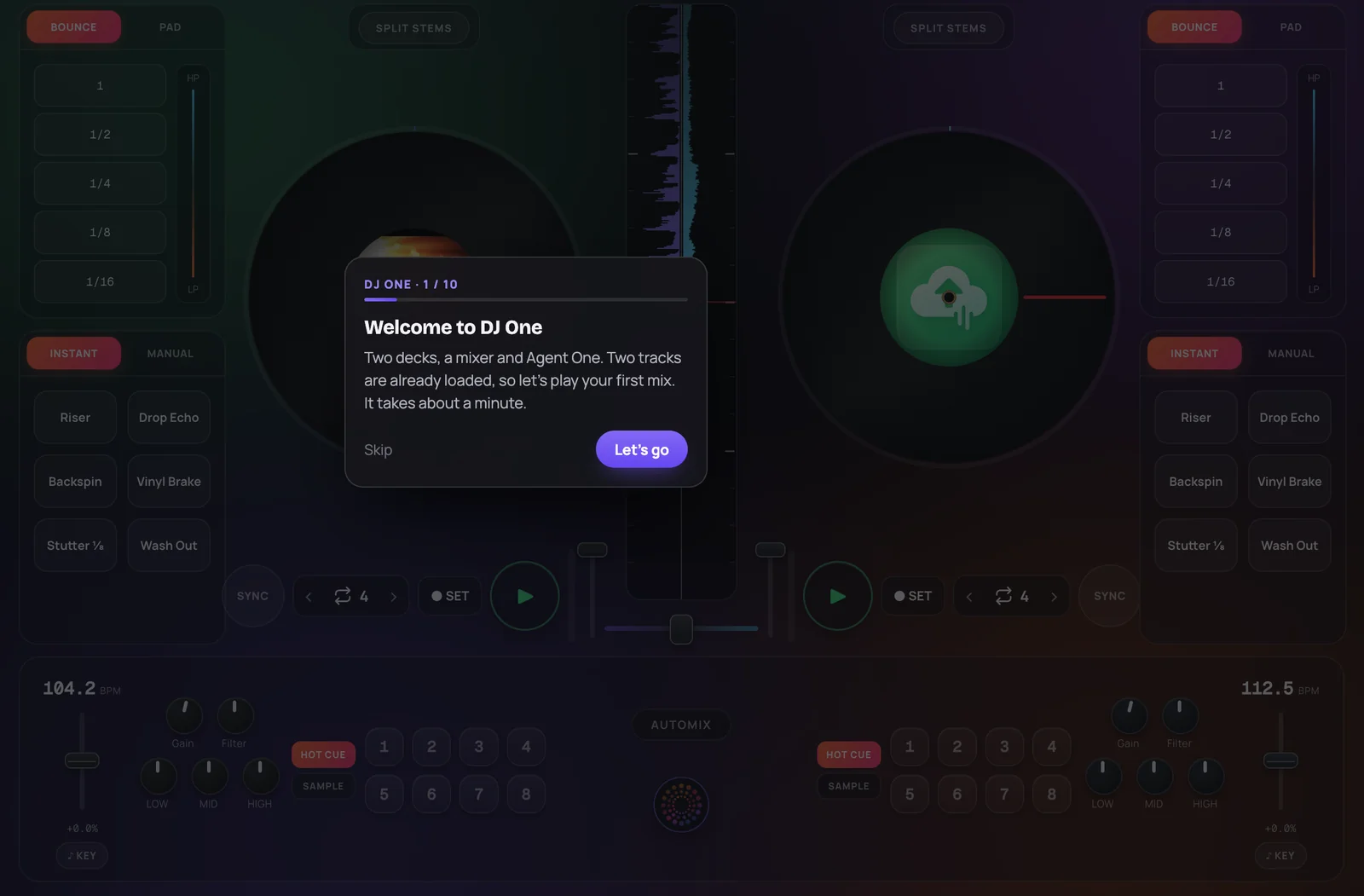
DJ One is Soundverse's online DJ mixer: a two-deck booth in your browser that plays the songs in your Soundverse Library. It's for DJs, producers and creators who want to mix their own and AI-made tracks without installing software, using a mouse, keyboard shortcuts or a MIDI controller. You get scratchable vinyl platters, SYNC, hot cues, loops, keylock, a 3-band EQ, performance effects, Automix and Agent One in the booth.
How it works
Open the booth
Choose DJ in the Create menu to open DJ One. With songs in your Library, it loads two of them onto Deck A and Deck B to start.
Load your tracks
Open your Library and drag a song onto a deck, or drop an MP3, WAV, FLAC, M4A or OGG file from your computer, which is added to your Library first. A Library song dropped on a live deck waits as Up Next.
Beatmatch, cue and add FX
Press SYNC to lock a deck's tempo to the other deck, then tap it again to line up the beats. Set cues and hot cues, loop, ride the EQ and crossfader, and in Pro mode fire effects like Riser, Backspin or Wash Out.
Hand off to Automix or Agent One
Clear one deck (right-click its waveform and choose Remove audio), then turn on AUTOMIX to let DJ One queue your Library and run each transition. Or ask Agent One in the booth for a track, such as 128 bpm amapiano, and drop the result onto a deck.
Why use DJ One
A full booth, nothing to install
Two decks with scratchable vinyl platters, 3-band waveforms, SYNC, cue, eight hot cues, loops, keylock, gain, filter, a 3-band EQ and a crossfader, all in your browser.
Effects built for performing
Pro mode adds one-tap Riser, Drop Echo, Backspin, Vinyl Brake, Stutter and Wash Out, loop rolls, an XY pad and 10 beat-synced effects. Minimal mode hides them for a cleaner booth.
Automix runs the transition
For each pair of songs, Automix picks a blend, drop-swap, echo-cut or filter-fade from their key, tempo and energy, syncs the next deck, glides the tempo and crossfades.
Agent One behind the decks
Ask Agent One for a track and it arrives as a card you can play on a deck, or lands on the deck you name. Typed commands such as "reverb on both" apply effects live.
What it costs
Works on the Free plan. Mixing in the booth uses no tokens; Agent One requests and section analysis do.
- Mix in DJ One: no tokens.
Creator $12.49 a month, or $9.99 a month billed yearly ($119.88 a year) · Pro $31.24 a month, or $24.99 a month billed yearly ($299.88 a year) · Max from $72 a month, or $60 a month billed yearly ($720 a year).
In India (PayU): Creator ₹499 a month, or ₹399 a month billed yearly (₹4,788 a year) · Pro ₹1,299 a month, or ₹1,039 a month billed yearly (₹12,468 a year) · Max from ₹2,999 a month, or ₹2,399 a month billed yearly (₹28,788 a year).
Prices outside India are in US dollars, billed through Stripe; in India they are in rupees, billed through PayU. Monthly tokens reset each month and don't roll over.
Frequently asked questions
Is DJ One free?
Yes. DJ One is included on every Soundverse plan, including Free, and mixing in the booth doesn't use tokens. Two things do: asking Agent One in the booth to generate a track, and section analysis, which runs when you choose Analyse sections on a waveform or drop a file from your computer onto a deck. Soundverse is free to sign up, and new accounts get free starter tokens.
Do I need an account to use DJ One?
To mix your own songs, yes. DJ One plays the songs in your Soundverse Library, so sign in to load them; without an account, the booth opens with empty decks, and a file you drop from your computer plays but isn't saved. Signing up for Soundverse is free, new accounts get 1,000 tokens, and mixing in the DJ One booth doesn't use any of them.
What music can I play in DJ One?
DJ One plays the audio in your Soundverse Library, including songs you made with Agent One or AI Song Generator and files you uploaded. You can also drop an MP3, WAV, FLAC, M4A or OGG file onto a deck, and when you're signed in DJ One adds it to your Library first. DJ One doesn't stream from outside music services, and you need the rights to anything you upload.
What can't DJ One do?
DJ One plays everything through one master output, so there's no separate headphone cue for pre-listening the next song before you bring it in. DJ One mixes the songs in your Soundverse Library and files you add, not tracks from streaming services, and a MIDI controller only works in a browser that supports Web MIDI.
What is DJ One, Soundverse's online DJ mixer?
DJ One is Soundverse's online DJ mixer: a two-deck DJ booth that runs in your browser and plays the songs in your Soundverse Library. DJ One gives you scratchable vinyl platters, SYNC, hot cues, loops, keylock, a 3-band EQ and crossfader, performance effects, Automix for hands-free transitions and Agent One in the booth to make new tracks.
How do I DJ online in my browser?
Sign in to Soundverse and choose DJ in the Create menu to open DJ One. Drag songs from your Library onto Deck A and Deck B, or drop audio files from your computer, then press play, use SYNC to match tempos and move the crossfader to blend. Click the question-mark button for a guided first mix, or press ? on your keyboard for every shortcut.
What does Automix do in DJ One?
Automix is DJ One's hands-free mixing mode. With AUTOMIX on, DJ One starts each transition as the playing song nears its end or reaches its outro, picks a blend, drop-swap, echo-cut or filter-fade from the two songs' key, tempo and energy, then syncs the next deck, glides the tempo and crossfades. Grab the crossfader at any point to take over.
Can I use a DJ controller with DJ One?
Yes, in a browser that supports Web MIDI. DJ One listens to any connected MIDI controller and maps it to a default layout, with channel 1 on Deck A and channel 2 on Deck B, covering channel faders, gain, EQ, filter, tempo, crossfader, play, cue, sync, hot cues and instant effects. A controller with a different layout may not line up, and DJ One has no screen for remapping controls. The MIDI button in the DJ One top bar shows the controller's name when it connects.
How is DJ One different from AI Studio?
DJ One is for performing a mix: two decks, a crossfader and live effects over finished songs. AI Studio is Soundverse's AI music studio for making those songs, with a multitrack timeline to record, generate, arrange, mix and export. Songs you generate with Agent One or Soundverse's AI tools are saved to your Library, ready to load onto a DJ One deck.
Ready to step up to the decks?
Open DJ One, load two songs from your Library and start mixing, or ask Agent One for a fresh track.
