Edit & enhance · Free
Sing or beatbox a part and hear it on sitar, bansuri, flute or tabla
Sing, hum or beatbox a part and pick an instrument model. Voice to Instrument plays your line back on it. On every plan, 150 tokens a conversion.
1,000 free tokens to start · No card needed · Cancel paid plans anytime
Do more with Voice to Instrument on Creator — from $9.99/mo, or ₹399/mo in India. 4,000 tokens a month. Billed $119.88 a year, or $12.49 month to month.
What you get
Play parts you can't play
Sing a sitar or bansuri line and hear it on the instrument, without owning one or learning to play it.
Beatbox into tabla or dholak
Vocalize a rhythm and hear it played back on tabla or dholak, ready to layer under a track.
Lands in the right register
Pitch is set for each instrument, an octave up for bansuri and a fifth up for flute, and Override pitch lets you choose it yourself.
Who it's for
Indian and fusion music producers
Get sitar, bansuri, tabla or dholak parts into a track by singing or beatboxing them.
Songwriters
Turn a hummed hook into an instrument line without learning the instrument.
Beatmakers
Beatbox a groove and hear it on tabla or dholak to layer under a beat.
Instrumentalists
Write new parts for your own instrument by humming them into a model trained with Train Instrument Model.
When to use it
- A melody is in your head and there's no instrument nearby
- A track needs a bansuri or sitar phrase and you don't play either
- You can beatbox a rhythm faster than you can program it
- You have a voice memo of a riff you want to hear on an instrument
- You trained a model of your own instrument and want new lines for it
What you can make with it
A bansuri intro
Hum the opening phrase of a song and turn it into a bansuri line to start the track.
Tabla under a lo-fi beat
Beatbox a pattern and convert it to tabla to layer under a lo-fi or hip-hop beat.
Dholak for a sangeet
Vocalize a festive groove and hear it on dholak for a sangeet or wedding song.
Sitar answers
Sing short replies between vocal lines and play them back on sitar for a call-and-response.
A guide for a session player
Hum the part you want, convert it, and send the instrument version to a player as a reference.
A phone memo, now a part
Upload a melody you recorded on your phone and get it back played on an instrument, saved to your Library.
A hook for a short video
Hum a short phrase and turn it into a flute or bansuri hook for a reel or a short.
Screenshots
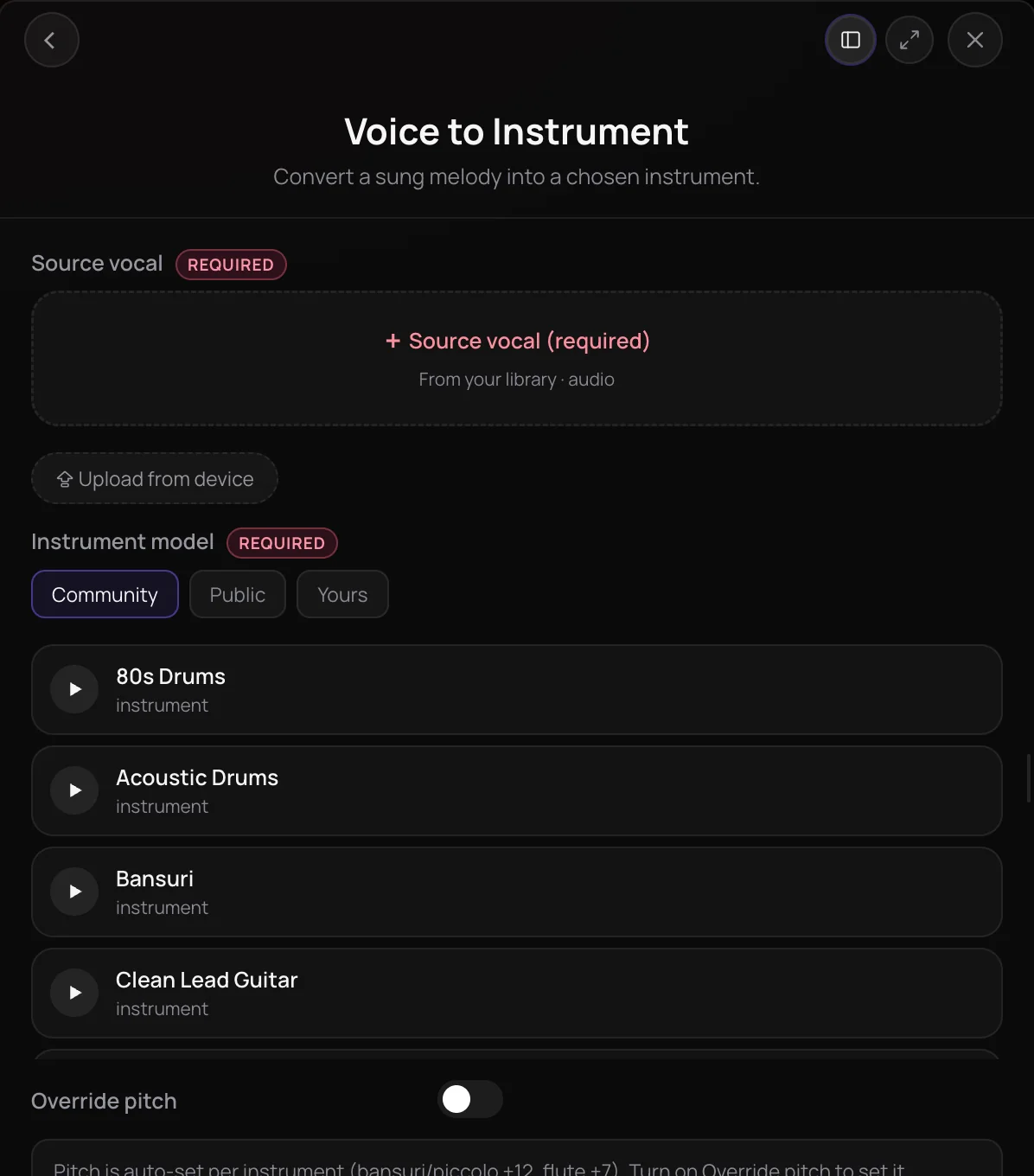
Voice to Instrument is a Soundverse tool that turns a sung, hummed or beatboxed part into the same line played on an instrument. It's for songwriters and producers who can sing an idea faster than they can play it, including parts for instruments like sitar, bansuri, tabla and dholak. You get one audio file of your line on the instrument you chose, ready to use in a track or in AI Studio.
See it in action
- Voice to Instrument - Soundverse AI Studio - Tabla AI Model Hum, sing or beatbox a rhythm and hear Soundverse turn it into tabla in AI Studio.
- Voice to Instrument - Soundverse AI Studio - Dholak AI Model Hum, sing or beatbox a part and hear it played back on the dholak model in Soundverse AI Studio.
- Every AI Tool in Soundverse “Edit”: Inpainting, Stems, Voice Swap, Remix and More | Full Walkthrough From 2:42. The Voice to Instrument part of Soundverse's Edit walkthrough, from input to result.
How it works
Add your vocal
Pick a recording from your Library or upload one, up to 50 MB, as MP3, WAV, AAC, OGG or M4A. Use a solo vocal, hum or beatbox, since any backing in the file is dropped.
Choose an instrument model
Browse the Community, Public and Yours tabs and pick an instrument. Yours holds the instruments you trained with Train Instrument Model.
Leave pitch or override it
Pitch is set per instrument, for example an octave up for bansuri and a fifth up for flute. Turn on Override pitch to shift it up to 24 semitones either way yourself.
Create and use the part
Click Generate in Chat and the converted audio appears in your chat and Library. In AI Studio, the result lands on a new track under your clip.
Why use Voice to Instrument
Play parts you can't play
Sing a sitar or bansuri line and hear it on the instrument without owning one or learning to play it.
Percussion from a beatbox
Beatbox or vocalize a rhythm and hear it played on tabla or dholak.
Pitch set for you
Each instrument starts in its natural register, so a hummed line lands where a bansuri or flute would play it.
Your own instrument too
Train a model of an instrument you play with Train Instrument Model, then hum new lines and hear them on it.
What it costs
Works on the Free plan. New accounts get 1,000 free tokens, enough for about 6 conversions.
- Turn one vocal into an instrument: 150 tokens (about $0.37–$0.47 on Creator, or ₹15–₹19 in India).
Creator $12.49 a month, or $9.99 a month billed yearly ($119.88 a year) · Pro $31.24 a month, or $24.99 a month billed yearly ($299.88 a year) · Max from $72 a month, or $60 a month billed yearly ($720 a year).
In India (PayU): Creator ₹499 a month, or ₹399 a month billed yearly (₹4,788 a year) · Pro ₹1,299 a month, or ₹1,039 a month billed yearly (₹12,468 a year) · Max from ₹2,999 a month, or ₹2,399 a month billed yearly (₹28,788 a year).
Prices outside India are in US dollars, billed through Stripe; in India they are in rupees, billed through PayU. Monthly tokens reset each month and don't roll over.
Frequently asked questions
Is Voice to Instrument free?
Voice to Instrument is one of the core tools on every plan, including Free, and each conversion uses tokens from your balance. Soundverse is free to sign up, and new accounts get free starter tokens, so you can try it before choosing a plan. The Pricing page lists what each plan includes.
How many tokens does Voice to Instrument use?
Voice to Instrument costs 150 tokens per conversion, whatever the length of your clip. It doesn't count toward the Free plan's three Agent One generations, so your 1,000 sign-up tokens cover six conversions. Paid plans add monthly tokens, starting with 4,000 a month on Creator.
What files does Voice to Instrument accept?
Voice to Instrument takes one audio file from your Library or your device, up to 50 MB, as MP3, WAV, AAC, OGG or M4A. A clean solo vocal, hum or beatbox gives the clearest result. You need the rights to anything you upload, so only use a recording of someone else's voice with their permission.
Can I use the instrument part commercially?
On the Free plan, what you make on Soundverse is for personal use. Paid plans add a commercial license; the Pricing page lists what each plan covers. You also need the rights to the recording you convert with Voice to Instrument, whether it's your own voice or someone else's.
Does Voice to Instrument work on a full song?
Only the voice is converted. Voice to Instrument is built for a solo vocal, hum or beatbox, and any music under the voice is dropped from the result, so from a full song you get the converted line on its own, not a new mix. Record or export a clean solo take when you want the most accurate part.
What is Voice to Instrument?
Voice to Instrument is a Soundverse tool that turns a sung, hummed or beatboxed part into the same line played on an instrument. You pick an instrument model on Soundverse, such as sitar, bansuri, flute, tabla or dholak, and get back one audio file of your part on that instrument.
How do I turn my voice into an instrument with AI?
Record or upload a short solo vocal, hum or beatbox, then open Voice to Instrument in Soundverse AI Tools. Pick an instrument model from the Community, Public or Yours tabs and click Generate in Chat. Voice to Instrument sets the pitch to suit the instrument, and you can turn on Override pitch to choose it yourself.
Which instruments can I choose?
Voice to Instrument offers instrument models in three tabs: Community, Public and Yours. The built-in models include Indian instruments such as sitar, bansuri, tabla and dholak, along with instruments like flute, and Yours lists any instrument you trained with Train Instrument Model. The list changes as people publish new models, so check the picker for what's there now.
Can I play my own instrument with Voice to Instrument?
Yes. Train Instrument Model turns at least 10 minutes of solo, dry recordings of an instrument you play into a model, and the finished model appears under Yours in Voice to Instrument. Cover the instrument's whole range at several dynamics so the model captures its true timbre. Train Instrument Model needs the Creator plan or above.
Hum your next instrument part
Add a vocal, hum or beatbox, pick an instrument model, and hear your line played back.
