Edit & enhance · Free
Translate lyrics into 11 languages and keep your song's shape
Paste up to 4,000 characters of lyrics and get them back in a new language, with section tags intact and an option to match syllables for singing.
1,000 free tokens to start · No card needed · Cancel paid plans anytime
Do more with Translate Lyrics on Creator — from $9.99/mo, or ₹399/mo in India. 4,000 tokens a month. Billed $119.88 a year, or $12.49 month to month.
What you get
Your song in a new language
Choose Spanish, French, German, Italian, Portuguese, Hindi, Japanese, Korean, Mandarin, Arabic or Russian.
Lines that fit your melody
Turn on Match syllables and each translated line aims for the original's syllable count, so it can sit on the same tune.
Structure kept, nothing to rebuild
Tags like [Verse] and [Chorus] come back as written, and each section aims to keep its number of lines, ready to paste into AI Song Generator.
Who it's for
Independent artists
Get a first draft of your lyrics in another language that keeps the song's sections in place.
Indian-language creators
Take English lyrics into Hindi, or carry a Hindi song into Spanish, Arabic or Japanese, with its tags kept.
Songwriters and co-writers
Hand a collaborator a singable draft in their language to rework into their own words.
Labels and managers
Prepare lyric drafts for releases aimed at listeners who speak other languages.
Content creators
Carry the meaning of a song's lines into another language for subtitles on a lyric or music video.
When to use it
- You're planning a version of a song for listeners in another language
- A collaborator will sing your song in their language and needs a starting point
- The translated lines have to fit the same melody
- Your lyric video needs subtitles that carry the meaning
- You've just transcribed a song and want it in another language
What you can make with it
A singable chorus
Translate only the chorus with Match syllables on, and check whether it sings on the original melody.
Subtitles that keep the meaning
Leave Match syllables off for lines that keep the imagery, and use them as subtitles on a lyric video.
A Hindi version of an English song
Turn English lyrics into Hindi with tags like [Verse] and [Chorus] kept, ready for a Hindi vocal.
A bilingual track
Translate one verse and keep the rest in the original language for a song that switches languages.
A new-language version to hear
Paste the translated lyrics, tags included, into AI Song Generator for a version sung in the new language.
A draft for a featured singer
Send a singer a singable draft in their language to adapt before they record.
Transcribe, then translate
Get the words of a recording with Audio Transcription, add section tags, then translate them.
Drafts for a fluent writer
Prepare Japanese or Korean drafts of a single's lyrics for a fluent writer to polish before release.
Screenshots
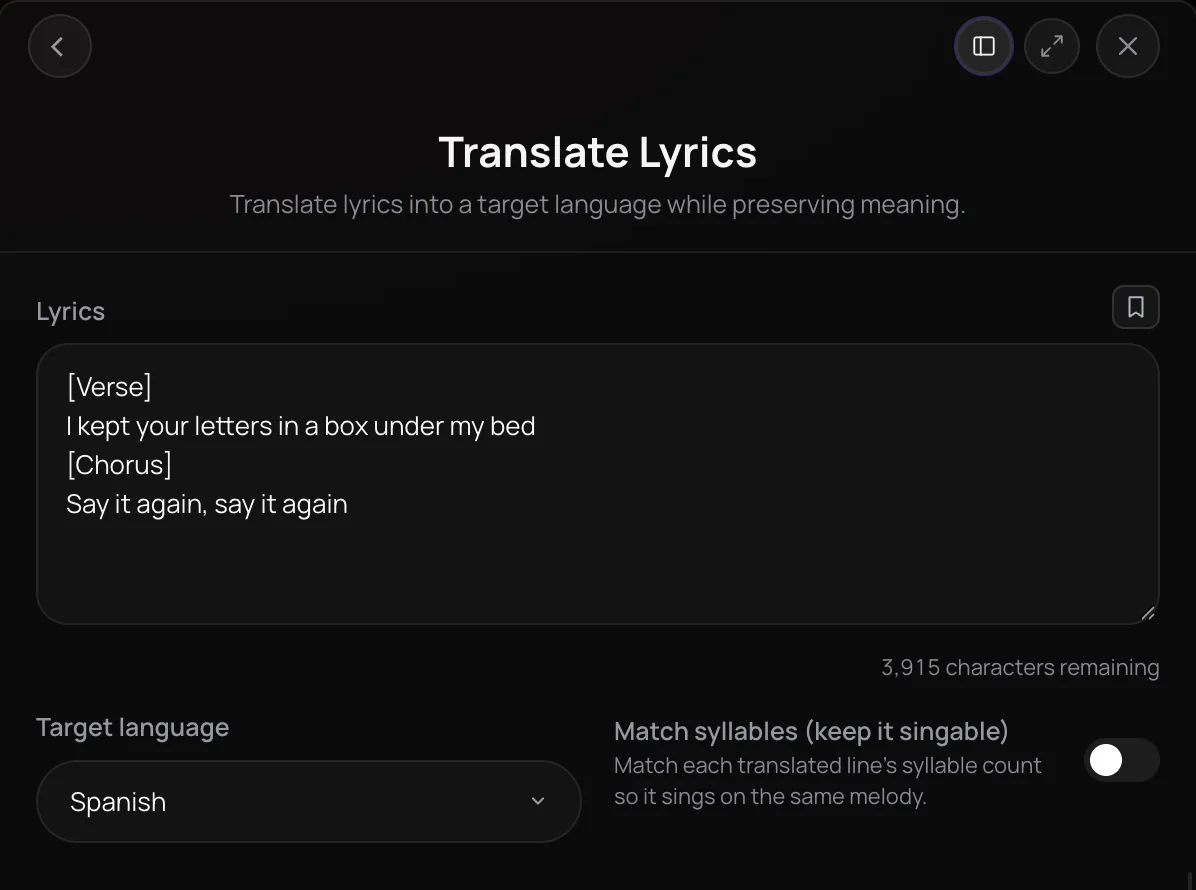
Translate Lyrics is a Soundverse tool that lets you translate lyrics into another language while keeping the song's shape: section tags stay as written and each section keeps its number of lines. It is built for artists and writers releasing in more than one language. You get the translated lyrics as text in the chat, written either for meaning and flow or matched line by line to the original syllable count.
See it in action
- Every AI Tool in Soundverse “Edit”: Inpainting, Stems, Voice Swap, Remix and More | Full Walkthrough From 3:34. The Translate Lyrics part of Soundverse's Edit walkthrough, from input to result.
How it works
Paste your lyrics
Open Translate Lyrics in the Edit section of AI Tools and paste up to 4,000 characters of lyrics. Keep tags like [Verse] and [Chorus]; they come back unchanged.
Pick a target language
Choose one of 11 languages, including Spanish, French, Hindi, Japanese and Mandarin. Spanish is selected by default.
Decide on singability
Turn on Match syllables (keep it singable) to keep each line's syllable count. Leave it off for a translation that puts meaning first.
Get the translation in chat
Click Generate in Chat. Agent One runs Translate Lyrics and posts the translated lyrics, section by section, in the chat.
Why use Translate Lyrics
Structure stays intact
Tags like [Verse 1] and [Chorus] come back exactly as written, and each section keeps the same number of lines as the original.
A singable option
Match syllables aims to give every translated line the same syllable count as the original, so it can sit on the same melody.
Meaning and mood first
In the default mode, the translation keeps each line's meaning, emotional tone and imagery instead of going word for word.
Ready for a new version
The result is plain text you can edit, then take into the AI Song Generator to hear the song in its new language.
What it costs
Works on the Free plan. The tool itself uses no tokens. On the Free plan it runs through Agent One, which gives free accounts 3 runs in all; sharing unlocks the 2nd and 3rd.
- Translate one song's lyrics: no tokens.
Agent One runs this tool for you, and the agent's own steps are metered on top of the tool's price: about 7 tokens a step in Lite mode, 54 in Standard mode and 128 in Pro mode, the default on paid plans.
Creator $12.49 a month, or $9.99 a month billed yearly ($119.88 a year) · Pro $31.24 a month, or $24.99 a month billed yearly ($299.88 a year) · Max from $72 a month, or $60 a month billed yearly ($720 a year).
In India (PayU): Creator ₹499 a month, or ₹399 a month billed yearly (₹4,788 a year) · Pro ₹1,299 a month, or ₹1,039 a month billed yearly (₹12,468 a year) · Max from ₹2,999 a month, or ₹2,399 a month billed yearly (₹28,788 a year).
Prices outside India are in US dollars, billed through Stripe; in India they are in rupees, billed through PayU. Monthly tokens reset each month and don't roll over.
Frequently asked questions
Is Translate Lyrics free?
Translate Lyrics is available on every Soundverse plan, including the Free plan. Soundverse is free to sign up, and new accounts get free starter tokens to try its tools. The Pricing page lists what each plan includes, so you can check before you upgrade.
Does Translate Lyrics use tokens?
Translate Lyrics itself costs no tokens. Agent One, which runs each translation, charges for its own work from your plan's tokens: least in Lite mode, the Free plan's mode, and more in Standard or Pro. On the Free plan, you need one of Agent One's three free generations available to send a translation, but because a translation returns only text, it doesn't use that generation up.
How accurate are translations from Translate Lyrics?
Translate Lyrics aims to keep each line's meaning, tone and imagery in its default mode rather than translating word for word, so some lines read differently from a literal translation. With Match syllables on, syllable count comes first, and some lines move further from the original wording. Before you release a translation from Translate Lyrics, have a fluent speaker read it, especially idioms, names and wordplay.
Can I release a song with the translated lyrics?
You need the rights to the original lyrics, so translate your own words or lyrics you have permission to adapt. On the Free plan, what you make with Translate Lyrics is for personal use. Paid plans add a commercial license; the Pricing page lists what each plan covers.
Which languages can Translate Lyrics translate into?
Translate Lyrics offers 11 target languages: Spanish, French, German, Italian, Portuguese, Hindi, Japanese, Korean, Mandarin, Arabic and Russian, with Spanish selected by default. You don't have to say which language the original is in, because Translate Lyrics works it out from the lyrics. English isn't on the target list.
Can I turn the translated lyrics into a song?
Yes, with another tool. Translate Lyrics returns text only, not audio. Paste the translated lyrics into the AI Song Generator to create a version sung in the new language, or use a singable translation as a guide when you record the new vocal yourself.
What is Translate Lyrics?
Translate Lyrics is a Soundverse tool that lets you translate lyrics into another language while keeping the song's structure. You paste up to 4,000 characters of lyrics and choose one of 11 target languages, and Agent One returns the translated lyrics in the chat with every section tag and each section's line count preserved.
How do I translate song lyrics with AI?
Open Translate Lyrics from the Edit section of Soundverse's AI Tools, paste your lyrics with their section tags, choose a target language and click Generate in Chat. Agent One runs Translate Lyrics and posts the result in the chat. Turn on Match syllables first if you want each line to keep its original syllable count.
What does Match syllables do?
Match syllables (keep it singable) tells Translate Lyrics to give each translated line the same number of syllables as the original line, so the words can be sung on the same melody. In this mode, syllable count takes priority over literal meaning, so some lines move further from the original wording than they would in the default mode.
Does Translate Lyrics keep my verse and chorus tags?
Yes. Translate Lyrics keeps every section tag, such as [Intro], [Verse 1] and [Chorus], exactly as written and translates only the lyric lines between them. Each section also keeps the same number of lines as the original, so the translation lines up with your song when you compare the two side by side.
Ready to translate your lyrics?
Keep the structure, choose meaning-first or singable, and take your song into a new language.
